
You cannot directly create or edit a Google knowledge panel. You can make your business easy for Google to recognize, claim the panel once it exists, and send corrections through Google’s feedback process. That is what knowledge panel optimization really means: feeding Google consistent, verifiable facts about your entity, then managing what it shows. This guide covers each step, with the difference between a knowledge panel and a Business Profile spelled out for local service businesses.
TL;DR
- A knowledge panel is the information box Google builds from its Knowledge Graph. You influence it, you do not write it.
- Google creates panels automatically when it is confident about an entity. Search interest, reputable citations and consistent identifiers across the web all play a role.
- If a panel exists, search for it and look for the “Claim this knowledge panel” option. If there is no button, the panel is not claimable yet.
- Once verified, you suggest changes through feedback and back them with authoritative sources. Edits are reviewed, not applied instantly.
- Most local businesses should start with a complete, accurate Google Business Profile and clean listings, then build the wider entity footprint.
Table of Contents
- What a knowledge panel is, and what it is not
- Who can get a knowledge panel, and when Google shows one
- How to optimize for a knowledge panel: the entity groundwork
- How to claim a knowledge panel
- How to edit a knowledge panel
- A realistic timeline and what to measure
- Our perspective: entities first, panels second
- Where NSYGHT can help
- FAQ
- Sources
What a knowledge panel is, and what it is not
A knowledge panel is a visual information box on Google Search. The Knowledge Graph is the database behind it. Google describes the panel as a front-end snapshot of structured facts, while the graph itself is a much larger record of people, places and things. Google says the Knowledge Graph, launched in 2012, holds more than 500 billion facts about five billion entities.
That distinction matters for optimization. You are not optimizing a box. You are optimizing the facts and signals that feed the graph, and the box follows. Google’s own help page frames the panel as a visualization of data connected through the Knowledge Graph.
Knowledge panel vs. Google Business Profile
Many local owners search “knowledge panel” when they actually mean the box that appears when someone searches their business name: the map, reviews, hours, phone number and photos. For a business that serves customers at a location or within a service area, that box is driven by a Business Profile. Google says businesses that make face-to-face contact with customers are eligible for a Business Profile.
A classic knowledge panel, the encyclopedia-style box with a description, logo, social profiles and related entities, is a different thing. It appears for entities Google recognizes with high confidence: well-known brands, organizations, public figures, franchises with a large footprint. A single-location roofer or dentist will usually see a Business Profile result, and that is the asset to get right first. Our guide to Google Business Profile optimization walks through the fixes that matter most there.
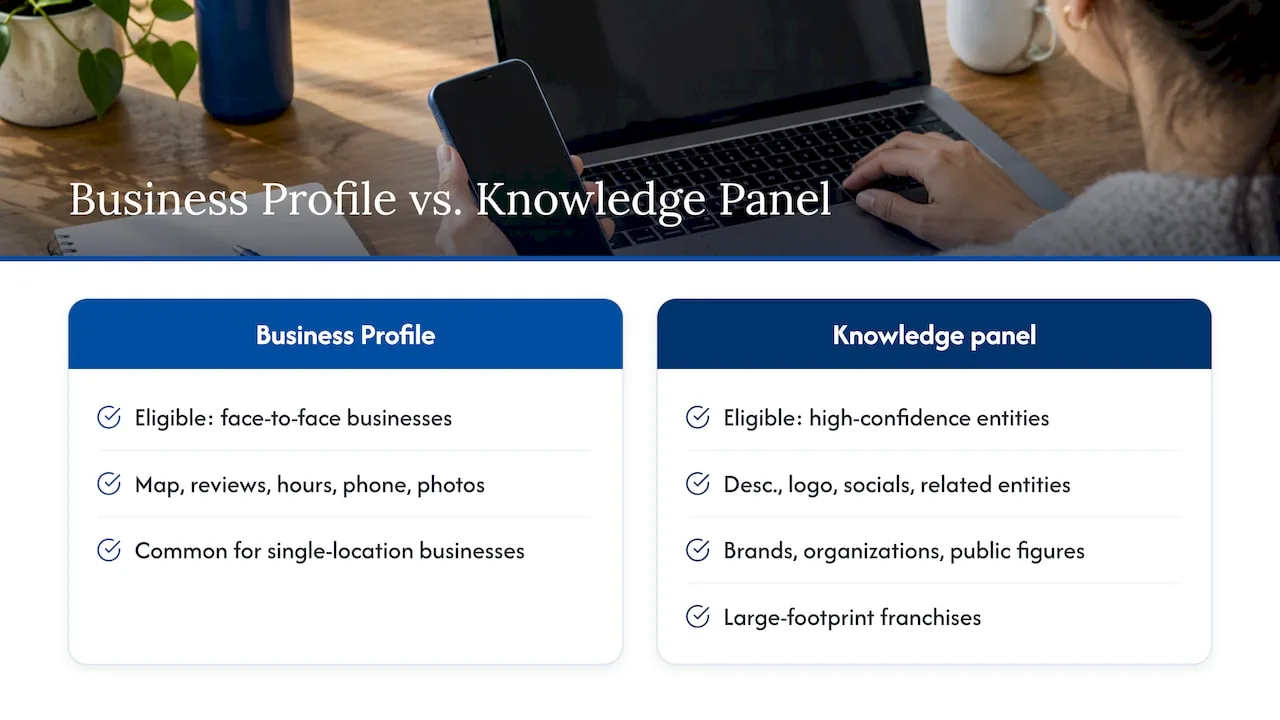
In practice, the work overlaps. Both rely on the same foundation: accurate, consistent facts about who you are, where you operate and what you do.
Who can get a knowledge panel, and when Google shows one
Google’s help documentation says panels are generated automatically when Google has gathered enough reliable information and is confident in its understanding of an entity. Companies, people, events and products can all qualify.
Search Engine Land’s guide summarizes the practical thresholds as three implied signals:
- Search interest. People search for the entity by name.
- Reputable citations. Credible third-party sources mention it.
- Consistent unique identifiers. The same name, address, phone number, website and profiles appear across the web.
You cannot buy a panel or apply for one. You can only improve the odds that Google understands you. A new business with no mentions will not get a panel by filling out a form, and an established business with conflicting listings can get a panel that is wrong.
How to optimize for a knowledge panel: the entity groundwork
The steps below are in priority order. Skipping ahead to step five without finishing step one is the most common mistake we see.
1. Fix your name, address and phone number everywhere
The most basic signal is identical NAP details across every source: your website, Business Profile, directories, social profiles and industry listings. Search Engine Land lists consistent NAP data as a core step in helping Google recognize an entity.
Pick one exact business name format, one address format and one primary phone number. Then audit for old tracking numbers, former addresses, abbreviations like “St.” in one place and “Street” in another, and duplicate listings. A local SEO audit built around your Business Profile first gives you the order of operations. For a practical take on cleaning up listings before layering anything else on, this local listings clean-up playbook is worth a read.
2. Complete and verify your Business Profile
For most local businesses, the Business Profile is the primary entity record Google sees. Fill in every field: primary and secondary categories, service areas, hours, services, attributes, a description that says plainly what you do and for whom. Category choice has an outsized effect, so review our guide on choosing the right Google business categories. A short checklist for a Google Maps profile shows the same logic applied to one industry: complete fields, current hours and fresh photos.
If you run a service area business without a storefront, the setup differs. See our 90-day plan for service area business SEO.
3. Make your website the source of truth
Your site should state, in plain text, your legal and public business name, what you do, where you operate, who runs it and how to reach you. Add an About page that a person and a machine can both parse. Add structured data (schema markup) for your organization or local business type, with sameAs links pointing to your official profiles. Structured data does not guarantee a panel, but it removes ambiguity about which profiles belong to you. As Search Engine Journal’s explanation of the Knowledge Graph notes, facts stored in structured fields make it much easier for Google’s systems to connect related entities.
This is the core of what we call entity-driven SEO architecture: a site built so that every page reinforces one clear definition of the business. You can see how the pieces fit in the NSYGHT stack.
4. Build citations from reputable third parties
Google weighs what independent sources say about you. Strong candidates for local service businesses include:
- Your state or local licensing board and professional associations
- The local chamber of commerce
- Reputable industry directories relevant to your field
- Local news coverage, sponsorships and community organizations
- Official social profiles that link back to your site
Search Engine Land recommends building citations from reputable sources and keeping a Wikipedia page current if you have one. Most local businesses do not qualify for a Wikipedia page, and trying to force one usually backfires. Focus on the sources you can legitimately earn.
5. Build search demand for your name
Branded search interest is one of the thresholds, and it is the slowest to move. It comes from the rest of your marketing: referrals, local ads, community visibility, reviews, and consistent publishing. It is also the signal no listing tool can fake.
How to claim a knowledge panel
Claiming only works if a panel already exists for your entity. The steps, per Google’s verification help page:
- Search Google for your business or brand name while signed in to a Google Account.
- Find the knowledge panel and look for the “Claim this knowledge panel” option.
- Follow the prompts to sign in with an account tied to one of the official sites or profiles listed for the entity.
- If Google cannot identify your associated sites, it may ask for more information.
Google states that not every panel is claimable, so if the option is missing, check back periodically. Search Engine Land adds that the absence of the button means the panel is not yet claimable and you should wait for it to appear.
If what you see is a Business Profile rather than a knowledge panel, the equivalent step is claiming and verifying the profile itself, which is the more common path for local businesses.
How to edit a knowledge panel
You cannot type changes directly into a knowledge panel. Per Google’s guidance, once you are verified you suggest changes through the feedback link at the bottom of the panel. Make each request easy to approve:
- State exactly which fact is wrong.
- State exactly what it should say.
- Include links to authoritative pages that confirm the correct fact, ideally your own site plus a third-party source.
- Stay signed in to the same Google Account you used for verification, because Google says this helps your feedback get priority review.
Search Engine Land reports that review can take anywhere from a few days to several weeks depending on how complex the change is. Send one clear request per issue rather than a long list.
What to do when a change is rejected or the panel is wrong
Panels update automatically as information changes on the web, and Google also uses feedback from verified representatives and the public, according to its help page. So a rejected edit usually means the web does not yet agree with you. Fix the underlying source first: update your site, your listings and any third-party page that carries the old fact, then resubmit with those links.
A panel that disappears or shifts usually points to the same root cause: the signals that supported it weakened or began to conflict. Audit your NAP data, check for new duplicate profiles, and confirm your website and Business Profile still match.
A realistic timeline and what to measure
No one outside Google can promise a panel by a certain date, and we would be skeptical of anyone who does. What you can track:
| What to track | Why it matters | How often |
|---|---|---|
| Branded search results page | Shows whether a panel or Business Profile appears and what it says | Monthly |
| NAP consistency across top listings | Conflicts are the usual cause of wrong facts | Quarterly |
| Business Profile completeness and activity | It is the main entity record for local businesses | Monthly |
| Third-party mentions and citations | Build credibility signals | Quarterly |
| Claim option on any existing panel | Tells you when you can start submitting changes | Monthly until available |
Keep a simple log of every change you make and the date. When a fact changes in Google, you will be able to tell which update caused it.
Our perspective: entities first, panels second
We get asked about knowledge panels most often by owners who saw a competitor’s box and want one. Our honest view: for a local service business, the panel is a symptom, not a project. The work that earns it is the same work that wins map pack placements and shows up in AI-generated answers: a clear, consistent definition of who you are, where you work and why you can be trusted.
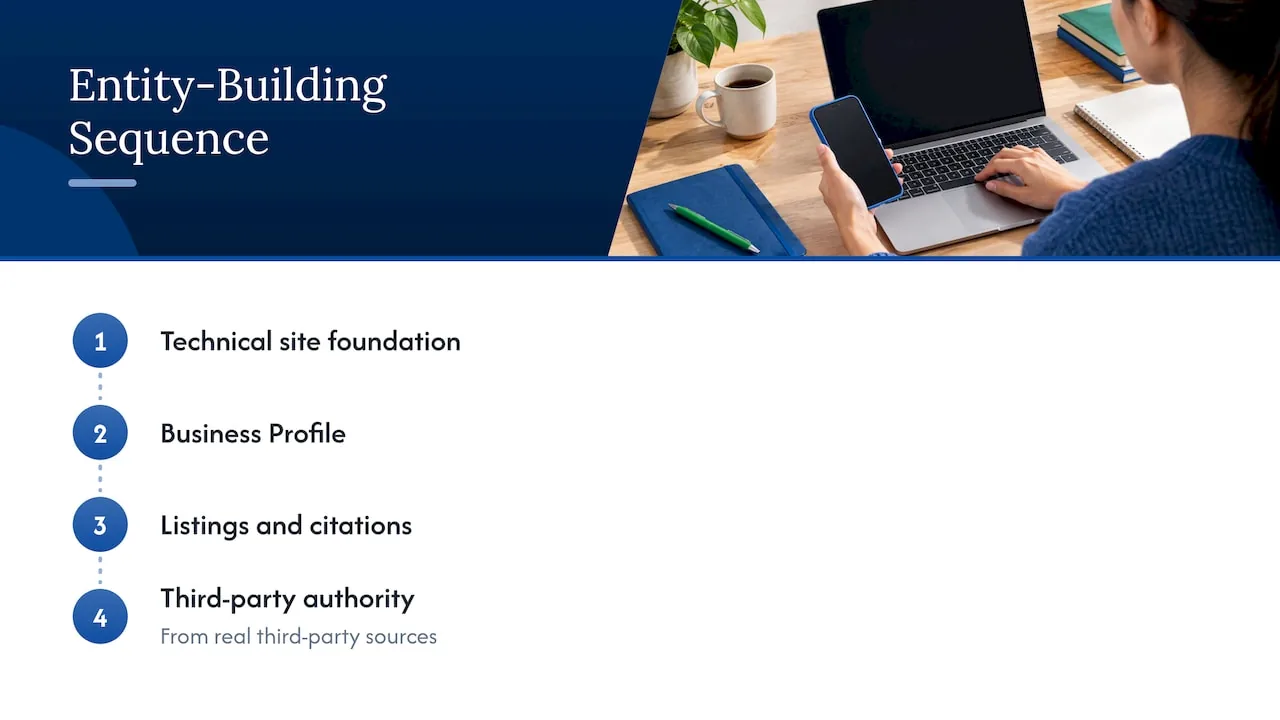
We build that definition in a set order. First the technical foundation of the site, then the Business Profile, then listings and citations, then authority from real third-party sources. AI search tools draw on the same web of facts, so the cleanup helps traditional search, Generative Engine Optimization and Answer Engine Optimization at once. When we see a wrong phone number in a panel, the fix is almost never a feedback form alone. It is an old directory listing nobody remembered.
For multi-location brands, the discipline matters more: one location with a different name format can pull the whole entity out of focus. Our write-up on multi-location SEO for maps and AI answers covers how we structure that.
, NSYGHT
Where NSYGHT can help
If your Business Profile is incomplete, your listings disagree with each other, or your site does not state clearly who you are, those gaps are where we start. Our Google Business Profile management keeps your primary entity record accurate and active, and our SEO services build the site, citation and authority layers around it. Pricing for the SEO plans is not published, so talk to us about your situation and we will tell you plainly where to begin.
For a wider view of what ongoing local visibility work involves, see what local SEO actually takes in 2026.
FAQ
Can I create a knowledge panel for my business?
Not directly. Google generates panels automatically once it has enough reliable information and confidence about an entity. You can improve your chances with consistent business details, structured data on your site and credible third-party citations. If you serve customers locally, a verified Business Profile is the practical equivalent.
Why is there no “Claim this knowledge panel” button?
Not all panels are claimable, according to Google. If you cannot see the option, the panel is probably not yet eligible, so check back periodically. Meanwhile, strengthen your official website and profiles so Google can tie them to your entity.
Can I edit my knowledge panel directly?
No. After you verify, you use the feedback link at the bottom of the panel to suggest changes, with links to authoritative pages that support the correct information. Review can take from a few days to several weeks, so correct the sources on the web first.
How is a knowledge panel different from my Google Business Profile?
A Business Profile is the listing for a business that serves customers at a location or in a service area, and you manage it directly. A knowledge panel is generated from Google’s Knowledge Graph and only lets verified representatives suggest changes. Local businesses often have the first and not the second.
Does structured data guarantee a knowledge panel?
No. Schema markup helps Google understand your entity and connect your official profiles, but panels depend on notability, citations and consistent identifiers across the web. Treat markup as one supporting signal.
Sources
- Google: Knowledge Graph and Knowledge Panels
- Google Knowledge Panel Help: About knowledge panels
- Google Knowledge Panel Help: Get verified on Google
- Google Business Profile Help: Get started
- Search Engine Land: Google Knowledge Panel guide
- Search Engine Journal: Google Knowledge Graph and how it works