

Google Business Profile categories tell Google what your business IS, not what it sells, and that distinction decides how much local traffic you get. You get one primary category and up to nine secondaries, but the primary carries the most ranking weight by far. Pick the most specific option that truthfully completes the sentence "This business is a ___," and stack only two or three secondaries that reflect real, distinct services.
- Choosing a highly specific primary category that accurately describes your business is crucial, as it carries the most ranking weight and influences feature visibility.
- Limiting to one primary and two to three secondary categories improves relevance, avoids diluting the profile, and prevents exhibiting multiple business identities.
- Changes to primary categories can trigger re-verification and temporary ranking fluctuations, requiring careful preparation and testing before implementation.
- Industry practitioners recommend focusing on categories that reflect actual services, supported by website content, and verified through competitor benchmarking and monitored over 30 days.
- Using the Business Information API or third-party tools ensures precise, current category names and IDs, especially for managing multiple locations at scale.
What Google Business Categories Are and Why They Matter for Search Visibility
A category is the single strongest signal Google uses to match a search query to your listing in the Local Pack, the three-result map block that shows up for searches like "plumber near me" or "emergency dentist." Get the category wrong and you can have five-star reviews, a complete profile, and still miss the search that would have sent you a customer.
Every profile carries one primary category and can carry up to nine additional secondary categories, according to Google's own guidance on managing business categories. Only the primary category shows publicly beside your business name in some interfaces, and it does the heaviest lifting for ranking. Secondaries broaden what you can be found for without diluting the core signal, as long as you don't overdo it.
Google's taxonomy is layered. Choose a specific "child" category like Italian Restaurant, and Google often infers the broader "parent" category (Restaurant) automatically. That inference is why Google explicitly advises against padding your profile with parent categories once a specific child category is already set. You'd just be burning a slot you could use on something that adds new information.
Categories also unlock features baked into the profile:
- Restaurants and cafés get menu links and reservation buttons.
- Service businesses like electricians or plumbers can enable service-area displays and booking integrations.
- Hotels and lodging categories surface amenity fields (pool, parking, pet policy) that other categories never show.
Choosing the right category isn't just an SEO exercise. It's the difference between a profile that looks complete and one that quietly hides features customers expect to see.
How Many Google Business Profile Categories Should You Use?
Google's hard limit is one primary category plus nine secondaries, for a maximum of ten total. Almost nobody should use all ten.
Practitioners working across large volumes of local listings have converged on a practical sweet spot: one primary category plus two to three tightly chosen secondaries, for four total. That's not a Google rule. It's a pattern that shows up repeatedly in how well-optimized listings are built, since businesses that stop around four categories tend to keep every category tied to a real, distinct service rather than a stretch.
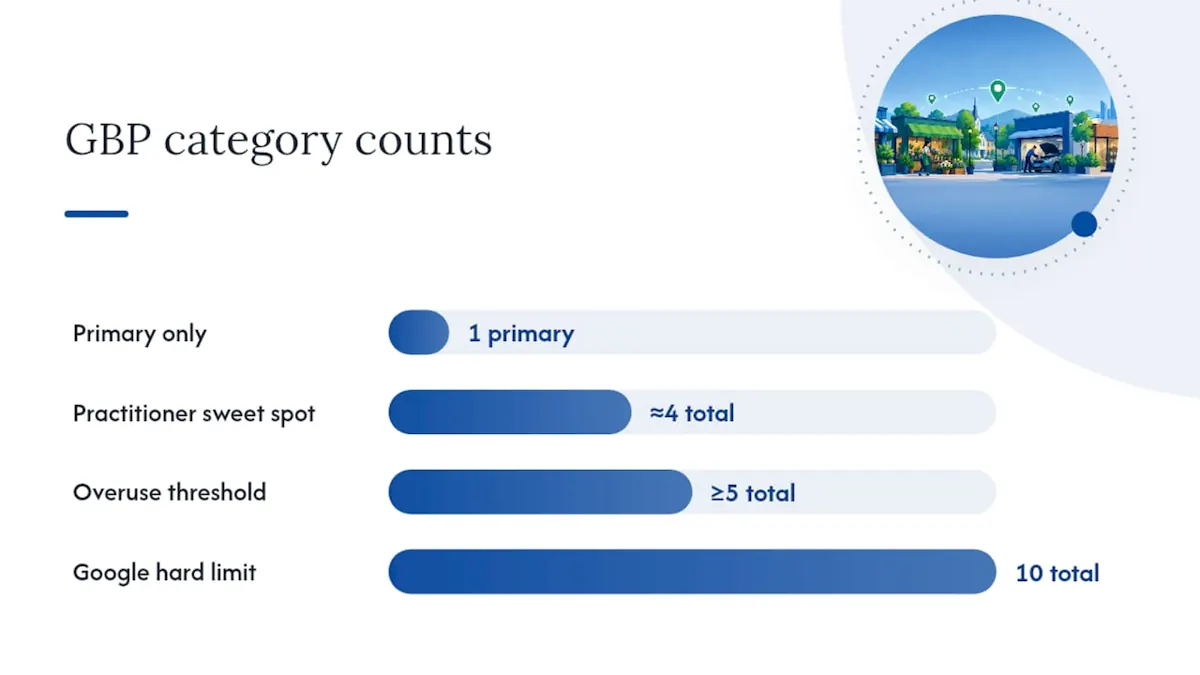
The category math that matters: Google allows up to 10 categories total (1 primary + 9 secondary), but industry practitioners have found that businesses using around 4 total categories, one primary plus roughly three well-matched secondaries, tend to maintain stronger topical relevance than profiles that pile on five or more.
Why does piling on categories backfire? Every category you add is a claim about what your business is. Stack in tangential ones, "General Contractor" next to "Plumber" next to "Handyman," and you're telling Google's algorithm your business is three different things at once, which muddies the specific signal that made your primary category strong in the first place. A few consequences show up in practice:
- Loosely related secondaries can pull your profile into searches you're not actually positioned to win, hurting click-through and conversion even if impressions tick up.
- A bloated category list makes it harder for Google to decide which single intent your business best satisfies.
- Categories chosen for reach rather than accuracy tend to age poorly as Google's matching gets more precise.
Fewer, sharper categories consistently outperform a long list of loosely related ones.
How Do You Choose the Right Primary Category?
Getting the primary category right is a five-step process, and skipping steps is where most businesses go wrong.
-
Pick the most specific category that truthfully completes "This business is a ___." Not "Contractor." Not "Business Service." If you're a roofer who only does roofing, the primary is Roofing Contractor, full stop. Google's own policy exists precisely to stop businesses from choosing broad categories to maximize reach, since broad, inaccurate primaries violate the platform's representation guidelines.
-
Benchmark your top three local competitors. Search your main service term plus your city, open the three listings that rank in the Local Pack, and check what primary category each one uses (visible in the "About" section or via a quick search of the business name plus "category"). If all three use a more specific category than the one you were about to pick, that's a signal you're underspecifying.
-
Select two to three secondary categories that reflect genuinely distinct services, not synonyms of your primary. A plumber offering drain cleaning and water heater installation should add those as secondaries because they're separate customer intents. Adding "Plumber" as both primary and secondary, or adding a parent category your primary already implies, wastes a slot for nothing.
-
Align your categories with your website's actual content. If "Water Heater Installation Service" is a secondary category, your site needs a page about water heater installation, with real copy, service details, and ideally reviews mentioning it. Category and content misalignment is one of the more common reasons a well-chosen category still underperforms. Google's ranking systems increasingly cross-reference what a profile claims against what the linked website and review text actually say.
-
Change one category at a time and monitor for 30 days before touching anything else. This is the step almost everyone skips, and it's the one that actually tells you whether a change worked. Track map-pack position, website clicks, and direction requests in your profile insights before and after each change. If you change three things simultaneously and rankings shift, you have no idea which change caused it.
Before you save any category change, search your exact business name plus "hours" or "near me" in an incognito browser window. If a competitor's listing pops up above yours with a more specific category, that's your competitive benchmark, not a guess.
Businesses with multiple physical services sometimes make the mistake of trying to capture every possible search in their category list instead of trusting content and secondary categories to do that work over time. The primary category answers one question: what are you, fundamentally. Everything else is refinement.
What Are the Most Common Google Business Category Mistakes?
Google's policy team is explicit about what counts as abuse, and the penalties range from ranking suppression to profile suspension.
The biggest one is using categories as a keyword list instead of a description of what the business is. Google's guidelines state directly that categories should describe what a business IS, not what it does or sells, and warns against selecting categories purely to rank for extra search terms. A bakery that adds "Wedding Planner," "Event Venue," and "Gift Shop" because it sometimes does wedding cakes and sells mugs is exactly the pattern Google is warning against.
Other pitfalls show up constantly in category audits:
- Co-located but separately owned businesses sharing one profile. If a salon rents chairs to three independent stylists, each stylist needs a separate profile with separate categories. Google's policy is unambiguous that independent businesses operating inside another business require their own listings, not shared categories under one umbrella.
- Redundant parent categories stacked next to a specific child. If your primary is "Emergency Dental Service," adding "Dentist" as a secondary is usually unnecessary. Google typically infers it. You'd get more value from a category that captures a genuinely different service line.
- Ignoring the re-verification risk before changing a primary category. Swapping your primary category can trigger a new verification cycle, and Google's documentation notes that this process can affect how your listing ranks while the change is processed. That's not a reason to avoid fixing a wrong category. It's a reason to do it deliberately, not on a whim.
- Choosing categories based on what competitors rank for rather than what the business truthfully is. Copying a competitor's category list without matching their actual service mix invites suspension risk and won't hold up if a customer or Google reviewer flags the mismatch.
None of these mistakes are exotic. They're the default outcome of treating the category field like a marketing headline instead of a factual classification.
Where Do You Find the Full List of Google Business Categories?
Google doesn't publish a single downloadable master list inside the standard Business Profile dashboard, but there are three reliable ways to get the exact, current category names.
The Google Business Profile Help pages cover the policy rules, examples of acceptable and unacceptable categories, and edit instructions, and they're the first stop for understanding what's allowed before you touch the list itself.
For anyone managing categories programmatically or across many locations, the Business Information API's categories.list method returns the canonical, current category names along with each category's stable categoryId, and it supports filtering by regionCode and languageCode so you get categories valid for your specific market and language. That categoryId matters more than it sounds. Display names can shift or vary by locale, but the ID stays stable, which is why any bulk or automated update should reference the ID rather than typing the name and hoping it matches.
If you're not building against the API, third-party tools fill the gap for quick manual lookups. PlePer maintains a searchable mirror of Google's business category list that's useful for a fast check on exact wording, though it's worth remembering these are third-party copies, not the canonical source. When precision matters, especially for multi-location accounts, cross-check against the API.
- Google Business Profile Help: policy and examples
- Business Information API
categories.list: canonical names and IDs, filterable by region and language - Third-party mirrors like PlePer: fast manual lookups when you don't need API access
What Happens When You Change a Business Category?
Not all category changes carry the same risk, and treating them identically is how businesses end up with unexplained ranking drops.
Secondary category changes are low-stakes. They typically take effect within a few days and rarely trigger any additional verification step. Primary category changes are a different situation entirely. Google's own documentation confirms that changing a primary category can trigger re-verification and produce ranking fluctuation while the change processes, and in practice that fluctuation window often runs two to four weeks before rankings settle into a new pattern.
That doesn't mean you should avoid fixing a wrong primary category out of fear. It means you prepare first.
- Make sure your business name, address, and phone number (NAP) are consistent across your website, citations, and profile before you touch the category. Verification checks tend to flag inconsistencies that were previously ignored.
- Update the relevant service pages on your website before or immediately after the change, so the category and the content agree from day one instead of catching up weeks later.
- If you manage multiple locations, change the category at one location first, or a small control group, and watch performance for the full window before rolling the change out everywhere.
Screenshot your current category setup and your last 30 days of profile insights before making any primary category change. If something goes sideways, you'll have a clean baseline to compare against instead of guessing what "normal" looked like.
Copyable Category Sets for Common Local Businesses
These pairings are starting points, not rules. Adjust based on what services you actually offer and what your top local competitors are using as their primary.
Plumber: Primary: Plumber. Secondaries: Drain Cleaning Service, Water Heater Installation Service. Add a third secondary only if you offer a genuinely separate service line, like Septic System Service.
Dentist: Primary: Dentist (or a more specific option like Cosmetic Dentist if that's truly your focus). Secondaries: Cosmetic Dentist, Emergency Dental Service. A general practice that also does implants might add Dental Implants Periodontist as a third, but only if it's a real, staffed service.
Restaurant: Primary: the most specific cuisine category available, such as Italian Restaurant or Sushi Restaurant, rather than the generic Restaurant category. Secondaries: Restaurant (as a broader catch-all secondary, which is one of the few cases where the parent still earns its slot), plus Caterer or Takeout Restaurant depending on what you actually run.
HVAC: Primary: HVAC Contractor. Secondaries: Air Conditioning Repair Service, Furnace Repair Service. Businesses leaning heavily into home comfort work benefit from a category structure like this, and it's worth reviewing alongside broader guidance on SEO for home services companies if HVAC is one of several trades you offer.
Law firms: Primary should match your dominant practice area specifically. Secondaries: additional practice areas you genuinely staff for, such as Family Law Attorney or Estate Planning Attorney.
Auto repair: Primary: Auto Repair Shop, or a more specific variant like Transmission Shop if that's your core specialty. Secondaries: Brake Shop, Oil Change Service, depending on what you actually service in-house.
Veterinarian: Primary: Veterinarian, or Animal Hospital if you offer overnight and emergency care. Secondaries: Emergency Veterinarian Service, Pet Groomer if grooming is offered on-site.
Retail: Primary should reflect your dominant product category as specifically as possible, Shoe Store rather than Clothing Store if footwear is your focus. Secondaries: two categories covering genuinely distinct product lines you carry, not every SKU in the building.
Roofing companies face a particular version of this problem, since "Roofing Contractor" gets confused with "General Contractor" constantly, and choosing wrong buries a specialist under generalist competition. Category precision for trades like this connects directly to broader local SEO strategy for roofing businesses.
How Category Choice Fits Into a Bigger Entity-Driven SEO Strategy
Categories don't operate in isolation. They're one input into how Google, and increasingly AI-driven answer engines, build an entity profile of your business, a structured understanding of what you are, what you offer, and where you fit relative to competitors. Get the category wrong and every downstream signal, from review matching to AI-generated local recommendations, inherits that error.
This is where category strategy overlaps with what's sometimes called Generative Engine Optimization and Answer Engine Optimization, the practice of making sure AI tools pull accurate, specific information about your business when generating answers rather than defaulting to a vague or outdated category label.
A controlled testing framework separates guesswork from evidence, especially for multi-location brands. The approach that holds up: pick a small control group of locations, change the category at a test set, define the metrics you're watching (map-pack position, website clicks, direction requests, booking events), and hold the observation window to 30 to 60 days before drawing conclusions. Change one variable at a time. Businesses that skip the control group tend to attribute ranking swings to category changes that had nothing to do with the actual cause, whether that's a seasonal demand shift or a competitor's own listing update.
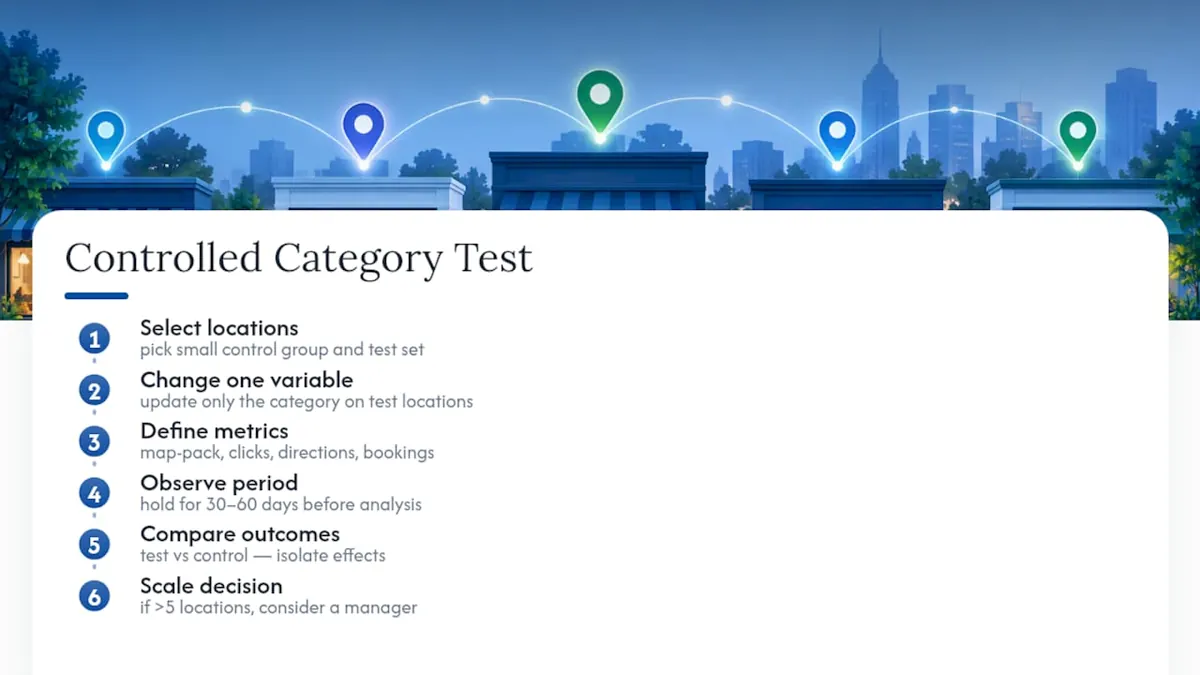
If you're managing categories across five locations, this is manageable with a spreadsheet and discipline. Past that, the coordination overhead, tracking which location tested what, when, and against which baseline, tends to outgrow what an in-house team can maintain alongside everything else on their plate. That's usually the point where bringing in a dedicated Google Business Profile manager stops being a luxury and starts being the more efficient option.
Why Specificity Beats Cleverness Every Time
The instinct to hedge, picking a broad category to "cover more searches," is understandable and almost always wrong. Google's matching has gotten precise enough that a broad category tends to signal weakness rather than breadth. A locksmith who picks "Locksmith" wins the searches that matter. A locksmith who picks "Home Services" to seem more discoverable ends up competing against everyone and winning nothing.
The second mistake is treating the category field as something to tinker with monthly. Every change resets part of the clock on how Google evaluates your listing's consistency. Test methodically, wait out the observation window, and resist the urge to touch it again just because rankings haven't moved yet.
Before saving any category change, run through three checks: is this the most specific truthful option, does my website content back it up, and am I prepared for a verification hiccup if this is the primary. Skip any of the three and you're gambling with a signal that took months to stabilize.
Managed Category Testing With NSYGHT's GBP Management Service
An alternative to guessing your way through category changes and hoping rankings don't tank is to run category audits, controlled testing across locations, and multi-location coordination as part of a Google Business Profile management service backed by entity-driven SEO methodology.

If you run a single location and have the time to benchmark competitors and monitor 30-day windows yourself, the DIY path outlined above will get you most of the way there. Where it gets harder is multi-location coordination, where a category mistake on one profile is manageable but the same mistake replicated across fifteen locations turns into a real revenue problem. That's the exact scenario NSYGHT's GBP management work is built for, along with the transparent reporting that shows exactly what changed and what it did to ranking and click data.
If your profile's category setup hasn't been audited in the last year, or you're managing more than a handful of locations, start with a look at the Google Business Profile Management service and get a clear read on where your current categories stand before you touch anything else.
Sources
For ongoing reference, three sources cover almost everything you'll need. Google Business Profile Help's category guidelines explain the policy rules and edit process in plain terms. The Business Information API's categories.list documentation is the canonical technical reference for anyone pulling category data programmatically. For a fast manual check on exact category wording, PlePer's searchable category list works as a third-party mirror, though the API remains the authoritative source when precision matters most.
- Manage your business category - Google Business Profile Help
- Google Business Profile Categories - Full List ( 2026 ), PlePer
Frequently Asked Questions
A Google Business Profile can have one primary category plus up to nine additional secondary categories, for ten total. Most businesses perform better sticking to a primary plus two or three well-matched secondaries rather than filling every available slot.
The primary category describes the single most accurate answer to "what is this business," and it carries the most weight for local ranking. Secondary categories add distinct additional services or offerings, but they should never duplicate or dilute what the primary already communicates.
Yes, temporarily. Google's documentation confirms that changing a primary category can trigger re-verification and cause ranking fluctuation for a period while the change processes, often settling within a few weeks. Prepare your NAP consistency and website content before making the change to minimize disruption.
Google doesn't issue an automatic penalty for using multiple categories within the allowed limit, but stuffing unrelated categories violates its guideline that categories should describe what a business genuinely is. Loosely related categories also dilute the relevance signal that drives ranking, even without a formal penalty.
The most reliable technical source is the Business Information API's categories.list method, which returns canonical names and category IDs filtered by region and language. For quick manual lookups without API access, third-party tools like PlePer's category list offer a searchable mirror of current categories.
If you run one or two locations, a careful DIY approach using competitor benchmarking and a 30-day testing window usually works fine. Multi-location businesses often benefit from managed services like NSYGHT's GBP Management offering, since coordinating controlled tests across many profiles gets complicated fast without dedicated oversight.