
Verifying your listing, completing every profile field, picking the right categories, and building a steady flow of reviews will do more for local visibility than any other single move. Add fresh photos and regular posts on top, then check Google Business Profile insights monthly to see what's actually working. Nothing else on this list matters until those five are in place.
- Verifying your Google Business Profile unlocks full control, improves trust signals, and significantly boosts local ranking probability.
- Completing every profile field accurately, especially your primary category and service list, is essential for relevance and visibility.
- Consistent review acquisition and prompt responses strengthen prominence and help prevent profile suspensions.
- Uploading regular, high-quality photos and videos, including exterior, interior, and team shots, increases customer engagement and trust.
- Linking your GBP to Google Ads and Analytics provides valuable insights and enhances ad relevance, maximizing local conversion chances.
What Does Verifying Your Google Business Profile Actually Unlock?
An unverified listing is basically invisible in ways that matter. You can't edit most fields, you can't respond fully to reviews, and Google treats the profile with a baseline level of suspicion until you prove you run the business. Verification is the lock that has to turn before anything else on this list works.
Google offers four main paths, and it chooses which ones you see based on your business category and history:
- Postcard verification, a physical code mailed to your business address, typically the default for new listings.
- Phone verification, a text or automated call with a code, available for many service businesses.
- Email verification, offered occasionally, mostly for businesses with an existing Google Ads or Search Console footprint.
- Instant verification, automatic for businesses already verified in Search Console with a matching domain.
Once verified, you get full editing rights and Google starts weighting your profile as a legitimate entity rather than a placeholder. That distinction shows up in how Google evaluates local ranking, which leans on trust signals tied to the business itself, not just the listing's content.
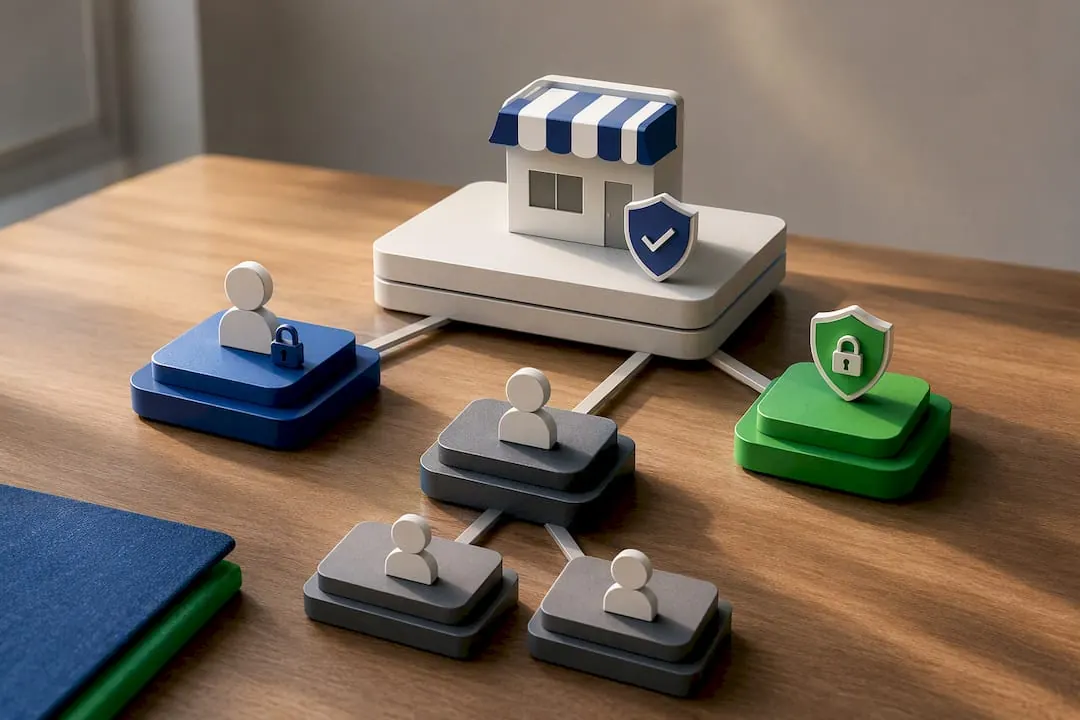
Account access matters just as much as verification status. Assign yourself as Primary Owner, add trusted staff as Managers rather than co-owners, and turn on two-factor authentication on the Google account tied to the listing. A hijacked profile (it happens more than owners expect, especially in crowded categories like law firms or contractors) can undo months of work in a weekend.
Re-verification gets triggered by a changed address, a swapped business name, or a flagged suspicious edit. Expect it, and don't panic when it happens. It's a routine trust check, not a penalty.
How Do You Complete Every Field on Your Business Profile?
Google Business Profile SEO starts with the boring stuff, and most owners skip it because it feels too basic to matter. It's not. An incomplete profile signals low effort to both searchers and Google's ranking systems, and it's the fastest fix available to anyone reading this.
Run through this order:
- Name, Address, Phone (NAP), must match exactly across your website, GBP, and every citation site (Yelp, Facebook, industry directories). Inconsistent NAP confuses Google's confidence in your location data.
- Hours, set regular hours, then layer in special hours for holidays weeks in advance. A listing showing "open" when you're closed for Thanksgiving is a one-star review waiting to happen.
- Business description, 750 characters, written for humans first. State what you do, where you do it, and one differentiator. Skip the keyword stuffing; a natural mention of your city and service does more than three forced repetitions of "best plumber near me."
- Services list, name each service individually rather than lumping them into one vague line.
- Service area, for businesses that travel to customers, list the cities and regions you actually cover, not every town within a two-hour radius.
Google actually pulls phrases from your business description into AI-generated summaries and local pack snippets. Write one clear sentence about your specialty and it may show up verbatim in search results.
Businesses in home services benefit especially from precise service and service-area setup, since that's often the split between a plumber getting found for "emergency repair" versus generic "plumbing" searches.
Which Categories and Attributes Actually Affect Rankings?
Your primary category carries more weight in Google's relevance calculation than almost anything else on the profile. Get it wrong and no amount of photos or reviews fully compensates.
Pick the most specific category that accurately describes your core business, not the broadest one. "Personal Injury Attorney" beats "Lawyer." "Italian Restaurant" beats "Restaurant." Google matches search intent against category data before it even looks at your description text.
- Use secondary categories to capture adjacent services (a bakery that also does catering adds "Caterer" as secondary, not primary).
- Add attributes honestly: online appointments, outdoor seating, wheelchair accessibility, delivery, women-owned, veteran-owned. These directly influence which filters and features surface your listing.
- Avoid the temptation to add every loosely related category. Diluting your category mix confuses relevance signals instead of expanding your reach.
- Incorrect categories, especially ones that misrepresent your business type, can trigger a suspension review. If Google flags a mismatch, expect a re-verification request before you can edit again.
Small category corrections often produce a bigger visibility jump than any other single change on this list, because relevance is the first filter Google applies before distance or prominence ever come into play.
What Photos and Videos Should You Upload to Your Profile?
Profiles with active photo libraries get more clicks and more direction requests, largely because searchers use images to decide trust before they ever visit your site. A profile with a blurry logo and nothing else looks abandoned, even if the business is thriving.
Cover these categories at minimum:
- Exterior shots, helps customers recognize your building from the street.
- Interior shots, sets expectations, especially for restaurants, retail, and medical offices.
- Team photos, humanizes service businesses and builds pre-visit trust.
- Product or service shots, the single highest-converting category for retail and food businesses.
Upload images at 720px by 720px minimum, and shoot with a phone in landscape or square, since most searchers view your profile on mobile. Refresh your photo set seasonally. A landscaping company posting the same spring photo in December reads as neglected.
Short videos (30 seconds or less) showing a service in action get noticeably more engagement than static photos. A quick clip of a haircut, a repair, or a plated dish outperforms a posed storefront shot almost every time.
How Do Products, Services, and Booking Options Work on Your Profile?
The Products tab suits retail and e-commerce; the Services tab suits anything you perform rather than sell, like consultations, repairs, or treatments. Using the wrong one, or skipping both, leaves conversion opportunities sitting unused.
- Add prices or price ranges wherever you can. Searchers filter and compare on price more than owners assume.
- Attach photos and short descriptions to each product or service entry rather than a bare name.
- Link directly to a booking or scheduling page if you offer appointments. GBP's booking button integration removes a full step from the customer's path to conversion.
- Retail businesses should keep stock and highlighted products current. A profile advertising an item that's been sold out for a month damages trust the same way a wrong phone number does.
Google's own guidance confirms that product and booking integrations tend to lift conversions directly when they're available to your business type.
How Do You Get More Google Reviews and Handle the Bad Ones?
Review count and review velocity, meaning how consistently new reviews come in over time, feed directly into prominence, one of the three pillars Google uses to rank local results. A business with 40 reviews trickling in over three years reads differently to Google's algorithm than one with 40 reviews earned steadily over six months.
Build a repeatable request flow:
- Ask right after a positive interaction, the moment a job finishes or a purchase completes, not a week later when the memory has faded.
- Use a direct link or QR code, text or email a shortened review link, or print a QR code on receipts and at checkout counters.
- Follow up once, a single polite reminder a few days later catches customers who meant to leave a review and forgot.
- Respond to every review, positive or negative, within 48 hours where possible.
For negative reviews, respond calmly, acknowledge the specific complaint, and move the resolution offline with a phone number or email. Never argue in public. A thoughtful response to criticism often reassures future customers more than a wall of five-star reviews does.
If a review violates Google's policies (fake, posted by a competitor, or clearly abusive) flag it through the profile's reporting tool. Disputes take time, sometimes weeks, so document everything and don't expect instant removal.
Ask happy customers to mention the specific service they received in their review. "Fixed our AC in an hour" does more for relevance matching than "Great service!" because Google's systems parse review text for service keywords too.
How Often Should You Post Updates to Your Business Profile?
Google Business Profile gives you three post types, and most owners only ever use one. Updates cover general news. Offers highlight discounts or promotions with a start and end date. Events promote a specific date-bound happening, like a sale or a workshop.
- Post a limited-time offer with a clear expiration date rather than a vague "check out our deals."
- Announce seasonal events (holiday hours changes, pop-up sales, community involvement) as Events, not generic Updates.
- Test different formats: a photo-led post versus a text-heavy one, and see which pulls more clicks over a month.
- Aim to maintain a consistent posting schedule. Profiles that go quiet for months start to look inactive, and active profiles tend to earn more trust and engagement from both searchers and Google's ranking systems.
Check post performance under the Insights tab. If offers consistently outperform plain updates, lean into that format going forward.
What Google Business Profile Metrics Actually Matter?
Google Business Profile insights break searches into two buckets: direct (someone searched your business name) and discovery (someone searched a category or service and found you). A high discovery ratio means your optimization work is paying off, since it shows you're winning searches from people who didn't already know your name.
Track these monthly:
- Total profile views and search impressions
- Calls generated directly from the profile
- Direction requests
- Website clicks
- Booking or appointment clicks, if applicable
Local visibility efforts genuinely move these numbers. Optimizing key GBP elements is directly tied to conversion lift, which is why tracking month over month matters more than checking once and forgetting about it.
If discovery searches climb but calls stay flat, the problem usually isn't your profile. It's your phone number visibility, hours accuracy, or a slow-loading website behind the "Website" button.
Once you've optimized the basics and growth flattens, that's the point to bring in deeper local SEO work: citation building, location page structured data, or content targeting the specific service keywords showing up in your search terms report.
What Are Google's Local Ranking Factors, and What Can You Control?
Google ranks local results on three factors: relevance (how well your profile matches the search), distance (how close you are to the searcher or the area they specified), and prominence (how well known and well reviewed your business is).
You can't move your business closer to every searcher, so distance is mostly out of your hands. Relevance and prominence are where the real work happens.
- Relevance: accurate primary category, complete service list, a description that names what you do without keyword stuffing.
- Prominence: review count, review velocity, media mentions, and overall web presence, including how consistently your business appears across other sites.
- Both: fresh photos, active posting, prompt review responses.
There's no paid shortcut here. Running Google Ads doesn't lift organic map placement, and no legitimate service can buy your way into the local pack. Experts consistently point to detailed service descriptions and steady review growth as the real levers, not budget.
NSYGHT Perspective: Practitioner Notes and Common Fixes We Implement
Most profiles we open for the first time have the same three problems: a primary category that's technically accurate but too broad, a review flow that depends entirely on the owner remembering to ask, and zero connection between the GBP listing and the website's own location pages.
That last one gets overlooked constantly, and it's a real gap. When structured data on a location page doesn't match the GBP entry, Google has to reconcile conflicting signals about the same business, which slows down prominence gains for multi-location clients specifically.
- Audit primary category against actual search terms customers use, not the category that sounds most impressive.
- Set up a review request system that doesn't rely on the owner's memory.
- Align schema markup on location pages with the GBP listing's NAP and category data.
If you manage more than one location, check that each location page on your website links to its matching GBP listing, not a generic contact page. That single fix often resolves confusing duplicate-listing issues in Google's system.
How Should You Use the Google Business Profile Messaging Feature?
The messaging feature lets customers text your business directly from the search results or Maps listing, without ever picking up the phone. For a lot of service businesses, it's the fastest way to catch a lead who wouldn't have called in the first place.
Turn it on inside your GBP dashboard under the "Messages" tab, and set an automated welcome message that confirms hours and sets a response expectation ("We typically reply within an hour during business hours"). Silence kills conversions here faster than almost anywhere else on your profile. Customers who message expect a fast reply, and a listing that goes unanswered for days trains people to skip messaging next time.

Assign a specific staff member or shared inbox to monitor messages daily, not whoever happens to check the dashboard. For businesses handling sensitive inquiries, law firms and medical offices especially, keep responses general and move detailed conversations to a phone call or secure channel.
A few practical uses that consistently work well:
- Answering quick availability or pricing questions before a customer commits to calling.
- Sending a booking link directly in the chat window.
- Following up on a missed call with a text instead of losing the lead entirely.
Messaging also shows up in your Insights data as its own action type, so you can track how many conversations start there versus phone calls or website clicks.
How Do You Manage Google Business Profiles for Multiple Locations?
Franchises and multi-location businesses face a different set of problems than a single storefront. Each location needs its own fully verified, individually optimized profile. Never merge locations into one listing or try to represent multiple addresses under a single profile. Google's guidelines require a separate listing per physical location.
Use Business Profile Manager's bulk location tools, or a Google-approved API partner, once you're past roughly ten locations. Manual management stops scaling well around that point, and inconsistent updates across dozens of listings create exactly the kind of NAP mismatches that hurt relevance signals everywhere.
Standardize what should be standardized (brand description language, category selection, photo style) while letting local managers handle what's genuinely local: hours around regional holidays, location-specific promotions, and review responses that reference the actual store visit.
Assign a regional manager or local staff member as a listing Manager for each location, with a central admin holding Primary Owner access across the group. That structure keeps a former employee's departure from creating an access crisis at one location while protecting central brand control everywhere else.
Franchise groups should also watch for duplicate listings. These pop up when a location gets re-verified under a slightly different name or address format, and they split review counts and search visibility between two competing profiles for the same physical business. Running a quarterly audit across all locations catches this before it compounds.
What Should You Do If Your Google Business Profile Gets Suspended?
Suspensions usually come from one of a few triggers: a category mismatch, a name that includes marketing language ("Best Pizza in Town" instead of the actual business name), a flagged address issue, or a spike in suspicious edit activity on the account.
Check your email and the GBP dashboard notification center first. Google typically states a reason, even if it's a general one. Fix the specific issue named, whether that's reverting a name change, correcting a category, or removing an address that doesn't match a real, staffed location.
Once corrected, submit a reinstatement request through the dashboard's support flow. Be factual and specific about what you fixed. Vague appeals ("please help, my business is legitimate") get slower responses than ones that name the exact correction made.
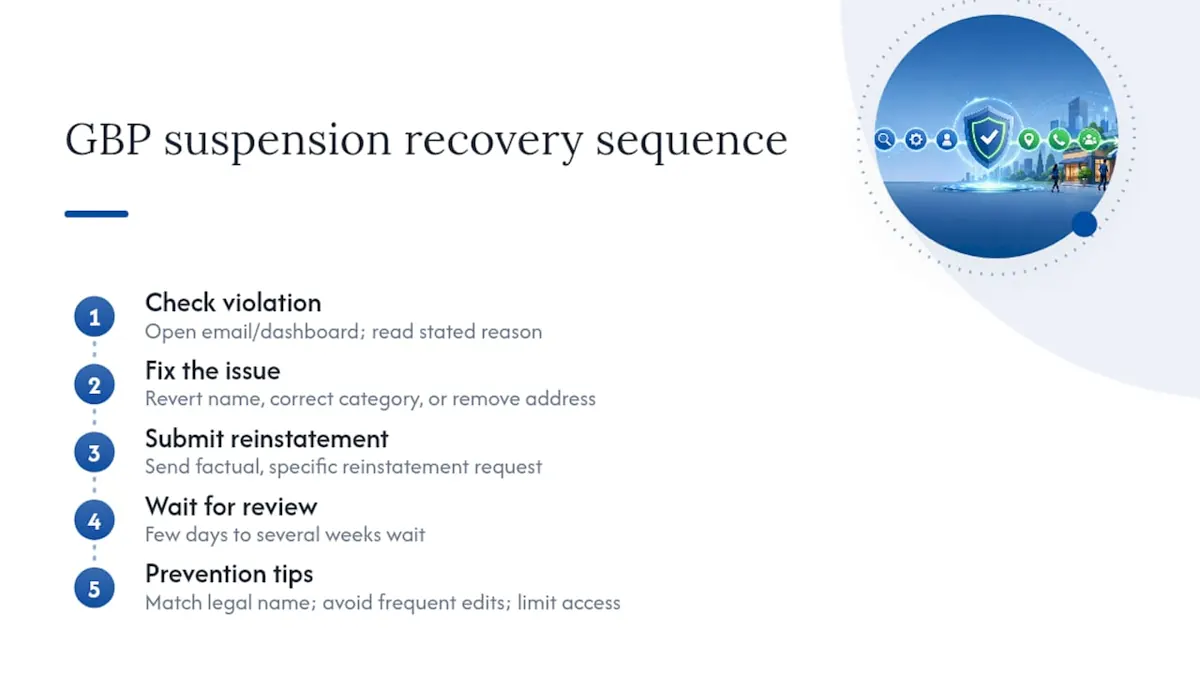
Reinstatement can take anywhere from a few days to several weeks, depending on the violation type and how backed up Google's review queue is. During that window, your business essentially disappears from Maps and local search, which is why prevention matters more than recovery. Keep your listing name exactly matching your legal signage, avoid frequent address or category changes, and limit account access to people who actually need it.
How Do You Optimize a Business Profile for Voice Search and Mobile Users?
Most Google Business Profile views now happen on a phone, and voice assistants pull answers directly from GBP data more often than most owners realize. Optimizing for both starts with the same foundation: clear, conversational, and complete information.
Voice queries tend to sound like full questions: "What time does [business] close tonight?" or "Is there a plumber near me open now?" Google answers these directly from your hours, category, and proximity data, so accurate real-time hours matter more here than almost anywhere else on the profile. A listing showing outdated holiday hours doesn't just lose a click, it gives a wrong answer out loud.
Mobile optimization overlaps heavily with the visual and speed work covered earlier: square or landscape photos that load fast, a description written in natural sentences rather than fragmented keyword lists, and a phone number that's tap-to-call ready. Make sure the "Website" link on your profile leads to a mobile-friendly page, since a slow or broken mobile experience after the click undoes everything the profile did right.
Test your own listing the way a customer would: pull up Google Maps on your phone, search your own category and city, and see what loads. If your hours, phone number, or photos look off on a small screen, a searcher using voice or mobile is getting the same broken experience.
How Does Google Business Profile Connect to Ads and Analytics?
A Google Business Profile doesn't operate in isolation from the rest of your Google presence, and treating it that way leaves data and conversion opportunities on the table.
Link your GBP to Google Ads through Location Extensions, which pulls your address, phone number, and rating directly into your search ads. This does two things: it improves ad relevance scores in some cases, and it gives searchers a map pin and directions link right inside the ad itself, which shortens the path from click to visit.
Connect GBP performance to Google Analytics by tracking the website clicks that flow from your profile as a distinct traffic source. Set up a UTM-tagged link where GBP allows it, or at minimum watch the "direct/none" traffic bump that typically follows profile optimization work. Without that connection, it's easy to credit a traffic increase to the wrong channel and miscalculate what's actually working.
If you run paid search alongside organic local efforts, watch for overlap: a searcher who clicks a paid ad and then also checks your organic GBP listing before calling is a single customer journey, not two separate leads. Treating GBP and Ads as connected systems, rather than parallel efforts, gives a far more accurate read on what's actually driving calls and visits.
A Note From NSYGHT on Where to Focus First
Verification, categories, and review flow account for most of the visibility gap we see when we open a new profile. Everything else on this list matters, but those three fix the biggest problems fastest.
We measure success in placements, calls, and bookings, not vanity metrics like profile views alone. A profile can rack up impressions and still convert nothing if the phone number's wrong or the category is off by one degree.
Run through the audit checklist in the earlier sections this week. Most owners find at least two or three fixable gaps in under twenty minutes.
How NSYGHT Handles Google Business Profile Management for You
If reading through verification steps, category audits, and review-request systems sounds like a full afternoon you don't have, that's a gap many businesses face. Rather than handing you another checklist, services that build and maintain the profile itself often include category audits, review programs, structured data alignment between your website and your listing, and monthly reporting tied to calls and bookings, not just views.
An initial audit typically covers verification status, category accuracy, NAP consistency across citations, and a review of how your location pages match your GBP data. From there, an ongoing engagement handles the maintenance work: fresh posts, review response management, and insight tracking so you're seeing real movement in calls and direction requests, not just a busier-looking dashboard.
Check NSYGHT's SEO services for local businesses to see what a managed engagement covers, or start with the full service overview if you're weighing GBP work against a broader local SEO push.
Sources
Google's own Business Profile Help Center remains the primary source on ranking factors and verification. For hands-on tactics, Semrush's guide and Backlinko's guide cover practitioner-level detail on reviews, posts, and profile completeness worth bookmarking alongside NSYGHT's local SEO checklist.