
Prefer to hand it off? See our Google Ads management.
Google Ads lead forms (now called lead form assets, and earlier lead form extensions) let people submit their contact details in a form inside your ad, without visiting your website. You attach one to a Search or Performance Max campaign, choose the questions, and Google delivers each submission to you. The form is easy to launch. The hard parts are keeping lead quality high and calling people back before they go cold, and this guide covers both.
TL;DR
- A lead form asset adds a Google-hosted form to your ad. You can use it on Search and Performance Max campaigns, and it needs a privacy policy link.
- Short forms get more submissions, but they also get more junk. Add one or two qualifying questions and turn on the quality settings.
- Do not leave leads in the Google Ads interface. Push them into your CRM or inbox so someone responds within minutes.
- Track form submissions as a conversion, and keep your website form conversions as well, so bidding learns from both.
- Check your vertical’s eligibility and your consent language before launch.
Table of Contents
- What Google Ads lead forms are
- Who can use lead forms
- How to create a lead form asset
- Where the leads go and how to check them
- Improve lead quality without killing volume
- Lead form or landing page?
- Privacy and consent in the US
- Our perspective
- Make your ad spend work harder
- A launch checklist
- FAQ
- Sources
What Google Ads lead forms are
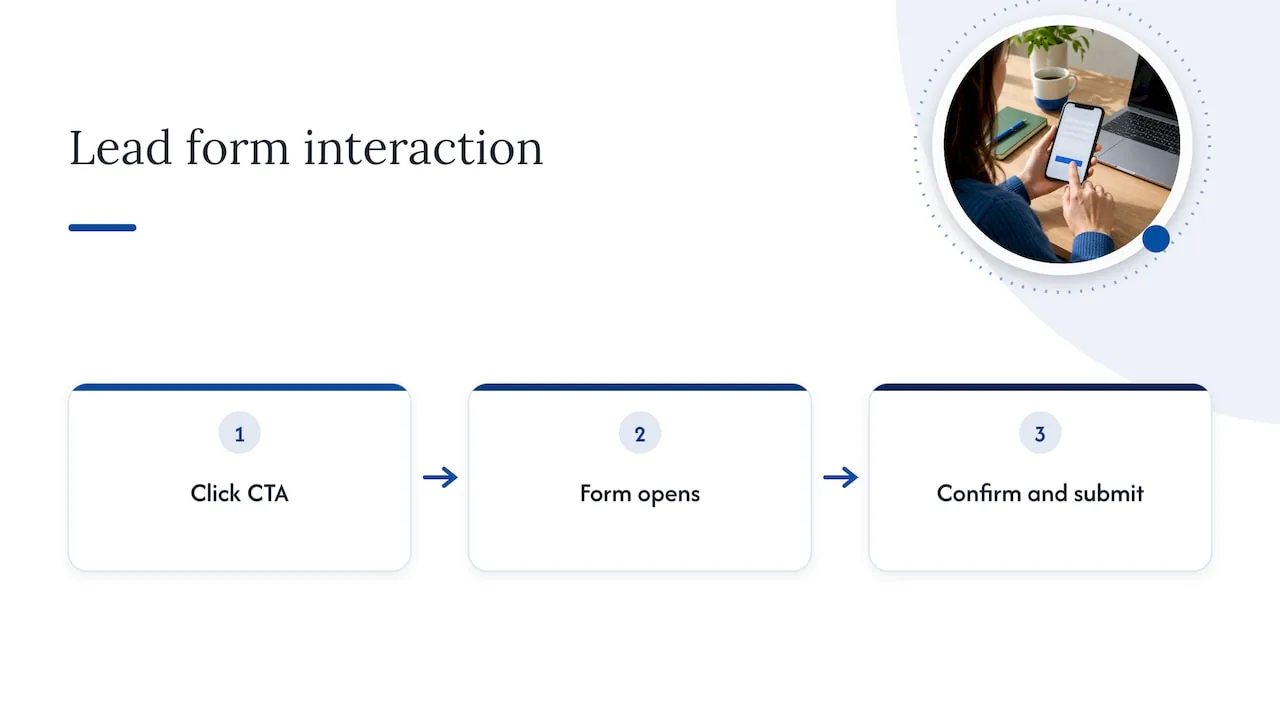
A lead form asset is an optional add-on to your ad. When someone clicks the call-to-action button, a form opens right in the results page. They confirm their details and submit. Google’s own help page describes the idea as letting people submit information in a form directly in your ad, capturing interest while they are searching, discovering or watching content.
The form can ask up to 10 questions, such as name, contact details and other information relevant to your industry. Because Google pre-fills what it knows about a signed-in user, completing the form takes a few taps on a phone.
A “lead” in Google Ads is simply a person who has shown interest and handed over contact information: a name and phone number, an email address, or an answer to a qualifying question. It is not a sale. That distinction matters later, when you decide what to optimize for.
Lead form assets versus lead form extensions
If you see “lead form extensions” in older tutorials, it is the same feature under its former name. Google moved from “extensions” to “assets” across the platform. The steps in old videos may look slightly different in today’s interface, but the concept is unchanged: a form attached to your ad.
Where they can appear
Lead form assets work with Search campaigns, where they sit beside your responsive search ad, and with Performance Max. Google documents that lead forms across campaign types can be used in both. In Performance Max you build the form at the asset group level rather than the campaign level, according to LeadsBridge’s walkthrough.
One more detail from Zapier’s guide: the form is shown only to people signed in to Google, and it is applied at the account or campaign level, not to an individual ad or ad group. Plan your campaign structure around that.
Who can use lead forms
Google sets a few requirements in its lead form policy:
- A good history of policy compliance on your account.
- An account in an eligible vertical or sub-vertical. Sensitive categories are excluded, and some regulated industries carry extra restrictions, so read the policy for your vertical before you build anything.
- A privacy policy for your business, linked at the end of the form.
- Affiliate networks and lead aggregators may not use lead form ads at Google’s sole discretion.
Spend thresholds used to be a barrier. Search Engine Land reported that Google dropped the $50,000 ad spend requirement from its documentation, leaving advertiser reputation and verification as the path in. Since policy wording can change, confirm your account’s status on Google’s page and in the asset editor itself.
If you do not see the lead form option in your account, the cause is usually one of three things: the account’s vertical, a policy history issue, or verification status. Fix those before assuming the feature is broken.
How to create a lead form asset
Google’s step-by-step help page lays out the flow. In plain terms:
- In Google Ads, go to Campaigns, click the plus button, then New campaign.
- Choose Leads as the objective and add the “Submit lead form (Google hosted)” conversion goal.
- Pick Search or Performance Max as the campaign type.
- In the lead form editor, select New lead form.
- Write the form headline, business name and description.
- Choose at least one basic contact question: name, email or phone number.
- Add your privacy policy URL.
- Write a headline and description for the confirmation message people see after submitting.
- Select a call-to-action type, such as Get quote or Contact us.
- Set up lead delivery (more on that below).
Two practical notes. First, edits can trigger a review. If you add a new custom question, for example, the associated campaigns pause until the updated form is approved, per the same help page. Make big form changes on a weekday morning, not before a weekend, so you are not dark when your phones are busiest.
Second, the Google Ads API sample shows how much the form can hold: business name, headline, description, privacy URL, fields for name, email, phone and preferred contact time, plus options like a background image, a custom post-submit message and webhook delivery. Agencies and in-house teams that manage many accounts often use the API to keep forms consistent across locations.
Write the form like a front desk script
The form is the first conversation a stranger has with your business. Treat it like one.
- Headline: state the service and the outcome, such as “Free roof inspection quote” or “New patient appointment request.”
- Description: one sentence on what happens next and how fast you will call.
- Confirmation message: repeat that promise and give a phone number for urgent needs.
- Call to action: pick the one that matches the real next step. “Book now” implies a calendar. “Get quote” implies a call back.
Where the leads go and how to check them
By default, leads sit inside your account. To view them, open Tools and Settings, then Assets, find the lead form asset, and open its leads tab (sometimes labeled Download leads). You can export a CSV. According to LeadsBridge, manual downloads reach back 30 days, although Google stores lead data for 60 days.
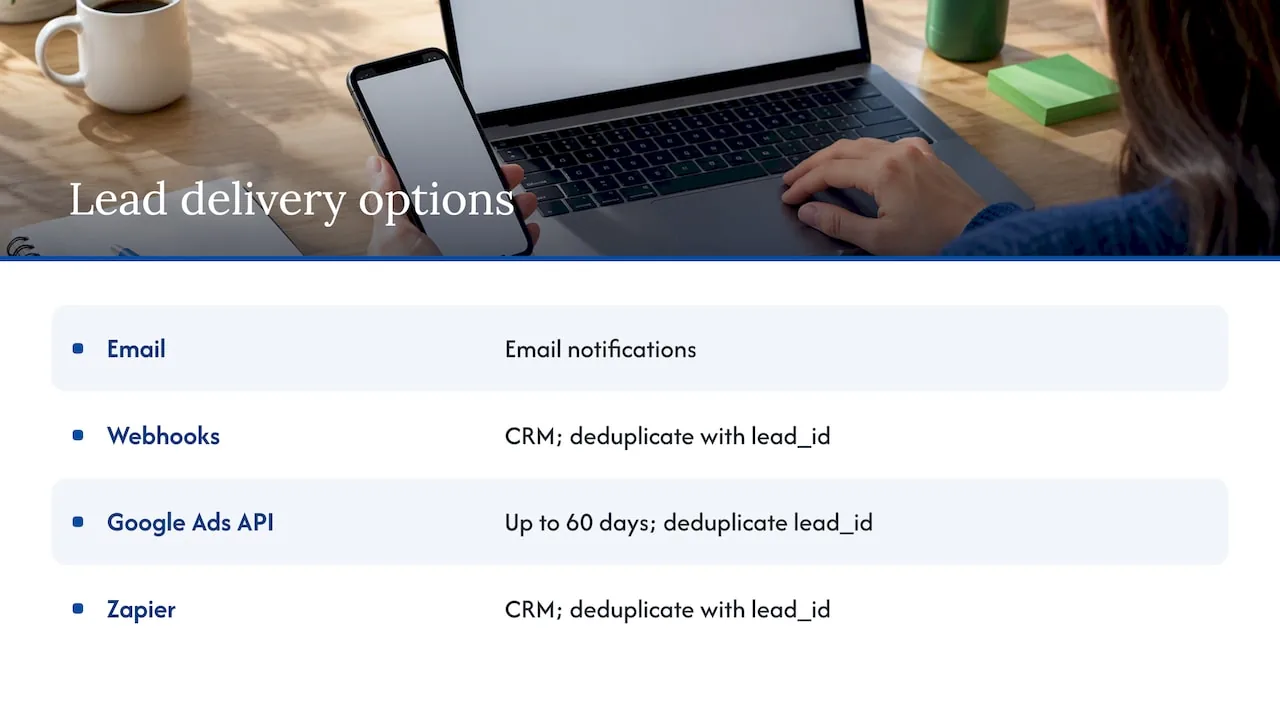
That is fine for testing and not much else. Google lists several delivery options: email notifications, webhooks, the Google Ads API (up to 60 days of data) and Zapier, covered in its lead form documentation. For a CRM connection, Google’s integration best practices recommend webhooks, the API or Zapier, and advise using the lead_id field to deduplicate, since one lead can be delivered more than once.
Speed to lead decides the outcome
Jyll Saskin Gales makes the point bluntly in Search Engine Land: leads should not sit idle in the interface. They need a system that pushes them into a CRM, because the longer you take to respond, the colder the lead gets. Someone who filled in a form on their phone while standing in a flooded kitchen or with a cracked tooth is comparing you against the next ad. The first business to call usually wins the conversation.
A simple setup that works for most local businesses:
- Webhook or Zapier delivery into your CRM or scheduling tool.
- An instant email and text alert to whoever answers the phones.
- A target response time you can actually meet, such as five minutes during business hours.
- A short follow-up sequence for people who do not pick up the first call.
Improve lead quality without killing volume
Because lead forms are so easy to complete, they attract casual submissions. Search Engine Land notes that forms completed directly from the results page are more vulnerable to low-quality leads, and recommends a screening question about budget or specific needs.
Add qualifying questions
Mark Cirillo of LeadsBridge explains the trade-off in their guide: extra questions reduce the number of people who finish the form, but they improve quality, and the cost per qualified lead should fall even if cost per lead rises. Judge the form on cost per qualified lead, not raw submissions.
Good qualifying questions are short and multiple choice where possible:
- “What do you need help with?” with three or four service options.
- “When do you need this done?” with timeline choices.
- “What is your approximate budget?” where it suits the business.
- “What is your zip code?” so out-of-area requests filter themselves out.
The same logic of screening before the handoff applies outside Google. This piece on qualifying prospects with lead capture questions shows how fit and need questions work on a website form, and the idea carries over to your Google form.
Use the built-in quality settings
LeadsBridge lists three levers: turn on phone number verification (a one-time passcode), choose the “More qualified” optimization setting, and add custom questions such as job title, budget or timeline. Verification trims fake numbers. The qualified setting asks Google to favor people more likely to follow through, usually at the cost of some volume.
Tell bidding what a good lead is
Search Engine Land advises setting Lead form submission as a Primary conversion action if you want Smart Bidding to prioritize lead generation, and keeping your normal website form conversion Primary too. That way the system learns from both paths.
If you want to be precise about the setup, this walkthrough on counting form submissions alongside website conversions is a useful companion. And once you can, send back what happened to the lead afterward. Contractors in particular benefit from sending offline results back to Google Ads, because a booked job is a far better signal than a form fill.
Google also suggests data-driven attribution to see which ads, keywords and campaigns drive both form submissions and landing page conversions, as noted in its lead form assets guidance.
Lead form or landing page?
Neither wins everywhere. A lead form removes friction, which suits mobile searchers who want a callback and do not need to read much. A landing page suits higher-consideration services where people want proof: reviews, photos, pricing context, service area details.
| Situation | Better fit |
|---|---|
| Urgent local service (repairs, emergencies) | Lead form, plus a call asset |
| Higher-ticket project with research | Landing page, with a form on it |
| Many locations with different offers | Location landing pages |
| Testing a new offer quickly | Lead form |
| Retargeting past visitors | Either; match the offer |
Many accounts run both: a lead form asset attached to the ad, and a landing page as the main click path. Compare cost per qualified lead and cost per booked job for each. If you build location-specific pages, our guide to location landing pages that rank shows how to structure them. And if you are deciding where budget should go first, the two-week ad test for picking SEO targets lets paid data guide your organic plan.
Privacy and consent in the US
A lead form collects personal information, so treat consent as part of the build, not an afterthought.
- Add your privacy policy link. It is mandatory and it appears at the end of the form.
- Google’s customer data policies require you to disclose that you share customer information with third parties for ad measurement, and to obtain consent where legally required. Data about people under 13 may not be uploaded, and conversions from sensitive categories may not be used for enhanced conversions or store-sales measurement.
- If you use Enhanced Conversions for Leads, consent signals matter. Elevar explains that ad_user_data and ad_personalization must both be granted for matching offline uploads against Google’s identity graph.
- Calling or texting people who submit a form carries its own rules. Have your attorney review your consent wording, especially for text follow-up and for regulated fields like healthcare and legal services.
Our perspective
We run lead forms for local service businesses, and the pattern is consistent: the form is rarely the problem. The problem is what surrounds it.
A form that asks for a name and phone number will produce cheap submissions, and a lot of them will never pick up. A form with a qualifying question, phone verification and a fast human follow-up produces fewer, better leads. We would rather hand you ten people who need your service this week than forty who clicked by accident.
We also treat paid and organic as one system. Ads give quick signals on which services and keywords convert. Entity-driven SEO and a well-managed Google Business Profile make the same business easier to find and trust afterward, in the local pack and in AI-generated answers. When someone searches your name after seeing an ad, the reviews, photos and location pages they find should confirm the decision.
That is why our Google Ads management is a flat monthly fee rather than a percentage of your spend. You should know what management costs, and we are paid to get you qualified leads, not to raise your budget.
NSYGHT
Make your ad spend work harder
If you would rather have a team build the form, wire it to your CRM and tune it against booked jobs, that is what our Google Ads management does. It costs $499 per month with a one-time $249 setup fee, and the fee does not change with your ad spend. Our reporting is transparent, so you can see what the money produced.

We pair ads with local SEO and Google Business Profile management, so the clicks you pay for and the visibility you earn point at the same strong presence. You can see everything we offer on our services page, or start from nsyght.com.
Strengthen the pages around your ads too: learn how to earn more Google reviews within the rules, and see how local services ads fit into spend planning.
A launch checklist
Before you switch a lead form on, run through this list:
- Confirm your account’s eligibility and verification status.
- Write the headline, description and confirmation message around the actual next step.
- Include one or two qualifying questions and enable phone verification.
- Link a privacy policy that covers how you contact people.
- Connect delivery to your CRM, email and a text alert, and test it with your own number.
- Set Lead form submission as a Primary conversion alongside your website form.
- Assign a person and a response-time target for every lead.
- Review cost per qualified lead after the first few weeks, then adjust questions and settings.
FAQ
How do I check leads from a Google Ads lead form?
Open Tools and Settings, go to Assets, find your lead form asset and open its leads tab. You can export a CSV of recent leads. Manual downloads cover 30 days, so set up email, webhook or Zapier delivery to avoid losing anything.
What is a lead in Google Ads?
A lead is a person who has shown interest and shared contact information, such as a form submission, a phone call or a message. It is not a closed sale. Track leads first, then connect them to qualified opportunities and revenue.
Is $20 a day enough for Google Ads lead forms?
It depends on your market’s cost per click, and costs vary widely by industry and city. A small daily budget may collect too few clicks to learn from in a competitive area. Start by working out how many qualified leads you need, then back into a budget from your own cost per lead.
Are lead form extensions the same as lead form assets?
Yes. Google renamed extensions to assets. The feature still adds a Google-hosted form to your Search or Performance Max ads, so older tutorials remain useful for the concept.
Sources
- About lead form assets, Google Ads Help
- Lead form requirements, Google Advertising Policies Help
- Create lead form assets, Google Ads Help
- Best practices to integrate lead form ads with your CRM, Google Ads Help
- Generate more leads with lead form assets, Google
- Understand Customer Data Policies, Google
- Google drops $50K ad spend requirement for Lead Form assets, Search Engine Land
- How to use Call assets, lead forms, and Message assets, Search Engine Land
- Google Lead Form Ads: A complete guide, LeadsBridge
- How to use Google Ads lead forms, Zapier
- Google Consent Mode update, Elevar