
Prefer to hand it off? See our Google Ads management.
Phrase match shows your ad on searches that include the meaning of your keyword. Broad match shows it on searches that are merely related to it. Phrase gives you control, broad gives you reach and discovery. For most local service businesses, phrase match is the right starting point, and broad match earns its place only once you have conversion data, Smart Bidding and a habit of checking search terms.
That is the short answer. The rest of this guide explains what each match type does today, why the old rules you may have read about no longer apply, and how to decide for your own account.
TL;DR
- Phrase match reaches more searches than exact match and fewer than broad match, and it triggers on searches that include the meaning of your keyword.
- Broad match is the default match type and can trigger on related searches that do not contain the keyword’s direct meaning, using signals such as landing page content and other keywords in the ad group.
- The broad match modifier (+keyword) is gone: legacy versions now behave as phrase match.
- Start new campaigns on phrase (and exact) match. Add broad match when you have steady conversions, Smart Bidding, clean tracking and negative keywords in place.
- Whatever you pick, review the Search terms report every week.
Table of Contents
- What each match type does today
- A worked example: one keyword, three behaviors
- Does the broad match modifier still work?
- How Google decides which keyword wins an auction
- Phrase match vs broad match: the decision
- Costs: is broad cheaper or more expensive?
- A safe rollout plan for local service businesses
- Mistakes that waste budget
- Our perspective
- Getting this set up without the guesswork
- FAQ
- Sources
What each match type does today
Google Ads has three keyword match types: exact, phrase and broad. According to Google’s keyword matching options page, broader match types capture all the queries of narrower ones, plus more. A broad keyword can therefore reach everything a phrase keyword reaches, and a phrase keyword can reach everything an exact keyword reaches.
Here is how the three compare:
| Exact match | Phrase match | Broad match | |
|---|---|---|---|
| Ads may show on searches that… | have the same meaning or intent as the keyword | include the meaning of the keyword | are related to the keyword, even without its direct meaning |
| Reach | Lowest | Middle | Highest |
| Control over who sees the ad | Most | Moderate | Least |
| Notation | [keyword] | “keyword” | keyword (no symbols) |
| Typical role | Proven, high-value terms | Core of most campaigns | Discovery and scale |
Notice that no match type means “the exact words only.” By default, every match type can also serve on close variants, such as reordered words, synonyms, paraphrases and implied words, and there is no way to opt out. That detail surprises many advertisers who still picture phrase match as “my words in my order.”
Phrase match in practice
Phrase match is meaning-based. Google’s own example in its documentation on the phrase match change is the keyword “moving services NYC to Boston.” It can match “affordable moving services NYC to Boston” and “NYC corporate moving services to Boston.” It will not match a search where the wording flips the meaning, such as one going from Boston to New York City.
For a local business, picture the phrase keyword “emergency plumber” in your city. Searches like “emergency plumber near me open now” or “24 hour emergency plumber” fit the meaning. A search for “plumber apprenticeship” does not.
Broad match in practice
Broad match is the default and the loosest type. Google says it may take into account recent search activity, landing page and asset content, and other keywords in the ad group, as described on the keyword matching options page. Google’s 2022 Unlock the Power of Search guide goes further: broad match is the only type that uses all available signals, including landing pages, other ad group keywords, previous searches and user location, to read the intent behind both the search and your keyword.
That is the upside and the risk in one sentence. The system has more room to find customers you would never have guessed, and more room to wander.
A worked example: one keyword, three behaviors
Take a dental practice in Phoenix bidding on emergency dentist.
- Exact match [emergency dentist]: “emergency dentist,” “urgent dentist,” and other searches with the same intent.
- Phrase match “emergency dentist”: the above plus “emergency dentist open Sunday Phoenix” or “same day emergency dentist for broken tooth.”
- Broad match emergency dentist: all of the above plus related searches such as “tooth pain relief tonight” or “dental clinic that takes walk-ins.” It might also drift into “emergency dentist salary” or “dental school clinic,” which are not buyers.
The pattern is consistent across industries. A published example from an agency guide shows a broad keyword like “commercial dishwasher for restaurant” matching both relevant searches (“industrial dishwasher for cafe”) and junk (“dishwasher repair jobs,” “dishwasher manual pdf”) when no protection is in place. The lesson is that broad match without negative keywords is a budget leak, not a strategy.
Does the broad match modifier still work?
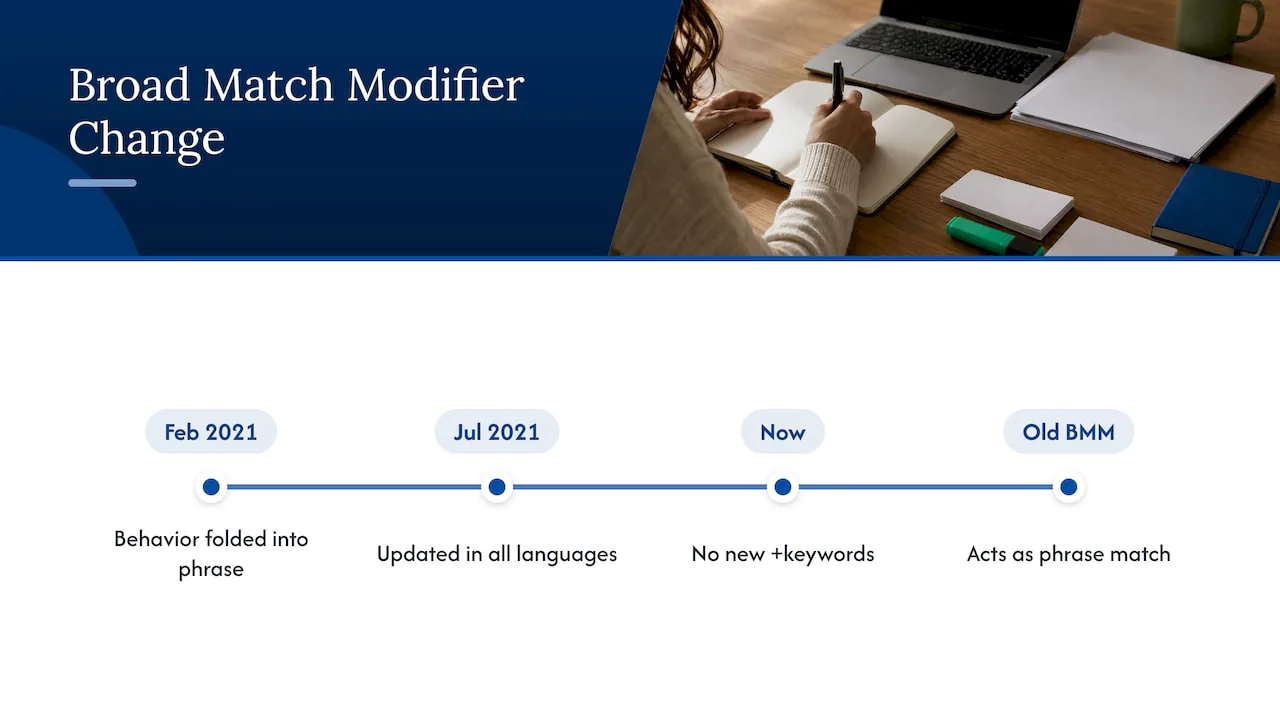
No. Google began folding broad match modifier behavior into phrase match in February 2021, and by July 2021 both had the same updated phrase behavior in all languages, according to Google’s announcement of the change. You can no longer add new keywords with the +keyword notation. Old BMM keywords still serve but act as phrase match, and if you edit one, it converts to phrase notation when you save.
If you are following an older tutorial that says “phrase match is strict, use +plus signs for flexibility,” that advice describes a system that no longer exists. Today’s phrase match is looser than the pre-2021 version and slightly tighter than the old modifier.
How Google decides which keyword wins an auction
Understanding the mechanics helps you structure campaigns sensibly. Per Google’s explanation of how matching works, the system interprets a search using spelling corrections, synonyms and related concepts, then retrieves enabled keywords. It checks eligibility against match type and campaign settings such as budget, geotargeting, audience targeting, negative keywords, an approved ad and landing page, and time restrictions. Among eligible keywords, it prioritizes ones identical to the search term across match types, then weighs bids and relevance for Ad Rank.
Two practical consequences follow:
- If you have the same term as exact, phrase and broad, the more specific keyword is prioritized when it is identical to the search. Keeping a proven term as exact protects your best traffic and your tailored ad copy.
- Negative keywords, geotargeting and budgets apply before match type does. Your guardrails matter as much as the match type you choose.
Phrase match vs broad match: the decision
Use this as a checklist rather than a rule.
Choose phrase match when
- The account is new or has little conversion history.
- Budget is limited and every click counts, which is typical for a single-location service business.
- You sell a defined service in a defined area (“water heater repair,” “wedding bounce house rental”).
- You want the Search terms report to show clean, understandable matching patterns.
- Your industry limits how you can advertise. Google’s guidance recommends exact and phrase for campaigns where matching only to specific searches is mandatory because of regulation, for example in finance or pharma. Healthcare and legal advertisers should keep their own compliance rules in mind when deciding.
Choose broad match when
- Campaigns already produce a steady flow of conversions.
- You use a conversion-based Smart Bidding strategy. Google states that Smart Bidding is critical with broad match because every search is different and bids should reflect the signals present at auction time.
- Conversion tracking is clean. If form fills, calls and booked appointments are counted correctly, the algorithm learns from real outcomes.
- You want to find new search terms to promote, and new negatives to add.
- You can monitor queries every week.
Google describes broad match as a way to extend reach beyond exact and phrase by finding related queries, and says it can give Smart Bidding more data and flexibility, in its guide to broad match.
How much data is “enough”?
Google does not publish one universal threshold. Many practitioners work from a rule of thumb of roughly 30 or more conversions per campaign per month before pairing broad match with Smart Bidding. Treat that as a practical benchmark, not an official requirement. A campaign generating five leads a month is not giving the bidding system much to learn from, and a phrase match structure will usually serve it better until volume grows.
Costs: is broad cheaper or more expensive?
Advertisers often assume exact match is cheaper per click and broad is wasteful. Google’s Unlock the Power of Search document makes a more careful point: exact match is not inherently cheaper. If a broad keyword picks up the same traffic as a paused exact keyword with the same bids, creatives and budgets, the cost of that traffic is equivalent. Reports can make exact look cheaper when you compare cost per click instead of cost per conversion or return on ad spend.
So judge match types on cost per lead or booked job, not on CPC alone. A cheap click that never calls is more expensive than a pricey click that books a roof inspection.
A safe rollout plan for local service businesses
This is the sequence we use as a starting framework when setting up local campaigns. Adjust it to your budget and conversion volume.
- Seed negatives before launch. Add the obvious non-buyers for your trade: “jobs,” “salary,” “free,” “DIY,” “course,” and competitors you do not want to bid on. Add more every week.
- Launch on phrase and exact. Put your best commercial terms in phrase match, and your top performers in exact match so they keep their own budget and ad copy.
- Track real conversions. Calls, form submissions and booked appointments, not just clicks. Check that tracking fires correctly before spending real money.
- Review the Search terms report weekly. Promote searches that convert into their own keywords and add the irrelevant ones as negatives. A search ad testing approach that pairs phrase-match reach with a regular look at the queries actually triggering your ads keeps relevance from slipping.
- Test broad match separately. Use its own campaign, its own budget, a strong negative list and a clear success measure, such as cost per qualified lead against your phrase campaign. Do not convert your whole account at once.
- Scale or retreat. If broad produces leads at or below your target cost, give it more budget. If it drifts, pull back and tighten negatives.
One setting to know about: the broad match campaign setting converts all existing phrase and exact keywords in a campaign to broad, and it is only available with conversion-based Smart Bidding. Do not switch it on casually.
Mistakes that waste budget
Treating match type as set and forget. Phrase match is tighter than broad, but it still expands to meaning-based variants. Review it regularly.
Running broad on a thin account. With few conversions and weak tracking, the bidding system has little to learn from, and broad match widens the range of searches it must guess about.
Ignoring location and intent words. If you serve one metro area, geotargeting and keywords with city or service terms keep matching relevant. Intent signals matter too: some advertisers pair their campaigns with intent data for Google Ads to sharpen which audiences they pursue.
Judging by CPC. As above, look at cost per lead and revenue.
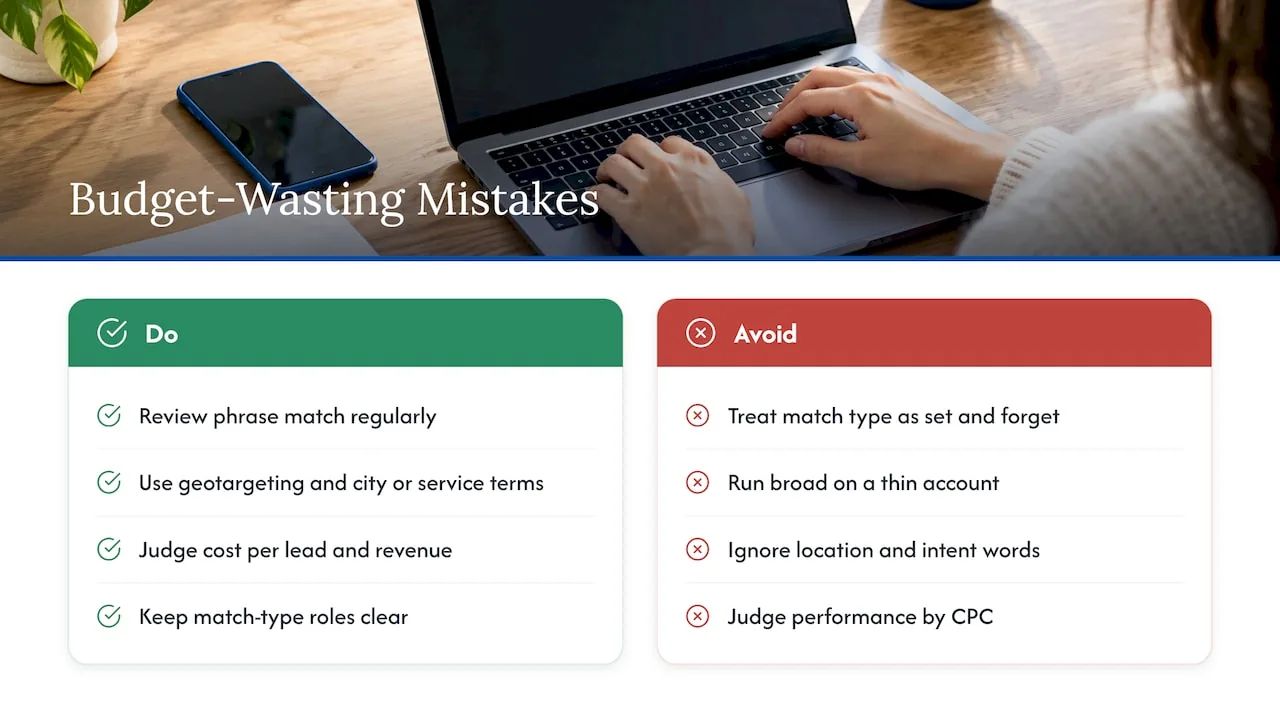
Duplicating the same keyword in every match type without structure. It is fine to run exact, phrase and broad versions of one term, but keep the roles clear so you can read the results.
Our perspective
Most local service businesses we meet are not short of keywords. They are short of clean data and a weekly habit of looking at what they actually paid for.
That is why we begin accounts on phrase and exact match, build the negative list early and treat the Search terms report as a working document. Phrase match gives a local advertiser the reach to find customers without handing Google the whole steering wheel.
Broad match has a real place. We bring it in deliberately, in a separate campaign with Smart Bidding, once tracking is trustworthy and conversions are steady. At that point it becomes a discovery tool that feeds new converting terms back into the core structure.
Paid search also works best alongside organic and map visibility. The searches that convert in ads show you which services and phrases to build pages and Google Business Profile content around, and the reverse is true as well.
NSYGHT
Getting this set up without the guesswork
Match type choices, negative keywords and weekly search term reviews are exactly the routine work our team handles. Our Google Ads management is a flat $499 per month with a one-time $249 setup fee, and the fee is not a percentage of your ad spend. Pricing details are on our services page.
If you are still deciding between paid and organic channels, our guide on using a two-week ad test to pick SEO targets shows how ad data can shape your keyword plan. You can also browse more Google Ads articles from our team.
FAQ
Should I use broad or exact match?
It depends on your data and goals. Exact match gives the most control and suits proven, high-value terms. Broad match gives the most reach and works best with Smart Bidding, steady conversions and active negative keyword management. Many accounts use phrase match as the middle layer between the two.
Is phrase match better than broad match for a small budget?
Usually, yes. Phrase match keeps ads closer to the meaning of your keyword, so a small budget is less likely to be spent on loosely related searches. Once your campaigns convert consistently, you can test broad match in a separate campaign.
Can you give an example of a broad match keyword?
A broad match keyword is entered with no symbols, such as roof repair. Besides searches containing those words, it can serve on related searches like “fix leaking shingles” or “storm damage contractor.” It may also reach unrelated ones such as “roofing jobs” unless negative keywords block them.
Do broad match and phrase match use the same notation?
No. Phrase match is written in quotation marks, like “roof repair.” Broad match has no punctuation. The old plus-sign modifier is retired, and legacy keywords that use it now behave as phrase match.
Sources
- About keyword matching options, Google Ads Help
- Keyword close variants: Definition, Google Ads Help
- About changes to phrase match and broad match modifier, Google Ads Help
- How matching works, Google Ads Help
- Unlock the Power of Search, Google (2022)
- Your guide to broad match, Google Ads Help
- About the broad match keywords campaign setting, Google Ads Help