
"Google Ads local" means the mix of Local Services Ads and location-driven Search and Maps formats that connect nearby customers to service businesses. The single best first move is confirming and linking your Google Business Profile, then checking whether your trade qualifies for Local Services Ads. Get that right and everything else, from cost per lead to Google Guaranteed status, follows from it.
- Local Service Ads charge per qualified lead, making them ideal for high-conversion service businesses with strong phone close rates.
- Verification can take days or weeks, often delayed by mismatched business information such as license or address discrepancies.
- Proper setup requires claiming and verifying your Google Business Profile, linking it to Google Ads, and maintaining accurate, current business data.
- Lead response speed critically impacts performance, with under-five-minute replies significantly improving placement and lead quality.
- LSAs perform best when combined with a solid organic entity presence, as cross-channel trust signals lower costs and boost overall lead flow.
What Local Services Ads and Other Local Ad Formats Actually Do
Local Services Ads (LSAs) are Google's lead generation format built specifically for service businesses: plumbers, electricians, lawyers, cleaners, locksmiths. They show at the very top of relevant Search results, above the regular ads, and they also surface as promoted pins on Google Maps when someone searches nearby. Unlike a standard search ad, an LSA listing shows your business name, star rating, years in business, and often a Google Guaranteed or Google Verified badge before the customer ever clicks.
The outcomes LSAs drive are narrow and specific: phone calls, message leads, and booked jobs. That focus is the point. You're not paying for a click that might bounce off your homepage; you're paying for someone who wants to hire you right now.
Beyond LSAs, Google runs other local ad formats that lean on the same underlying data:
- Local campaigns, often built through Performance Max, which push visits, calls, and directions across Search, Maps, YouTube, and Display.
- Map search ads, which place your listing as a promoted pin when someone browses the map directly.
- Location extensions on standard Search ads, which add your address and distance to a regular pay-per-click ad.
All of these depend on accurate business data. Get that piece wrong and nothing downstream works.
LSAs vs Standard Local Campaigns: What Actually Separates Them
The billing model is the biggest divide. LSAs charge per qualified lead. Standard local campaigns, run through Performance Max or Search with location assets, charge per click, so you pay whether or not that click ever calls you. That distinction alone should shape where your first dollars go.
- Billing: LSAs bill per lead; standard local campaigns bill per click regardless of outcome.
- Trust signal: LSAs can display Google Guaranteed or Google Verified badges; standard ads carry no comparable third-party endorsement.
- Placement: LSAs sit above traditional ads in Search and appear as Maps pins; standard local campaigns run across Search, Maps, YouTube, and Display simultaneously.
- Best use case: LSAs suit businesses that convert well over the phone or through direct messages; standard campaigns suit businesses that also want broader visibility and website traffic, not just calls.
A Google Help comparison frames it plainly: LSAs are lead based with verification baked in, while standard campaigns are click based and format flexible. Most established local businesses eventually run both. Early on, though, if your budget is tight and your close rate on phone leads is solid, LSAs usually earn back their spend faster because you're not paying for tire kickers who never dial.
Eligibility, Verification, and What Google Guaranteed Actually Means
Not every trade qualifies for LSAs. Google restricts the program to specific service categories, home repair, legal, healthcare, and similar fields where trust and licensing matter, and the list varies by location. Checking your eligibility takes about five minutes on Google's Local Services Ads signup page, where you enter your zip code and category to see if you can apply.
Verification is where most owners underestimate the timeline. Google typically walks you through:
- Identity verification for the business owner or a designated representative.
- Business registration checks, confirming your legal business name and address match public records.
- License verification, where applicable, submitted directly or checked against state licensing databases.
- Background checks on the business and, in many categories, on individual technicians or staff who'll be dispatched to jobs.
- Insurance confirmation, when your category requires proof of liability coverage.
Once submitted, review can take anywhere from a few days to a few weeks depending on how backed up your category's verification queue is and how quickly your state or licensing body responds to Google's requests.
The most common delays come from mismatched business information: a license registered under a slightly different legal name than your Google Business Profile, or an address that doesn't match your state filing. Fix the mismatch before you resubmit rather than after, or you'll restart part of the queue.
Pull your business license and insurance documents before you start the LSA application. Having them ready to upload immediately, rather than requesting them from an insurer mid-review, can shave a week or more off your verification timeline.
Your Setup Checklist for Local Google Ads
Getting local ads live correctly the first time beats fixing a broken setup later. Work through this in order.
- Claim and verify your Google Business Profile. This is the data source for everything that follows.
- Link your GBP to your Google Ads account. This step is what enables location assets, the underlying feature that lets ads show your address, hours, and distance.
- Turn on account-level location assets so every eligible campaign can pull from your GBP data automatically.
- Pick your campaign type. Apply for LSAs if your category qualifies, and layer in a local Performance Max or Search campaign with location assets if you want broader reach.
- Set up billing and confirm payment details specific to your chosen format, since LSA billing runs separately from standard Ads billing in most accounts.
Before you launch anything, double check the account settings that feed your ads:
- Accurate name, address, and phone number (NAP) that match your GBP exactly.
- Correctly defined service areas, not just a single storefront pin, if you travel to customers.
- Current business hours, including holiday exceptions.
- At least a handful of recent, well-lit photos of your work, team, or location.
- Booking or payment links if your business supports online scheduling.
If you want your listing to show up reliably as a promoted pin on Maps, your location asset needs a verified GBP link and complete address data. Store visit tracking, if you want it, needs a minimum volume of foot traffic data before Google will report it reliably, so don't expect that metric on day one.
Targeting, Ad Placement, and Setting a Realistic Budget
Geotargeting for local ads works on three levels: radius around a point, city or zip code boundaries, and locations of interest that Google infers from search behavior. Radius targeting feels precise, but very small radii, think a mile or less in a dense area, can fail to serve consistently. Google requires a minimum audience size for privacy reasons, and a radius that's too tight simply won't have enough eligible users to trigger delivery.
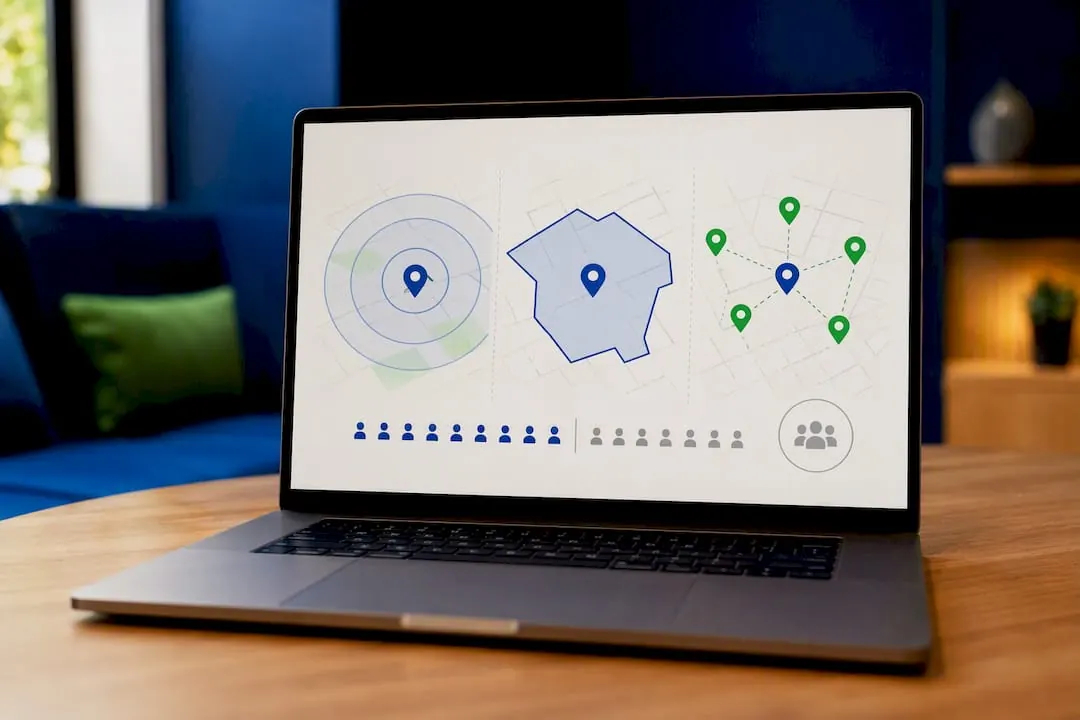
City or zip targeting tends to serve more reliably for local service businesses covering a metro area or a defined service radius of five to ten miles.
The formats that depend on location assets each behave a little differently on the surfaces where they appear:
- Promoted Maps pins show when someone browses the map directly, often while comparing several nearby options.
- Map search ads appear within Maps search results for a specific query, like "electrician near me."
- Local ad carousels in Search blend location assets with standard ad copy, showing distance and rating inline.
For budgeting, start by working backward from a lead target. If you need about twenty booked jobs a month and your close rate on LSA leads is solid, you need a proportionate number of qualified leads to hit that number, and your LSA spend should scale to support that volume. Once your LSA pipeline is stable, consider adding a modest Performance Max budget for awareness and broader reach, but track cost per lead separately for each format. Blending the numbers hides which channel is actually working.
Optimization: What Actually Moves Lead Quality and Volume
Two levers matter more than anything else in this program: reviews and response speed. Businesses with more recent five star reviews consistently rank higher within the LSA auction, and slow response times to incoming leads directly cost you future placement, not just the job in front of you.
Beyond that, a few habits separate accounts that perform from accounts that stall:
- Ask every satisfied customer for a review immediately after the job, not weeks later when the memory's faded.
- Keep your GBP photos current with recent job site images, not stock photography or shots from three years ago.
- Update service listings whenever you add or drop a service line, since mismatched offerings confuse both Google's matching and the customer.
- Set a firm internal response SLA, ideally under five minutes for calls and under an hour for messages, since LSA leads often call two or three competitors simultaneously.
- Build a short qualification script for whoever answers the phone, so leads that don't fit your service area or budget get filtered fast instead of wasting dispatch time.
Community discussion around GBP-to-Ads linking backs this up: treating your Google Business Profile as a core account asset, not a one-time setup task, is what keeps dynamic ad copy accurate as your business changes.
Audit your GBP and location assets on the same day every month. Google occasionally overrides account-level settings with campaign-level ones, and a quiet mismatch can quietly starve a campaign for weeks before anyone notices the lead count dropped.
Tracking Results and Fixing Common Problems
The local actions worth tracking as primary conversions are calls, direction requests, booking form submissions, and, where volume supports it, store visits. Set these as your primary conversion actions in Google Ads rather than treating website clicks as your main success metric, since a click means little for a business that closes deals over the phone.
To confirm your setup is actually working, check that data is flowing correctly between GBP and Ads:
- Verify your location asset shows the correct address, hours, and phone number by previewing the ad directly.
- Confirm call tracking numbers are forwarding correctly if you're using Google's call forwarding feature.
- Check that conversion actions are marked "primary" so Google's bidding algorithms optimize toward them.
When something breaks, work through this order before calling support:
- Disapproved location: usually a mismatch between your GBP address and your business registration; fix the record, don't just resubmit.
- Missing location assets: almost always a broken GBP-to-Ads link; re-link the account and confirm permissions.
- Verification stuck for more than three weeks: contact Google support directly rather than waiting, since automated review queues occasionally lose documents.
How NSYGHT Sees LSA Spend Fitting Into a Bigger Local Strategy
Paid leads from Local Services Ads work best when they sit on top of strong underlying entity signals, not instead of them. A well-structured Google Business Profile with consistent name, address, and phone data, backed by structured data on your site, makes every location asset render more accurately and gives AI-driven answer engines something clean to cite.
NSYGHT generally advises local businesses to treat LSA spend as the fast lane and entity-driven SEO as the road it runs on. If your GBP and site entity signals are shaky, paid leads cost more and convert less, because Google's own trust scoring for LSAs partly reflects the same signals that AEO and organic local visibility depend on. Businesses that invest in both tend to see steadier lead flow, since organic and AI-referred traffic keeps producing leads even during months when ad budgets tighten.
Google Local Ads for Service Businesses: What the Data Actually Supports
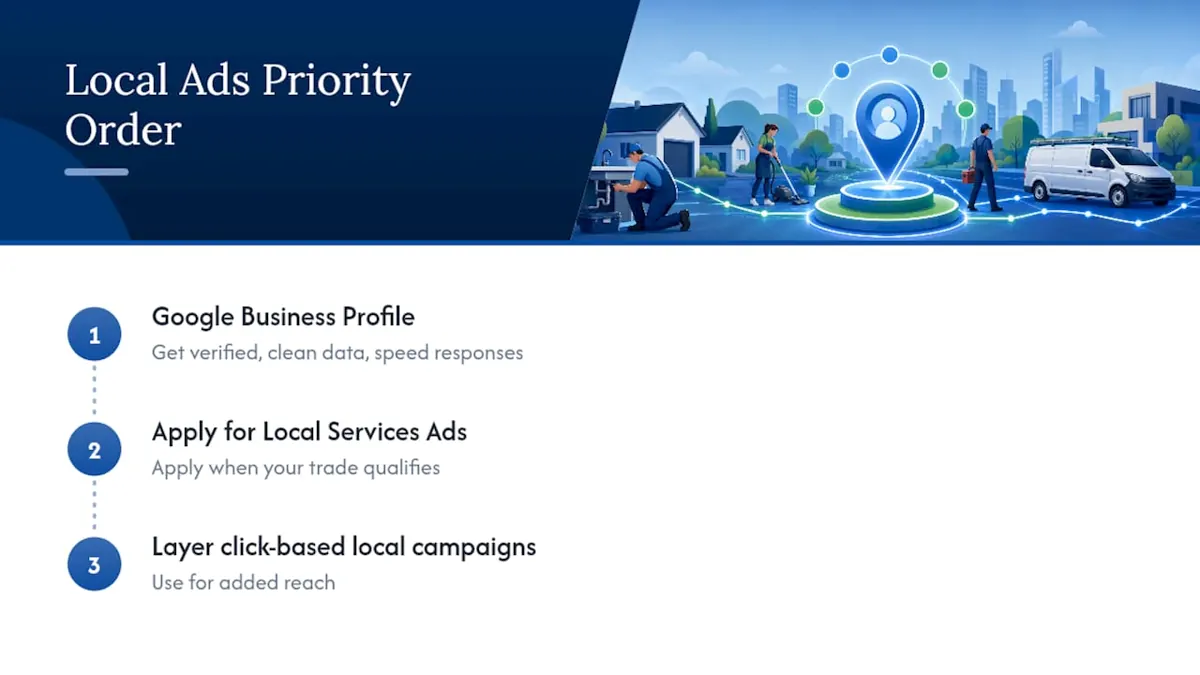
Most advice on this topic treats LSAs and standard local campaigns as competitors. They're not. The research here supports a clearer priority order: fix your Google Business Profile first, apply for Local Services Ads if your trade qualifies, and only then layer in click-based local campaigns for reach.
Where conventional advice falls short is response speed. Plenty of guides mention reviews and photos but treat lead response time as an afterthought. It isn't. A business that answers in under five minutes competes on entirely different terms than one that calls back the next morning, because LSA leads are shopping multiple providers in real time.
The reader's first priority should be verification readiness, not campaign strategy. A business stuck in verification limbo for three weeks loses more potential leads than a business running a mediocre campaign that's actually live. Get the badge, get the GBP data clean, then optimize. Sequence matters more than most owners assume when they start.
How NSYGHT Handles Setup, Verification, and Ongoing Local Ads Management
Running LSAs well means juggling GBP accuracy, verification paperwork, campaign settings, and lead response tracking, often all at once while you're still running the actual business. NSYGHT handles Google Ads management for local service businesses end to end: linking and cleaning up your Google Business Profile, walking through LSA eligibility and verification documentation, and setting up conversion tracking so you know exactly what a lead costs and where it came from.
Beyond the ads themselves, NSYGHT builds the entity-driven SEO foundation underneath them, so your Google Business Profile, site structure, and local citations reinforce each other instead of working in isolation. That combination tends to lower cost per lead over time because Google's own trust signals for LSAs improve alongside your organic visibility. If you're ready to see where your current setup stands, request a local visibility review through NSYGHT's SEO services page and get a clear breakdown of what's costing you leads right now.
Where to Verify These Steps Directly
For exact procedural details, check these Google resources directly:
- Local Services Ads overview: confirms eligibility categories and current program details.
- Location assets setup: walks through linking GBP to Ads correctly.
- Geographic targeting rules: explains radius limits and privacy thresholds.
- Show ads on Google Maps: details requirements for promoted pins.