
Local marketing attribution is the work of connecting a phone call, a direction request or a booked job back to the ad, listing or page that produced it. You will never track every customer perfectly. You can build a model good enough to decide where the next dollar goes, and that starts with three things: capturing local actions, passing a shared ID into your CRM, and importing closed jobs back into Google Ads.
This guide is for owners and marketing managers of local service businesses: dental practices, law firms, home service companies, rental companies and multi-location brands. Most of your revenue happens off the website, on a phone line or at a front desk. Generic attribution guides built for e-commerce and B2B software skip that part, so we cover it here.
TL;DR
- Local attribution is about linking calls, direction requests and closed jobs to their source. Clicks and impressions alone do not tell you that.
- Start with proxy metrics (calls, directions, form fills) now. Do not wait for perfect data.
- Capture a shared identifier at the moment of inquiry, push it to your CRM, then import closed sales back into Google Ads as offline conversions.
- Link your Google Business Profile to Google Analytics 4 so Search and Maps actions sit next to website data.
- Multi-location brands should not assume one model fits every site. Results vary a lot by location.
Table of Contents
- What local attribution actually has to answer
- The local touchpoints you can measure
- Step 1: Set up proxy metrics first
- Step 2: Connect Business Profile data to Google Analytics 4
- Step 3: Pass a shared ID into your CRM
- Step 4: Send closed jobs back to Google Ads
- Choosing an attribution model that fits local reality
- Multi-location brands: do not average your way to the wrong answer
- Accept estimation and decide anyway
- A worked example: a home service company
- A monthly routine that keeps attribution honest
- Our perspective at NSYGHT
- Where we can help
- FAQ
- Sources
What local attribution actually has to answer
Attribution in general is the practice of deciding which touchpoints deserve credit for a conversion. Local attribution answers a narrower, more practical set of questions:
- Did the money we spent on Google Ads, the map listing or social posts produce phone calls and booked appointments?
- Which of those calls turned into paying customers, and how much did they pay?
- Which location, service line or neighborhood is doing the work?
The reason these questions are worth answering is that local intent converts fast. Google’s consumer research found that 50% of smartphone users who run a local search visit a store within a day, and 18% of those searches lead to a purchase in that same 24 hours. That journey is short, and much of it happens away from your website. If your reporting stops at the click, you are blind to the part that pays.
The local touchpoints you can measure
Before choosing a model, list the places a local customer can raise a hand. For most service businesses they fall into four groups.
Google Business Profile actions
Your profile reports how people find you on Search and Maps and what they do next. Business Profile performance data covers discovery and actions such as calls and direction requests. It is the cheapest source of local signal you have, and it is free.
Paid search and local ad actions
Google Ads can count local engagements as conversions. Local actions conversions measure things like calls and direction requests tied to your physical location, which helps you see which ads bring people toward you. They are specific engagements, such as tapping Call or Directions in a profile or search ad, and they work as indicators of local intent. The default attribution window for them is 30 days. Because they are conversion actions, Smart Bidding can optimize toward them.
Website behavior
If your site pushes people to a physical location, Google’s own guidance is to track events like address lookups, map views and direction clicks in Analytics and mark the important ones as key events. Add form submissions, click-to-call taps and online booking confirmations.
Offline outcomes
This is the group most local businesses miss: the signed retainer, the completed crown, the roof replacement, the rental that actually shipped. These live in your CRM, practice management system or invoicing tool, not in an ad platform. Getting them back to the platform is the hardest step and the most valuable one.
Step 1: Set up proxy metrics first
A common trap is delaying measurement until the data is complete. Practitioners writing in a Google-published industry piece on online-to-offline myths recommend the opposite: use proxy metrics such as calls, direction requests and website clicks to build a working model, because even rough estimates guide budgets better than impressions and clicks alone.
A practical starting list:
- Track calls from ads (call extensions or call assets) and from your Business Profile.
- Track direction requests and website clicks from the profile.
- Track every form and booking submission on the site as a conversion.
- Give each channel a distinct, consistent tag so you can tell where a lead originated (UTM parameters on profile links, ad tracking templates).
- Record the lead source in your CRM for every new inquiry, even if the answer is “unknown”.
That last item matters more than it looks. A front-desk habit of asking “How did you hear about us?” and logging the answer gives you a sanity check on every dashboard you build later.
Tag your Business Profile links
The website and appointment links on your profile can carry UTM parameters, so visits from the profile show up as their own source in Analytics rather than blending into organic search. Do this for every location, with the location name in the campaign field. It takes minutes per profile and pays off in every report afterward.
Step 2: Connect Business Profile data to Google Analytics 4
Google now lets you link a Google Analytics property to your Business Profiles, so you can see how people find and engage with you on Search and Maps alongside website and app data. As of June 2026, the integration pulls calls, direction requests, bookings and website clicks into a dedicated reporting collection, as described in Google’s Analytics release notes.
Why it helps: before this, the story of a customer who found you on Maps, called, then later visited your site lived in two separate tools. Now you can read them together. It does not replace call tracking or CRM data, but it gives you a cleaner top-of-funnel picture.
If you manage many locations, link each profile to the right property and keep naming consistent. A tidy structure now saves hours of cleanup later. Our multi-location SEO guide covers how to keep profiles, pages and entity signals aligned across a brand.
Step 3: Pass a shared ID into your CRM
To connect online ads to offline results, you need a shared identifier that travels from the first click to the closed sale. Google’s guidance describes using something like a hashed email, a user ID or a client or device ID captured when someone books online or submits a form, then pushed to the CRM. That ID lets an offline transaction be mapped back to the original ad click.
In practice, for a local service business:
- Web forms: capture the Google click identifier (GCLID) in a hidden field and store it with the lead record. If you collect email or phone, you can also use them for enhanced matching.
- Phone calls: use call tracking that records the source and can pass the caller’s number and keyword data into your CRM. Forward-only numbers with no logging give you a call count and nothing else.
- Walk-ins and appointments: ask for the source at scheduling and tag the record.
- Online booking: make sure the booking tool writes the identifier into the appointment, not just the contact.
The discipline here is boring but decisive: one lead, one record, one source field that is never left blank.
Step 4: Send closed jobs back to Google Ads
Once the CRM holds the source and the outcome, you can tell Google Ads what happened. Google describes offline conversion imports for exactly the case where an ad starts someone down a path that ends in a sale at your office or over the phone. You measure what happens after the click, and the bidding system learns which clicks lead to revenue, not just to forms.
That is the answer to what many people mean when they search for offline conversions in Google Ads. Two practical notes:
- Use qualified stages. Import “qualified lead”, “appointment kept” and “job won” as separate conversion actions with their own values. A form fill that never answers the phone should not train your bidding the same way a signed contract does.
- Mind the technical change. Google states that starting June 15, 2026, offline conversion imports and enhanced conversions for leads uploads move to the Data Manager API. Google recommends enhanced conversions for leads for more durable, easier-to-configure uploads and more accurate cross-device reporting. If an older import was built by a developer or a plug-in years ago, check that it still runs. A silent break means your bidding quietly goes back to optimizing for form fills.
If you are in a regulated field such as healthcare or law, involve your compliance contact or counsel before sending any customer data to an ad platform. Upload only what your privacy notice and your industry rules allow, and never include protected health details. A dental practice, for example, can often pass a conversion event and value without any clinical information, but your own compliance advisor should confirm what is permitted for your practice.
Choosing an attribution model that fits local reality
The models are simple to describe. First-touch gives all credit to the first interaction, last-touch to the final one, and multi-touch spreads credit across several. For local businesses the choice matters less than three practical facts.
The journey is short. Many local buyers search, call and decide within a day, so last-touch is not as misleading as it is in a six-month B2B cycle. The risk is that it over-credits branded searches and the map listing, which often catch demand created elsewhere.
Phone calls break the chain. A caller who clicked an ad on a phone, then called from the profile a day later, looks like two different people unless your call tracking and identifiers join them.
Data-driven models need volume. A single-location practice with 40 conversions a month will not get much from a complex model. Keep it simple, compare against your CRM, and spend the saved effort on data hygiene.
| Approach | Best for | Weakness |
|---|---|---|
| Last-touch with CRM source field | Single-location, short sales cycles | Over-credits branded search and the map listing |
| Platform data-driven attribution | Accounts with steady conversion volume | Needs volume, sees only its own platform |
| Offline conversion import | Anyone who closes sales by phone or in person | Requires CRM discipline and clean identifiers |
| Location-level geo tests | Multi-location brands, hard-to-track channels | Needs time and a clear test design |
Multi-location brands: do not average your way to the wrong answer
If you run many sites, a single blended model hides the story. Google’s published case study on Leroy Merlin found that the influence of marketing levers on in-store traffic ranged from 14% to 40% depending on the store. A retailer is not a dental group, but the lesson carries over: location context changes the result, so a universal model is rarely enough.
For franchises and multi-location groups:
- Report by location first, then roll up. A national average will flatter weak sites and punish strong ones.
- Use geo tests where individual tracking falls short: raise spend in two comparable markets, hold two steady, and compare booked jobs.
- Give every location its own call tracking number, profile UTMs and CRM source values, with identical naming rules across the brand.
- Review local pack visibility alongside conversions. Our local SEO audit checklist walks through a profile-first review.
Accept estimation and decide anyway
Privacy-focused tracking means some of your numbers will be modeled, not observed. Industry practitioners in that same Google-published piece argue that marketers should aim for representative data rather than 100% precision. The point of local attribution is a model reliable enough to support confident budget decisions, not a log of every individual.
A useful test: if two reasonable versions of your model would lead you to the same budget decision, the extra precision is not worth chasing. If they would lead to opposite decisions, find the data that separates them.
Bigger retailers show the payoff of this mindset. In a Google case study, The Home Depot measured the impact of mobile search ads on store visits rather than judging by clicks alone. A neighborhood roofer has far less data than a national chain, but the logic is identical: measure outcomes in the world where the sale happens.
A worked example: a home service company
The numbers below are an illustration, not client results.
A plumbing company spends $3,000 a month across Google Ads and a managed Business Profile. Its dashboard shows 90 form fills and 140 calls. That looks healthy, but the owner cannot tell which ones become jobs.
After setup, the company logs the source for every lead in its CRM and imports completed jobs into Google Ads. It finds that half the calls are existing customers or vendors, and that one ad group with cheap clicks produces forms that rarely close. A second group with higher click costs produces most of the booked jobs.
The decision: move budget to the group that closes, and stop counting a call as a lead unless it lasted long enough to be a real inquiry. Nothing here needed a sophisticated model. It needed a source field, a job-won status and a monthly review.
A monthly routine that keeps attribution honest
Measurement decays when no one looks at it. Set aside one hour a month:
- Compare platform-reported conversions to CRM leads. A growing gap means a tracking break.
- Check that offline imports ran and the match rate has not fallen.
- Review calls: duration, qualified or not, and source.
- Compare Business Profile actions with calls and forms logged for the same month.
- Read the “how did you hear about us” answers and see whether they match the dashboards.
- Decide one budget move, however small, and note why.
If your paid search ads are part of the mix, our write-up on making local ad spend pay shows how to judge Local Services Ads and search campaigns on booked work. To decide between paid and organic, our two-week ads test uses ad data to pick SEO targets.
Our perspective at NSYGHT
We work with local and multi-location service businesses, and the pattern repeats: owners judge marketing by whatever the default dashboard shows. That is usually clicks, impressions or a call count with no outcome attached. The result is spend moved toward whatever is easiest to see, not what produces customers.
Our view is that attribution is part of the infrastructure, not a report bolted on at the end. The same entity-driven thinking we apply to SEO applies here: define who you are, where you operate and which actions count, then make every channel report against that definition. Local pack placements, ad performance and referrals from AI-generated answers are all signals around one business, and they should be read together with transparent reporting that a business owner can follow.
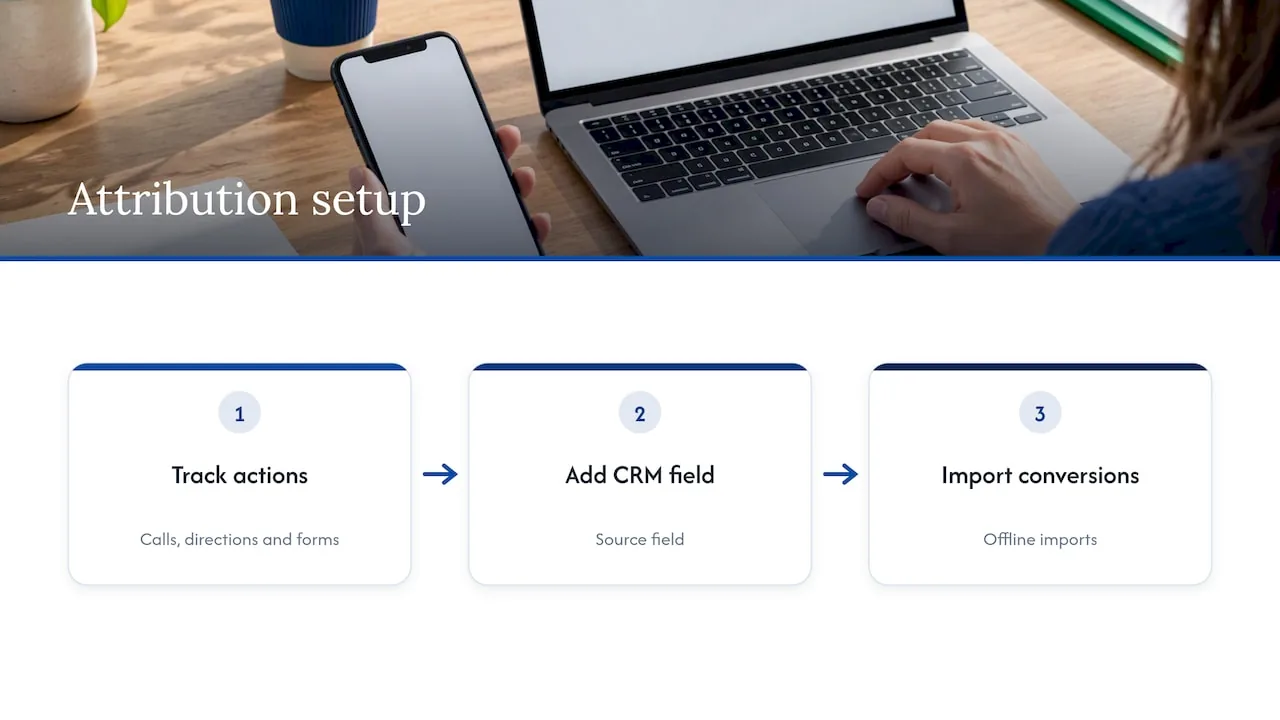
We also tell clients to resist waiting. Start with calls, directions and forms, add the CRM source field, then add offline imports. Each step makes the next decision a little better, and none of them require a six-figure analytics stack.
, NSYGHT
Where we can help
If you want attribution set up alongside the campaigns it measures, our Google Ads management is $499 per month plus a one-time $249 setup fee, and our Facebook and Instagram ads service is $349 per month plus a one-time $249 setup fee. For profile and local search work, see our Google Business Profile management and SEO plans. If you would rather talk through your tracking first, consulting is $125 per hour, listed on our services page.
FAQ
What is the difference between local attribution and general marketing attribution?
General attribution assigns credit across digital touchpoints to online conversions. Local attribution has to include calls, direction requests, walk-ins and in-person sales, so it depends on call tracking, Business Profile data and CRM records. The models are the same; the data sources are different.
How do I track offline conversions from Google Ads?
Capture a shared identifier, such as the Google click ID or hashed contact details, when a lead comes in and store it in your CRM. When the lead becomes a customer, upload that outcome to Google Ads as an offline conversion. Check Google’s current guidance, because uploads moved to the Data Manager API on June 15, 2026.
Are Business Profile calls and direction requests reliable?
They are useful indicators of local intent, not a complete count of customers. Treat them as proxy metrics, compare them with your logged calls and CRM leads, and watch trends over time rather than a single month’s total.
Do I need a complex multi-touch model for a single-location business?
Usually not. Short local buying cycles and limited conversion volume mean a clean source field, call tracking and offline imports will tell you more than an elaborate model. Add complexity only when simpler data leaves a real budget question unanswered.
Sources
- Understanding Consumers’ Local Search Behavior (Think with Google)
- Understand your Business Profile performance and insights (Google Business Profile Help)
- About local actions conversions (Google Ads Help)
- Grow offline sales (Google Analytics Help)
- Don’t be misled by these online-to-offline marketing myths (Think with Google)
- Connect Google Business Profile to Google Analytics (Analytics Help)
- What’s new in Google Analytics (Analytics Help)
- About offline conversion imports (Google Ads Help)
- About enhanced conversions for leads (Google Ads Help)
- Leroy Merlin case study (Think with Google)
- In-Store ROI with Mobile, The Home Depot (Think with Google)