

A location landing page must be the authoritative place-specific destination that maps, organic search, paid ads, and AI assistants all point to. Start by deciding whether you need a physical-location page or a service-area page, then make sure your Google Business Profile links to that exact page, not your homepage. Everything else, from schema to reviews, builds on that one decision.
- Building unique, location-specific metadata and at least 500 words of tailored content ensures the page signals local relevance to Google and AI models.
- Incorporating accurate NAP information, local schema, real photos, and reviews directly tied to the location enhances both search visibility and trust.
- Designing above-the-fold elements with a matching headline, prominent phone number, local proof, and clear CTAs maximizes conversions from mobile searches.
- Structuring pages with a hub-and-spoke model and appropriate URL patterns helps manage content at scale and maintains authority signals.
- Regular audits, schema validation, and consistent data between Google Business Profile and pages are essential to avoid duplicate content flags and improve AI citation.
What Makes a Location Landing Page Actually Work?
Most location pages fail for one reason: they're built as an afterthought, a city name swapped into a template with nothing else changed. Google notices, AI models notice, and customers notice. A page that actually performs treats each location as its own small business with its own proof points.
The foundation starts with metadata that isn't recycled. Your title tag, meta description, URL slug, and H1 all need the location paired with the specific service, not a generic city mention bolted onto boilerplate copy. "Emergency Roof Repair in Round Rock, Texas" beats "Round Rock Location" every time, because it mirrors what someone actually types or asks an AI assistant.
Content depth matters more than most teams budget for. A page needs at least 500 words of content that's genuinely specific to that location, according to a breakdown of location page structure and schema requirements. That means neighborhood names, service-area boundaries, parking notes, staff who work there, or jobs completed nearby. Swapping only the city name across fifty pages while keeping every sentence identical is the fastest route to a duplicate-content flag.
Here's what a page needs to cover, module by module:
- NAP block that matches exactly: Name, address, and phone number identical to your Google Business Profile, down to abbreviations and suite numbers.
- Phone number strategy: Use a local number when possible; if you run call tracking, keep the tracking number consistent with what's on your GBP listing to avoid NAP mismatches.
- Embedded map with directions: Include an interactive map, driving directions, and a line about parking or accessibility.
- LocalBusiness schema: Populate address, hours, geo-coordinates, URL, and aggregateRating fields, then validate the markup with Schema.org's validator before launch.
- FAQPage and Review schema: Structure common local questions and genuine customer reviews so search engines can parse them as distinct entities.
- Real photos: Actual storefront, team, and interior images, not stock photography that could belong to any city.
- Location-specific reviews: Testimonials that name the location or reference a local job, not generic five-star blurbs recycled site-wide.
- Conversion controls: Click-to-call buttons, click-to-directions links, and booking microcopy that doesn't make someone hunt for the next step.
A page hitting every one of these earns its place in the map pack and in organic results. Skip half of them, and you've built a page that looks like a placeholder because, functionally, it is one.
How Do You Design a Location Page That Converts?
Ranking gets someone to the page. Design gets them to call, book, or drive over. Those are different jobs, and treating them as the same thing is why so many location pages generate traffic without generating leads.
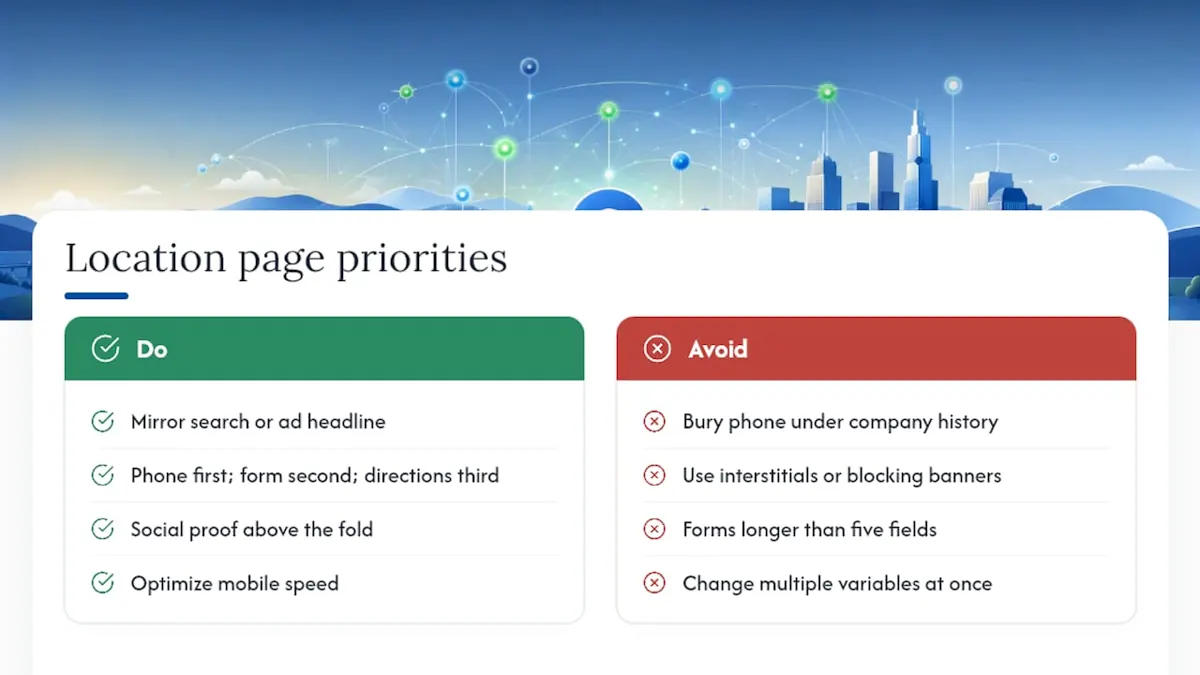
The fold above the scroll line carries the weight. Your headline should mirror the exact intent behind the search or the ad that brought someone there, not a rebranded slogan. If the ad said "24-Hour Plumber in Denver," the landing page headline should say close to the same thing. Underneath it, the call to action needs a clear hierarchy: phone number first (it converts fastest for local intent), a short contact form second, and a directions link third. Burying the phone number below three paragraphs of company history costs conversions you'll never see in your analytics.
Mobile performance decides whether any of this matters. Most local searches happen on a phone in the middle of a task, someone standing in a driveway looking at storm damage, someone stuck at their office with a toothache. Compress your hero images, trim unused CSS, and run the page through Core Web Vitals testing regularly. A three-second load delay on a phone with one bar of signal means the visitor is already back on the search results page.
Social proof belongs above the fold too, not buried near the footer. A star-rating callout next to the headline, paired with one or two short, location-specific testimonials, does more for trust in five seconds than an "About Us" paragraph does in five minutes. According to guidance on local landing pages that convert, pairing localized proof with clear CTAs and mobile-first layouts is central to turning local traffic into actual leads.
Avoid interstitials, cookie banners that block the click-to-call button, and forms longer than five fields. Every extra tap is a chance for someone to bail.
Test one variable at a time: CTA phrasing ("Call Now" versus "Get a Free Quote"), the hero image, and form length all move conversion rates independently. Change all three at once and you'll never know which one worked.
How Should You Structure Location Pages at Scale?
A business with three locations can wing it. A business with thirty needs a system, or every new page becomes a fresh argument about naming conventions and content depth.
The architecture that scales cleanly is hub-and-spoke: a central /locations hub page that links to every individual location page, which in turn link back to the hub and out to relevant service pages. Search Engine Land's guidance on structuring geographic pages at scale makes the case directly: businesses that treat this as an entity and authority problem, not just a URL-multiplication exercise, get clearer signals to search engines about which page owns which local intent.
URL patterns matter more than most teams think, because they signal structure to both crawlers and users:
/locations/[city]works well for straightforward multi-location businesses like a dental group or a gym chain./[service]/[city]fits businesses selling multiple distinct services across the same footprint, like a home services company offering roofing, gutters, and siding./[city]-[service]suits single-service businesses that want the keyword pairing directly in the slug for paid landing pages.
Not every city deserves a page. Before building one, confirm there's an actual physical presence, a meaningful volume of completed jobs, or demonstrable service activity in that area. If you serve a radius without a storefront, a service-area page (no street address, but a defined coverage zone) is the more honest and more defensible choice than fabricating a location.
Governance is where most multi-location programs quietly fall apart. Define who owns content updates, how often pages get refreshed, and what happens when a location closes or relocates. Search Engine Land's guidance on structuring geographic pages at scale also flags governance as the difference between an authority-building system and a pile of doorway pages waiting for a manual action. Assign one owner, set a quarterly review cadence, and build a decommissioning checklist before you need it.
Internal linking should funnel authority toward the strongest page for each intent cluster. If your flagship location has the most reviews and the richest content, link to it from blog posts and service pages targeting that metro area, rather than splitting equity across three thin competitors for the same query.
How Do You Optimize Location Pages for GBP and AI Search?
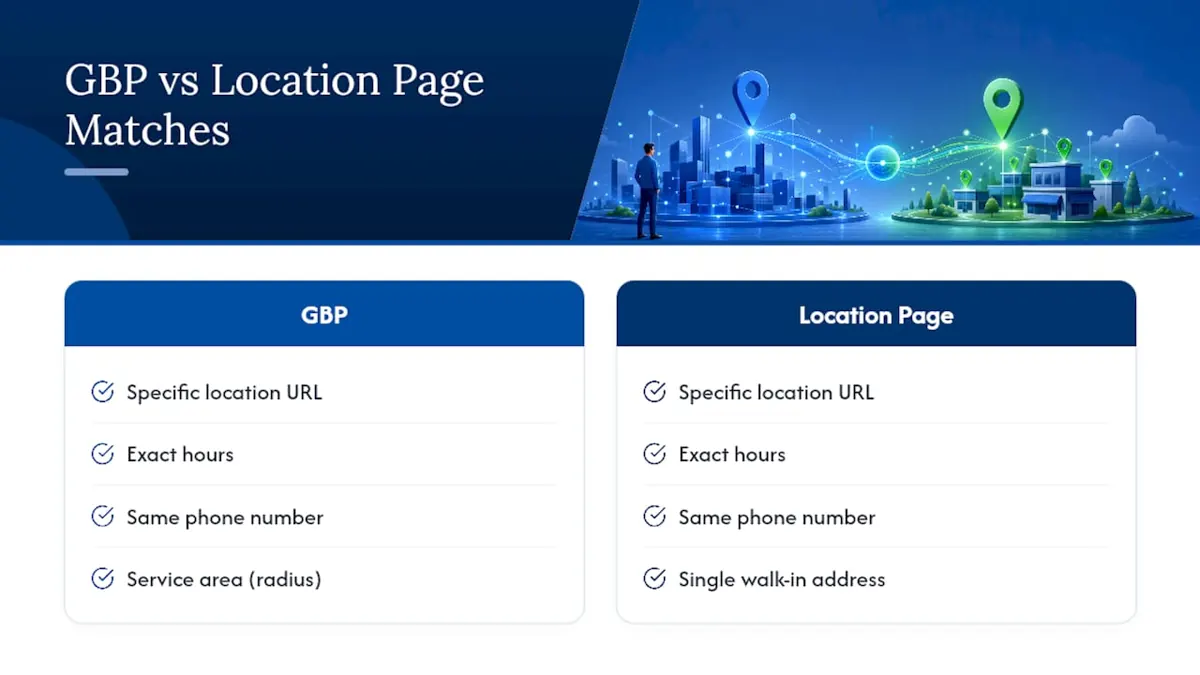
Your Google Business Profile and your location page need to function as one entity, not two loosely related listings. Point the GBP website field to the specific location page, never the homepage, according to Backlinko's breakdown of high-converting location pages. Every fact needs to match exactly: hours, phone number, service area, even how you spell the street type ("St." versus "Street").
AI-driven answers reward a different kind of formatting than traditional rankings did. Short, self-contained FAQ blocks, ones that answer a full question in two or three sentences without requiring the rest of the page for context, have a better shot at being lifted into an AI-generated response, per the same Backlinko analysis. Clear H2 and H3 headers that use question phrasing help both crawlers and language models parse what each section actually answers.
Schema does the heavy lifting behind the scenes. LocalBusiness markup should include address, hours, geo-coordinates, URL, and aggregateRating, with a serviceArea property added for any location that covers a radius rather than a single walk-in address. Layer in FAQPage schema for your most common local questions, and run everything through Schema.org's validator before it goes live.
There's a paid media payoff here too. Location pages make stronger PPC landing pages than generic homepages because ad copy, headline, and destination page all say the same thing, which improves relevance and quality score, a point Backlinko's location page research also underscores. AI-driven and voice-assisted transactions are a growing share of local commerce, according to Statista's data on voice assistant transactions, which makes answer-ready formatting less of a nice-to-have and more of a channel you're actively competing in.
What Should a Location Page Template Include?
A reusable template keeps quality consistent without making every page feel identical. The key is templating the structure, not the content itself.
The hero module needs the location name, primary service, a phone number, a one-line trust signal (years in business, review count, or a licensing note), and a CTA button. Microcopy should sound like a person talking, not a legal disclaimer: "Same-day service in Round Rock" beats "We provide services in the Round Rock area."
The information module covers services offered at that specific location, hours, staff names where relevant, and parking or access details. Leave out anything generic enough to apply to every location on your site; if a sentence works for both your Austin and your Dallas page unchanged, cut it.
The social proof module should surface reviews that are recent and tied to that location by name, alongside real photos of the space or the crew. A location page with three-year-old reviews sitting in a location that's since remodeled sends a stale signal to both readers and search engines.
The technical module is where schema markup, canonical tags, and sitemap inclusion live, along with the analytics events you'll need to measure performance.
Before launch, run through this checklist:
- Confirm GBP website field points to the live location page URL.
- Validate LocalBusiness and FAQPage schema through Schema.org's validator.
- Test page speed and Core Web Vitals on a real mobile connection.
- Set analytics goals for calls, form submissions, and direction clicks.
- Tag paid campaign links with UTM parameters so channel performance is traceable.
For a broader audit framework, Save Your App offers a useful lens on why a page or product stalls despite traffic, a diagnostic mindset that applies directly to location pages generating clicks but not calls.
What NSYGHT Has Learned Building Location Pages at Scale
Entity-driven architecture is the piece most agencies skip. NSYGHT's approach combines technical SEO, Generative Engine Optimization, and Answer Engine Optimization so a location page isn't just crawlable, it's citable, structured clearly enough that an AI assistant can lift a direct answer from it. That's a different discipline than writing for keyword density.
Clients report improved local pack placement and higher referral rates from AI-generated answers after restructuring pages around this model, results the agency attributes to clearer entity signals rather than any single ranking trick.
The operational lessons from multi-location clients tend to repeat: data governance breaks before content quality does. A location page with beautiful copy but a phone number that doesn't match GBP is worse than a plain page with consistent facts. Prioritization matters too, fix your top five revenue-driving locations before building page fifty. The NSYGHT Stack explains how these three disciplines fit together in practice.
The Real Gap in Most Location Page Advice
Most guides treat location pages as an SEO checklist: hit the word count, add the schema, ship it. That advice isn't wrong, it's just incomplete for where local search is heading. A page can satisfy every classic ranking factor and still get ignored by an AI assistant that can't find a clean, self-contained answer to lift.
The overrated piece is volume. Businesses chase page count, five city pages this quarter, ten next, when the pages they already have are thin and inconsistent with their GBP data. Fix the ten pages you have before building fifty more nobody trusts.
What should come first is entity consistency: matching facts across GBP, schema, and the page itself. That's boring work. It's also the difference between a page that shows up in a map pack and one that shows up nowhere, and increasingly the difference between a page an AI assistant cites and one it silently skips.
Get Your Location Pages Built or Audited
Some agencies overlook structuring location pages to simultaneously perform well in the map pack, organic results, and AI-generated answers. If you're managing this in-house and it's stalled, an outside audit usually surfaces the mismatch faster than another internal review cycle.
A typical engagement starts with an audit of your existing pages against GBP data, schema completeness, and content depth, followed by a prioritized roadmap covering which locations need rebuilding first, implementation, and ongoing measurement. NSYGHT's SEO services include GBP Management, SEO Foundation, SEO Growth, and SEO Premium plans built around this exact workflow, and its Google Business Profile management service handles the GBP-to-page linkage directly so your listing and your landing page stop working against each other.
If you manage several locations and aren't sure where the biggest gaps are, request an audit and get a prioritized list of what to fix first.
Sources
- Multi-location SEO: How to structure geographic pages at scale
- How to Build Location Pages That Rank, Convert, and Get Cited
- Location Pages for SEO (2026): Structure, Schema & Ranking Tactics
- Voice assistant transactions statistic (Statista)
Frequently Asked Questions
Start by choosing physical-location or service-area format, then build unique metadata, 500+ words of location-specific content, a matching NAP block, LocalBusiness schema, and real local photos and reviews. Link your Google Business Profile directly to the page, and validate schema through Schema.org's validator before launch.
A strong example pairs a headline matching search or ad intent with an above-the-fold phone number, a star-rating callout, and location-specific testimonials. It includes an embedded map, real photos of the actual location, and FAQ content structured for both readers and AI citation, as outlined in Backlinko's location page guide.
Costs vary widely depending on whether you're building one page or fifty, and whether you're paying for a template-based approach or custom entity-driven content. NSYGHT's SEO plans, including audits and location page work, don't have published flat rates; current pricing is available through NSYGHT's SEO services page.
Build it on your own domain, under a structured URL like /locations/[city], rather than a third-party listing page or a subdomain that fragments your site's authority. This keeps the page inside your hub-and-spoke architecture where internal linking and schema can reinforce it.
Use a service-area page when you cover a radius without a walk-in address, and a physical-location page when you have a real storefront with meaningful local activity. Building a location page for a city with no actual presence risks looking like a doorway page to both search engines and AI systems.