
Call tracking does not hurt SEO when it is set up correctly. The damage comes from sloppy setups: a tracking number swapped in as your only number on your site, your listing and every directory. Done well, you keep a consistent business phone number for search engines and still see which pages, keywords and listings produce calls.
This guide is for owners and marketers of local service businesses, where the phone is often the main conversion. It covers how the setup works, where it goes wrong, how to handle Google Business Profile (GBP) and multiple locations, and what to check for legal compliance.
TL;DR
- Keep one “real” local number consistent across your site and citations. Use tracking numbers as additions, not replacements, in places where Google and directories read your NAP (name, address, phone).
- Use dynamic number insertion (DNI) on your website for visitor-level attribution. Use a static tracking number on your GBP, with your main number as an additional number.
- Use local-area-code numbers you control, and test every number by calling it.
- If you run Google Ads, call tracking ties phone leads back to campaigns, assets and keywords.
- Call recording is regulated by state law. Get consent language right before you turn it on.
Table of Contents
- Why phone calls belong in your SEO reporting
- How call tracking works
- The NAP consistency concern, and what is actually true
- Setting up call tracking on Google Business Profile
- Call tracking with Google Ads
- Where call tracking can hurt SEO
- A practical setup, step by step
- Multiple locations
- Call recording and legal basics
- What to look for in a call tracking platform
- Our perspective: calls are an entity signal, not just a metric
- Get call tracking set up as part of your local SEO
- FAQ
- Sources
Why phone calls belong in your SEO reporting
Most local SEO reports stop at rankings, traffic and form fills. For a plumber, roofer, dentist or law firm, the most valuable lead usually arrives as a phone call. If you cannot see those calls, you cannot tell which pages, listings and campaigns earn their cost, and SEO looks like it is underperforming when it is not.
Call tracking fixes that blind spot. Each source of traffic gets its own phone number, and an incoming call is credited to the source that number represents. That lets you answer practical questions:
- Which service pages generate calls, and which only generate visits?
- Do calls from your Google Business Profile outnumber calls from your website?
- Which location is getting the calls in a multi-location brand?
- Are paid ads cannibalizing calls you would have received organically?
That is the real link between call tracking and SEO. It does not boost rankings directly. It tells you where to put effort, and it gives you proof of return that rankings alone cannot.
How call tracking works
There are two mechanisms, and they solve different problems.
Static (source-level) tracking numbers
A static tracking number is a fixed number you assign to one place: your GBP listing, a print ad, a billboard, a single directory. Every call to that number is credited to that place. It is simple and stable, which makes it the safer choice for third-party listings.
Dynamic number insertion on your website
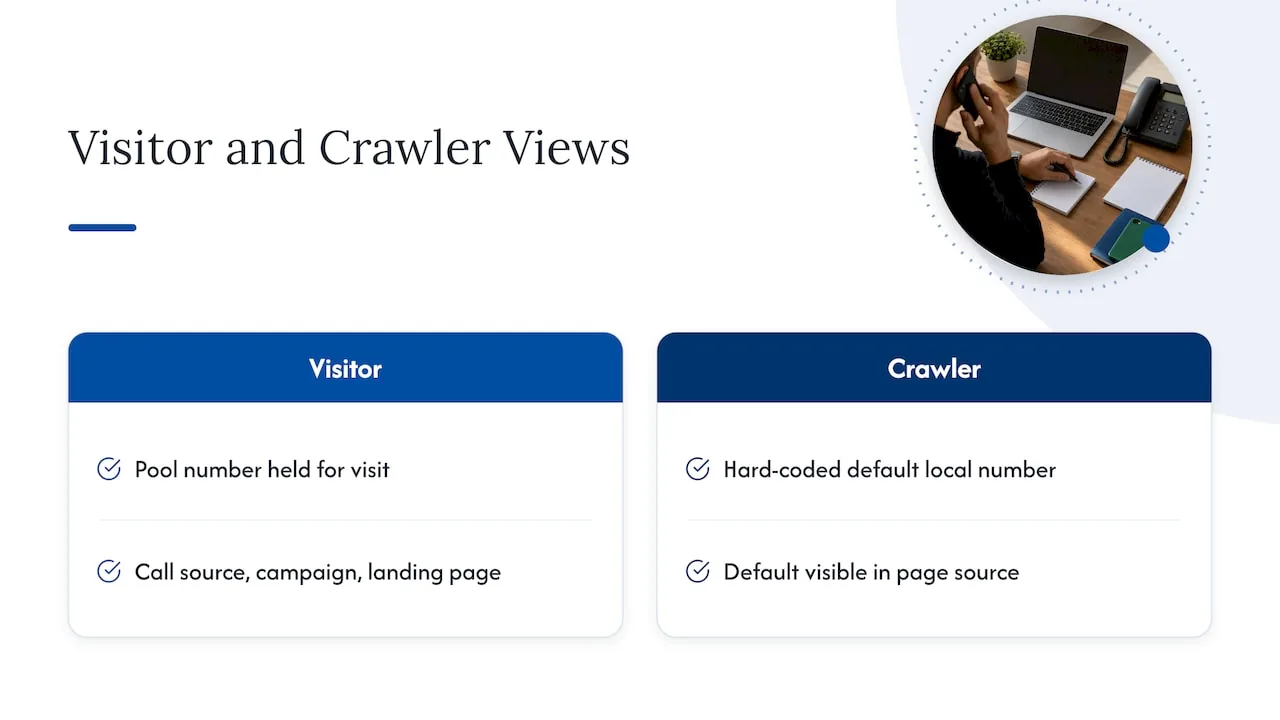
DNI uses a small script on your website. When a visitor arrives, the script shows a number from a pool, and that number is held for the visit. When the person calls, the platform knows which source, campaign and landing page brought them. It can tell organic search from paid search from a referral, which a single static number cannot.
The SEO question is what a search engine crawler sees. Crawlers generally see the default number in your page source, the one you hard-coded, which is why your real local number should be the default and the tracking numbers the swapped-in layer. Ask your provider how the script handles crawlers and test it yourself by viewing the page source and a cached or rendered version.
The NAP consistency concern, and what is actually true
Local SEO leans on consistency of your business name, address and phone number across the web. The worry is simple: if your site shows one number, your listing another and a directory a third, search engines may be less sure which business is which.
That risk is real when you use tracking numbers carelessly. It is small when you follow a few rules:
- Keep a primary local number consistent on your site (the hard-coded default), your footer, your contact page and your structured data.
- Use tracking numbers on a limited number of surfaces, such as your GBP and specific campaigns, rather than seeding a new number into every directory.
- Never replace your real number everywhere with a tracking number. If you cancel the tracking service, you lose the number and the citations that point to it.
- Do not create a separate tracking number for each directory. Dozens of numbers across the web are exactly what creates confusion.
A practical approach is to treat directories and citations as the “identity layer” with your main number, and your website, GBP and ads as the “measurement layer” with tracking numbers added on top.
Setting up call tracking on Google Business Profile
For many local businesses, the GBP listing delivers more calls than the website. It is also where mistakes are most visible.
The usual setup is to put the tracking number in the primary phone field and your main business number in the additional phone field. Google can then still see your main number as part of the listing, and the call button on Maps and Search routes through your tracking line.
The number you use must be one you control. One local-business guide recommends a local number, or another direct line that reaches that specific business or location, and says to call it from another phone to confirm it rings. Do that for every number before you publish it. A tracking number that goes to a dead line or the wrong location costs you calls and trust.
Two more habits help:
- Use a number with a local area code that matches your service area. A toll-free or out-of-state number can look unrelated to the business.
- Record the change. Note the date you swapped numbers, so you can explain a shift in call volume when reporting. If you want a broader look at profile upkeep, a 90-day Google Business Profile plan for local service businesses lays out the other tasks that sit alongside this one.
We cover this field in more depth in our Google Business Profile articles, and our GBP management service handles the profile setup for local service businesses.
Call tracking with Google Ads
If you pay for clicks, call tracking is not optional. Without it, a phone-driven business sees ad spend and no matching leads.
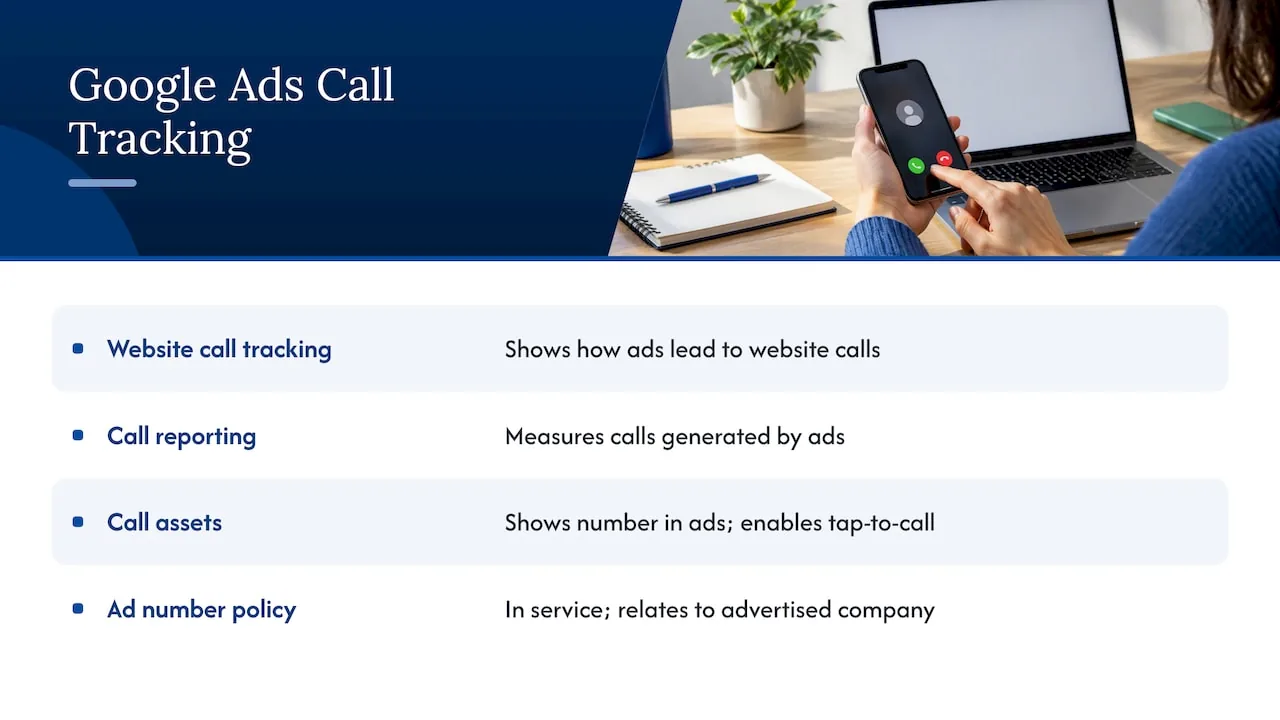
Google describes website call conversion tracking as a way to see how well your ads lead to phone calls from your website. Its help documentation also lists call reporting and other best practices for measuring the calls your ads generate. And call assets let you show your phone number with your ads so people can tap or click to call.
One policy point matters here. Google’s advertising rules say phone numbers in call-only ads and assets must be in service and relate to the advertised company. Another reason to test every line before it goes live.
If you also run local service ads, our post on making Local Services Ads spend pay off explains how calls fit into that channel. For managed campaigns, our Google Ads management is $499 per month with a one-time $249 setup fee.
Where call tracking can hurt SEO
It is better to know the failure modes than to avoid the tool entirely.
| Mistake | Why it hurts | Fix |
|---|---|---|
| Tracking number is the only number on the site | Crawlers and citations disagree on your NAP | Hard-code the main number as the default, swap with DNI only for visitors |
| A new tracking number on every directory | Dozens of conflicting numbers online | Keep citations on the main number |
| Number not controlled by you | You lose it if you change providers | Use a provider that lets you port or retain numbers |
| Script slows the page | Page speed suffers on mobile | Load the script asynchronously and test speed before and after |
| Tracking number in schema markup | Structured data disagrees with citations | Keep the main number in schema |
| Pool too small | Numbers reused across concurrent visitors, so attribution is muddy | Size the pool to your peak concurrent traffic |
None of these are reasons to skip tracking. They are reasons to install it deliberately and audit it.
A practical setup, step by step
- Inventory every phone number you use today. Website, GBP, directories, ads, social profiles, email signatures. Pick one main number per location.
- Decide what you need to measure. If you only want to know GBP versus website versus ads, three source-level numbers may be enough. If you want page-level and keyword-level data, add DNI.
- Choose local numbers with the right area codes and confirm you own or can port them.
- Install DNI on the site with your main number as the default. Check that the swapped number appears on every page where a phone number is shown, including the header, footer and click-to-call buttons.
- Add the tracking number to GBP as primary, with your main number as additional.
- Connect to your analytics and ads accounts so calls show up as conversions with source data.
- Test. Call each number from a mobile phone, from a computer, and from a second location. Confirm routing, whisper messages and the source reported.
- Set conversion rules. Decide what counts as a lead, for example a minimum call length, and exclude repeat callers and existing clients when you can.
- Audit monthly. Check that numbers on the site, listings and ads still match your records.
Multiple locations
Franchises and multi-location brands have the hardest version of this. Each location needs its own consistent number across its location page, GBP and local citations. Add tracking on top without breaking that link.
A workable pattern:
- One main local number per location, used on the location page default, citations and schema.
- One GBP tracking number per location, in the primary field, with the main number as additional.
- DNI on location pages and on any shared landing pages, with pools by location.
- A reporting view that rolls up by brand, region and location.
Our post on multi-location SEO for brands goes through how we structure location pages and entities so that each location stays clearly defined.
Call recording and legal basics
Many call tracking platforms offer recording and transcripts. They are useful for training and for qualifying leads, but they bring legal obligations.
Recording rules in the United States vary by state. One telecom provider’s guide notes that state requirements differ widely and tells businesses to confirm consent rules before recording. A 50-state survey from Justia (last reviewed September 2024) is a good starting reference for how each state treats it. Because callers can be in any state, many businesses play a recording notice at the start of every call.
This applies hardest to healthcare providers and law firms, where calls may include sensitive details. Before enabling recording or call transcripts, ask your attorney, and for a medical or dental practice your compliance officer, how consent and data storage should work for you. We are a marketing agency and cannot give legal advice.
What to look for in a call tracking platform
You do not need a specific brand to start. You need a tool that does these things:
- Local and toll-free numbers, with number porting if you leave.
- DNI that handles crawlers properly and keeps the default number in the page source.
- Source, keyword and landing page data, ideally with integration to your ads and analytics accounts.
- Call routing by location, schedule and tracking source.
- Call recording with configurable notices, and the ability to switch it off.
- Reporting you can export, so the data is yours.
Price varies with the number of lines and minutes. Ask for the all-in monthly cost including numbers and overage, and ask what happens to your numbers if you cancel.
Our perspective: calls are an entity signal, not just a metric
We work with local service businesses, dental and healthcare practices, law firms, roofers and franchises, and phone calls are the outcome most of them want. We treat call tracking as part of defining a business clearly, not as an add-on.
Our approach to SEO is built around the entity: who the business is, where it operates and how consistently that is expressed on the web and in the sources AI tools draw on. A phone number is one of the simplest identity facts. When it is the same on your site, your profile and your citations, search engines and AI answer tools have less to reconcile. That is why we keep the identity layer stable and put measurement on top, rather than letting tracking numbers spread.
The second point is reporting. If you cannot see calls by source, you end up judging SEO by rankings alone. We favor transparent reporting that connects work to leads, so owners can see what is paying off. You can read how this fits our wider approach in The NSYGHT Stack and our overview of what local SEO takes in 2026.
, NSYGHT
Get call tracking set up as part of your local SEO
If you want calls measured without risking your listings, we can build it into your local SEO program: a clean NAP across the web, GBP configured with the right numbers, and reporting that shows which pages and listings bring calls. See our local SEO services or get in touch through our site. If your site needs rebuilding first, our SEO-native website design handles the technical groundwork. You can also run through our local SEO checklist to find gaps in your current setup.
FAQ
Does call tracking hurt SEO?
Not when it is implemented with care. Problems appear when a tracking number replaces your main number everywhere, or when many different numbers spread across directories. Keep your main number as the default on your site and in citations, and use tracking numbers on limited surfaces.
Should I put a tracking number on my Google Business Profile?
Many local businesses do, using the tracking number as the primary number and the main business number as an additional one. Make sure you control the number and that it is a local line that rings correctly. Note the date you made the change so you can explain shifts in call data.
What is dynamic number insertion?
DNI is a script that shows each website visitor a number from a pool, so a call can be credited to the visitor’s source, campaign and landing page. Your main number stays as the default in the page code. It gives more detail than a single static number.
Is it legal to record calls from tracking numbers?
It depends on the states involved, since recording consent laws differ across the US. Many businesses play a notice at the start of each call. Check with your attorney before enabling recording, especially for healthcare or legal calls.
Sources
- Set up tracking calls to a phone number on a website, Google Ads Help
- Measure the calls you receive, Google Ads Help
- About call assets, Google Ads Help
- Unverified phone number, Advertising Policies Help
- What to do after Google Business Profile verification, ShiftFlow
- Laws and regulations about recording calls, 800.com support
- Recording phone calls and conversations: 50-state survey, Justia