
Google does not run a separate “local algorithm update” that it announces on its own. When your map pack position jumps or drops, the cause is usually a broad core update, a spam update, or a change in your own business data. That is good news, because all three are things you can diagnose and act on.
This guide covers what Google has actually released in 2026, how local rankings work underneath those updates, how to tell whether an update hit you, and what to do in the first week and the first quarter afterward.
TL;DR
- Google’s status dashboard lists core, spam and Discover updates, but no dedicated local update. Local results move with the broad ones.
- 2026 so far: a March core update, a May core update, and spam updates in March, June, August and September.
- Local ranking still rests on relevance, distance and prominence. Updates rebalance them, and Google does not publish the weights.
- Wait a full week after an update ends before reading your data. Small drops usually need no action. Large ones need a real audit.
- Fix what you control: accurate profile data, reviews, structured data, and honest business naming.
Table of Contents
- What Google released in 2026
- Why people believe there is a local algorithm update
- How local ranking actually works
- How to tell whether an update hit you
- What to fix first: the controllable list
- What to expect on timing
- Our perspective
- If you want help after an update
- FAQ
- Sources
What Google released in 2026
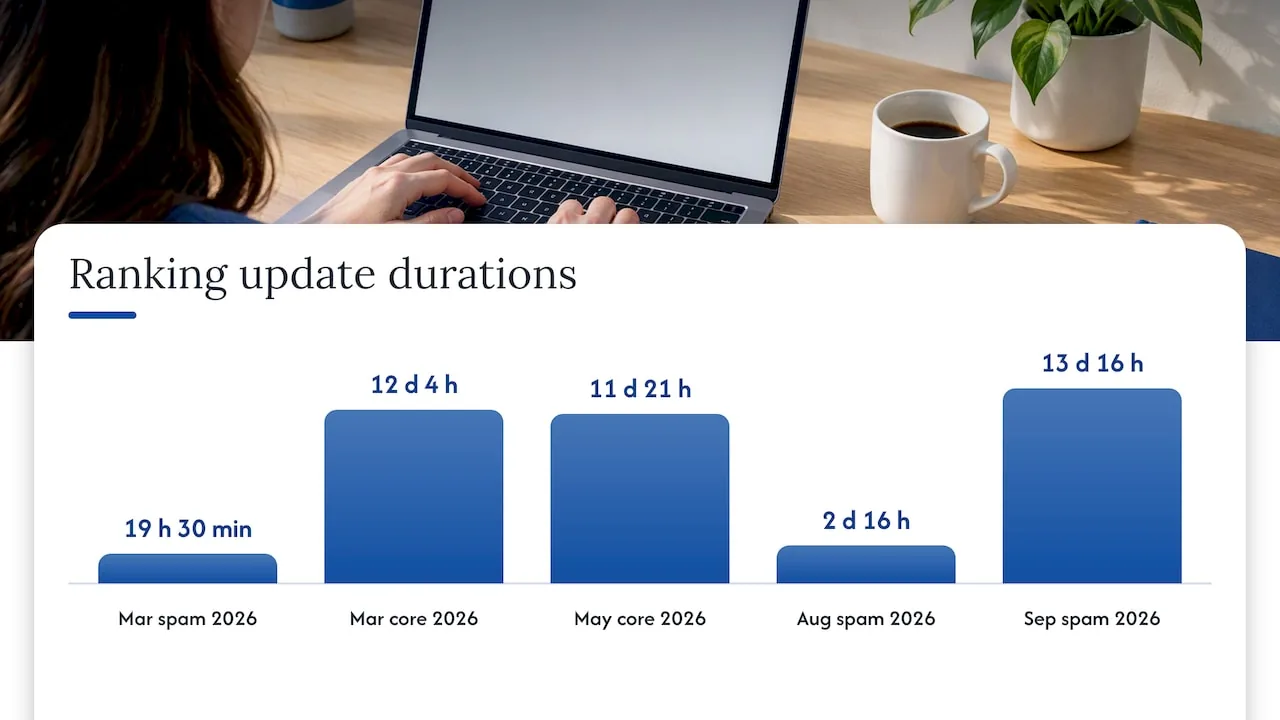
The Google Search Status Dashboard is the official record of confirmed ranking updates. As of October 2026 it shows these entries for ranking:
| Update | Start date | Duration |
|---|---|---|
| March 2026 spam update | 24 Mar 2026 | 19 hours, 30 minutes |
| March 2026 core update | 27 Mar 2026 | 12 days, 4 hours |
| May 2026 core update | 21 May 2026 | 11 days, 21 hours |
| June 2026 spam update | 24 Jun 2026 | 2 days, 1 hour |
| August 2026 spam update | 18 Aug 2026 | 2 days, 16 hours |
| September 2026 spam update | 24 Sep 2026 | 13 days, 16 hours |
The dashboard also lists a February 2026 Discover update, which affects the Discover feed rather than local results.
Notice what is missing: a line item called “local.” Local businesses feel these updates because local visibility depends on the same quality signals that power regular search. The September spam update is the one to note if your rankings moved in the past few weeks, since it ran for nearly two weeks, far longer than the August one.
Why people believe there is a local algorithm update
Search for the phrase and you will find tracker pages listing events such as the 2016 Possum update and its 2017 follow-up. Those names came from the SEO community, not from Google. Google has long declined to confirm many local changes, and some spikes turn out to be bugs. In January 2025, for example, Search Engine Roundtable reported an unconfirmed local ranking shift that was labeled a possible bug rather than an update.
Three things cause most of the “local update” scares:
- A core update that reshuffles quality signals. Google describes core updates as significant, broad changes to its search systems that happen several times a year. They are not aimed at any one industry.
- A spam update that removes help you did not know you had. If a competitor was ranking through manipulative tactics, such as stuffing keywords into a business name, a spam update can remove them and move you up. The reverse happens too.
- Changes to your own data. Google collects information from users and other sources and may edit your Business Profile when those sources report your info as wrong or outdated. A wrong phone number or category can cost you rankings before any algorithm shift.
Before you blame an update, rule out the third one. It is the cheapest to fix.
How local ranking actually works
Google’s own help page says local results are based on relevance, distance and prominence. In plain terms:
- Relevance: how well your profile matches what the person searched for.
- Distance: how far you are from the searcher, or from the location named in the query.
- Prominence: how well known you are, based on information Google has about you from across the web, including links, reviews and general search standing.
Google does not publish how much each factor counts, and the balance is not fixed. That is the real meaning of a local update: a shift in how those three are weighed or measured. You cannot change distance, so your leverage is in relevance and prominence.
This also explains why two businesses on the same street can react differently to the same update. One has a complete profile with a steady stream of recent reviews and a site that backs up its claims. The other has thin data and a handful of old reviews. When the system recalibrates, the first has margin and the second does not.
How to tell whether an update hit you
Do not react on day one. Google’s guidance says to wait at least a full week after an update finishes before comparing Search Console data to the period before. Updates roll out over days or weeks, and early numbers mislead.
Then work through this order:
1. Match the dates
Compare the date your calls, direction requests or clicks changed against the dashboard table above. If the change landed inside an update window, an update is a plausible cause. If it landed outside every window, look at your own changes first: a profile edit, a suspended listing, a website redesign, a new competitor.
2. Separate profile traffic from website traffic
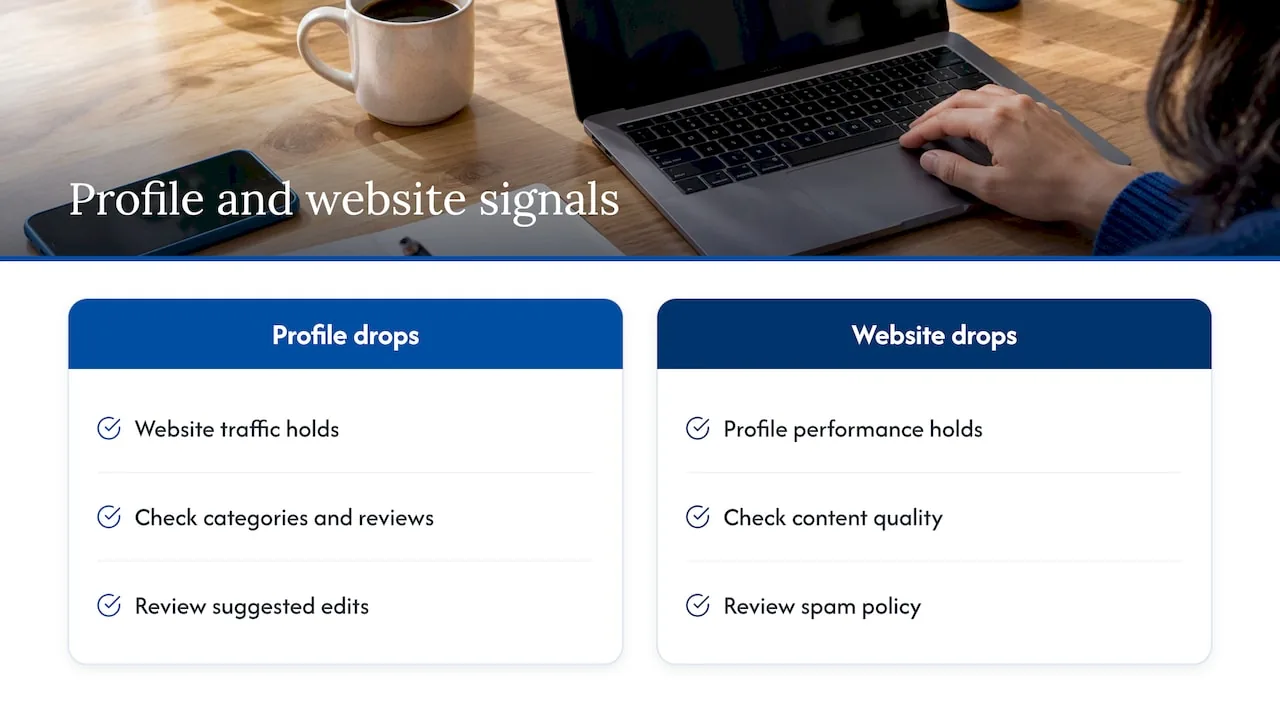
In your Business Profile performance data, look at calls, direction requests and website clicks. In Search Console, look at clicks and average position for your service and location pages. If the profile dropped but the site held, think map pack factors: categories, reviews, suggested edits. If the site dropped but the profile held, think content quality and spam policy.
3. Size the drop
Google’s documentation gives a useful yardstick: a small slide, such as position 2 to position 4, usually needs no action, while a large fall, such as 4 to 29, deserves a deeper review. It also warns against drastic changes to content that is already performing well after a minor fluctuation.
4. Check for a penalty myth
A drop after a core update is not a manual penalty. Core updates reassess how well pages meet current search intent and quality standards. There is no “reconsideration request” to file and no single button to press. If you got a manual action, you would see it in Search Console. If you did not, treat the drop as a signal to improve, not as a punishment.
5. Remember that rankings are personal
Local results change by searcher location, device and even the phrasing of the query. Checking your own phone from your office tells you very little. Judge by calls, form fills and booked jobs, with ranking tools as a secondary view.
What to fix first: the controllable list
Google’s local guidance has been consistent for years: keep business information complete and accurate, verify your location, respond to reviews and add photos. Here is how we turn that into a working order.
Audit your profile data
Confirm name, address, phone, hours, primary category and service areas. Your business name should match what is on your signage and website, with no added keywords or locations. Google’s guidance flags that kind of manipulation as a long-term risk, and spam updates keep targeting it.
Then open the section that shows Google’s own updates to your profile and accept or reject each suggested change. Ignored suggestions can leave wrong data live. For multi-location brands or agencies handling many profiles, Google also documents how to manage these updates through the Business Profile APIs.
If you want a full walkthrough, our Google Business Profile optimization guide covers the fixes that tend to drive calls.
Back the profile with your website
Prominence is partly about what the web says about you, and your own site is the part you control. Add LocalBusiness structured data so Google can read your name, address, hours and department details without guessing. Make sure the page the profile points to is a real, useful page for that location, not a thin template.
This matters more now that answers are increasingly assembled by AI features. Clear, consistent business facts are what those systems pick up. For a broader look at how traditional and AI-driven visibility connect, see what local SEO actually takes in 2026, or a third-party view on AI search optimization services if you are comparing approaches.
Keep reviews moving
Reviews feed both relevance and prominence. What helps is a steady flow of recent, genuine reviews and a visible reply from the owner. What hurts is a burst of reviews followed by silence, or anything that looks incentivized in a way Google’s policies forbid. Ask every customer at the end of the job, and respond to every review, the negative ones included.
Clean up citations and conflicting data
When directories disagree about your address or phone number, Google has to guess which is right. Fix the biggest directories, your social profiles and any old listing from a prior address. Our local SEO audit checklist puts the profile first and works outward from there.
Remove spam risk
If you or a past vendor ever bought links, stuffed keywords into the business name, or created extra listings for the same location, now is the time to undo it. With three spam updates since June, this is the category of change most likely to cost you if left alone.
What to expect on timing
People ask how long it takes for Google to reflect changes. Google says improvements to a site can take several months to be fully learned and reflected. Profile edits often show faster, but a recovery tied to quality or authority is measured in quarters, not days. Set the expectation internally before you start, so nobody rips out work in week three because the line has not moved.
A reasonable rhythm:
- Week 1: wait, and record the dates and metrics. Check that nothing is broken, such as a suspended listing or a site outage.
- Weeks 2 to 3: audit profile data, suggested edits, categories, structured data and citations. Fix every factual error.
- Month 2 to 3: improve location and service pages, build review habits, earn local links and mentions.
- Next core update: compare the change against your baseline, not against a competitor’s screenshot.
Our perspective
We work with local service businesses every day, including dental practices, law firms, home service companies and multi-location franchises, and the pattern repeats. Owners ask us about a “local update” when something moves. Nearly every time, the answer is less dramatic than the forum thread suggests, and more fixable.
Our view is that local search is no longer a list of tricks. It is a question of how clearly Google, and increasingly AI answer tools, understand who you are, where you operate and why you can be trusted. We call that your entity. When the entity is defined consistently across your profile, your site, your structured data and the wider web, an update has less room to hurt you, because there is less ambiguity for the system to resolve against you.
That is why we build around technical SEO, Generative Engine Optimization and Answer Engine Optimization together rather than separately, and why we report on calls and leads, not just positions. We would rather show you a flat ranking line with rising phone calls than a green rank tracker with an empty calendar. If you are weighing where to start, our local SEO checklist is a free self-audit with 40 items across eight categories.
, NSYGHT
If you want help after an update
If your visibility dropped and you would rather have a specialist read the data, we can help. Our Google Business Profile management covers the profile fixes above on an ongoing basis, and our SEO plans (Foundation, Growth and Premium) cover the site, structured data and authority work behind it. Consulting is available at 125 USD per hour if you only need a second opinion on a drop.
FAQ
Is there a Google local algorithm update happening right now?
Not as a separate event. The most recent confirmed ranking change on Google’s status dashboard is the September 2026 spam update, which began on 24 September and ran for 13 days and 16 hours. If your local results moved recently, start by comparing your dates to that window and then check your own profile data.
Why did my map pack ranking drop overnight?
The common causes are a core or spam update, an edit Google made to your profile from outside sources, a change to your categories or name, or a competitor improving. Check your profile for suggested updates first. If nothing changed there, wait a week after any update ends and compare Search Console and profile data before changing anything else.
How long does it take to recover after an update?
Google says changes to improve performance can take several months to be fully reflected. Fixing wrong profile data can show up sooner, while content quality and authority work takes longer. Avoid big reversals in the first few weeks.
Does a drop after an update mean I got a penalty?
No. A core update reassesses how well pages serve searchers and is not a manual action against your site. If you had a manual action, Search Console would tell you. Otherwise, treat the drop as a reason to improve clarity, usefulness and accuracy.
What are the main local ranking factors Google uses?
Relevance, distance and prominence, as described in Google’s Business Profile help. Google does not share how much each one counts. You cannot move distance, so focus on a complete, accurate profile, genuine reviews, and a website that supports what the profile says.
Sources
- Google Search Status Dashboard: ranking update history
- Google Business Profile Help: improve your local ranking
- Google Search Central: core updates
- Google Business Profile Help: understand Google updates on your profile
- Google Business Profile APIs: manage Google updates
- Google Search Central: LocalBusiness structured data
- Search Engine Roundtable: January 2025 local ranking update