

Log file SEO means reading your web server’s records of every request, so you can see which URLs search engine bots actually fetch, how often, and what your server told them. Crawlers and Search Console estimate or simulate that behavior. Logs show what happened. For most small local sites the payoff is modest. For large, fast-changing or messy sites, it is the most direct evidence you can get about crawling problems.
This guide covers what a log file contains, how to get one, how to analyze it (including with Screaming Frog’s Log File Analyser), which problems it exposes, and when it is not worth your time.
TL;DR
- A server log records each request to your site: who asked, when, for which URL, and what status code came back. Filtering for search bots shows real crawl behavior.
- Logs reveal crawl waste, 404s, redirect chains, server errors and important pages bots never visit. They cannot tell you whether a page ranks, converts or satisfies intent.
- Verify bots before trusting the data. User agents can be faked, so check IP addresses against the search engine’s own published method.
- Google says its crawl budget guidance is mainly for very large or fast-changing sites. A 50-page local site rarely needs a log audit.
- Start with 30 to 90 days of raw logs, compare them with a site crawl, and fix the biggest patterns first.
Table of Contents
- What a log file is in SEO
- Why logs show what other SEO tools can’t
- Does your site actually need it?
- How to get your log files
- Verify the bots before you trust the numbers
- How to analyze log files, step by step
- What log file analysis can uncover
- Turning findings into fixes
- What server logs cannot tell you
- Our perspective: logs are evidence, not a strategy
- Get a second pair of eyes on your crawl data
- FAQ
- Sources
What a log file is in SEO
Every time a browser, an app or a bot asks your server for a page, image, script or file, the server can write a line about it. That text file is the access log. Search Engine Land describes a server access log as typically recording the IP address, timestamp, requested URL, HTTP method, status code, response size and user agent.
A single line, simplified, tells you:
- Who: the IP address and the user agent, such as a browser or a bot that calls itself Googlebot.
- When: the exact date and time of the request.
- What: the URL requested and the method (usually GET).
- Result: the status code, such as 200 (OK), 301 (moved), 404 (not found) or 500 (server error), plus the size of the response.
That is the whole raw material. Log file analysis is the work of filtering millions of those lines down to the bots you care about and asking what they did.
Why logs show what other SEO tools can’t
A site crawler follows your links and reports what it can reach. Google Search Console reports aggregated, sampled views. Neither is a record of each request. Search Engine Land’s guide to log file analysis frames logs as complementary to crawl tools and Search Console: logs give request-level, historical visibility, while the others give simulations or summaries.
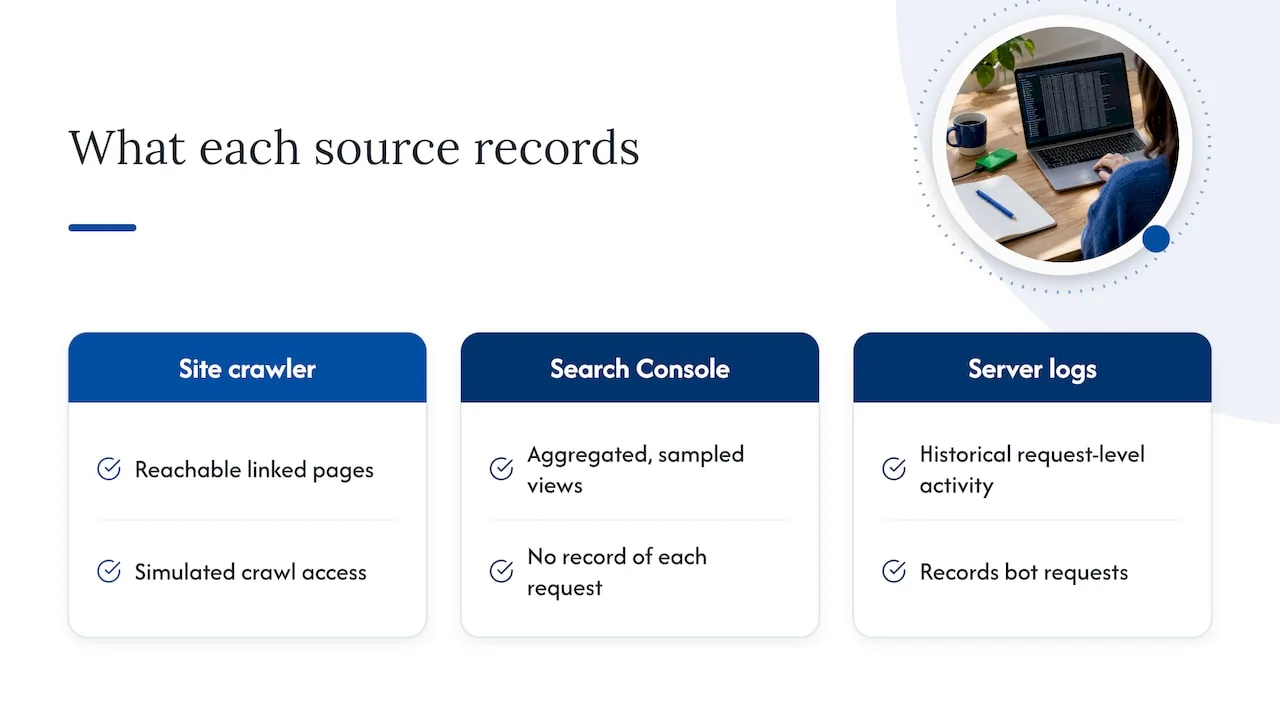
That difference matters in practice. A crawler can tell you a page is linked and indexable. Only the log can tell you Googlebot hasn’t requested it in two months. A crawler can tell you a redirect exists. Only the log can tell you bots hit that redirect 4,000 times last week.
Search Engine Land also published a piece on what server logs reveal that SEO tools miss, quoting consultant Kaspar Szymanski on why the direct interaction between crawlers and your infrastructure exposes blind spots standard tools cannot reach.
Does your site actually need it?
Honest answer: often not. Google’s own crawl budget guide says it is aimed at sites with 1 million or more unique pages that change weekly, sites with 10,000 or more pages that change daily, and sites with a large share of URLs marked “Discovered - currently not indexed” in Search Console. It adds that if your pages are generally crawled the same day they are published, you don’t need the guide.
Here is a practical way to decide.
| Your situation | Log analysis worth it? |
|---|---|
| Local service site, under a few hundred pages, new pages indexed within days | Rarely. Spend the time on content, your Google Business Profile and links. |
| E-commerce or directory site with filters, sort options and parameters | Yes. Parameter URLs are classic crawl waste. |
| Multi-location franchise with hundreds of location and service pages | Often. Checking that every location page is actually crawled is a real question. |
| Site just migrated or redesigned | Yes, for a few weeks. Logs show whether bots follow your redirects. |
| Large publisher or site with frequent updates | Yes, as a routine monitor. |
| Page not getting indexed, cause unknown | Yes, as a diagnostic after you have checked the basics. |
If you run a local business and your pages index fine, a local SEO audit will usually find bigger wins than a log file will.
How to get your log files
Where logs live depends on your hosting setup. Common sources:
- Your host’s control panel. Many shared hosts offer raw access logs or a download option in cPanel or a similar dashboard.
- Your server directly. Apache and Nginx write access logs to a directory your developer or sysadmin can reach.
- A CDN or edge service. If a content delivery network sits in front of your site, its logs hold requests your origin server never saw, so ask for those too.
- Managed WordPress hosts. Some offer log downloads on request, others only for higher tiers.
A few practical points before you analyze anything:
- Ask for raw, complete logs. Sampled or trimmed logs produce misleading conclusions.
- Pull a meaningful window. Thirty to ninety days is a common working range. Shorter windows miss slow-moving crawl patterns on pages bots visit rarely.
- Combine sources. If your origin and CDN both log, merge them so cached requests are not missing.
- Mind privacy. Logs hold IP addresses. Share them only with people who need them and keep them out of public tools.
Verify the bots before you trust the numbers
Anyone can send a request that calls itself Googlebot. If you analyze logs without checking, fake bots inflate your “Googlebot” numbers and send you chasing problems that do not exist. Search Engine Journal’s Ask an SEO column makes the same point: user agents can be spoofed, so check IP addresses against the known ranges of legitimate search bots.
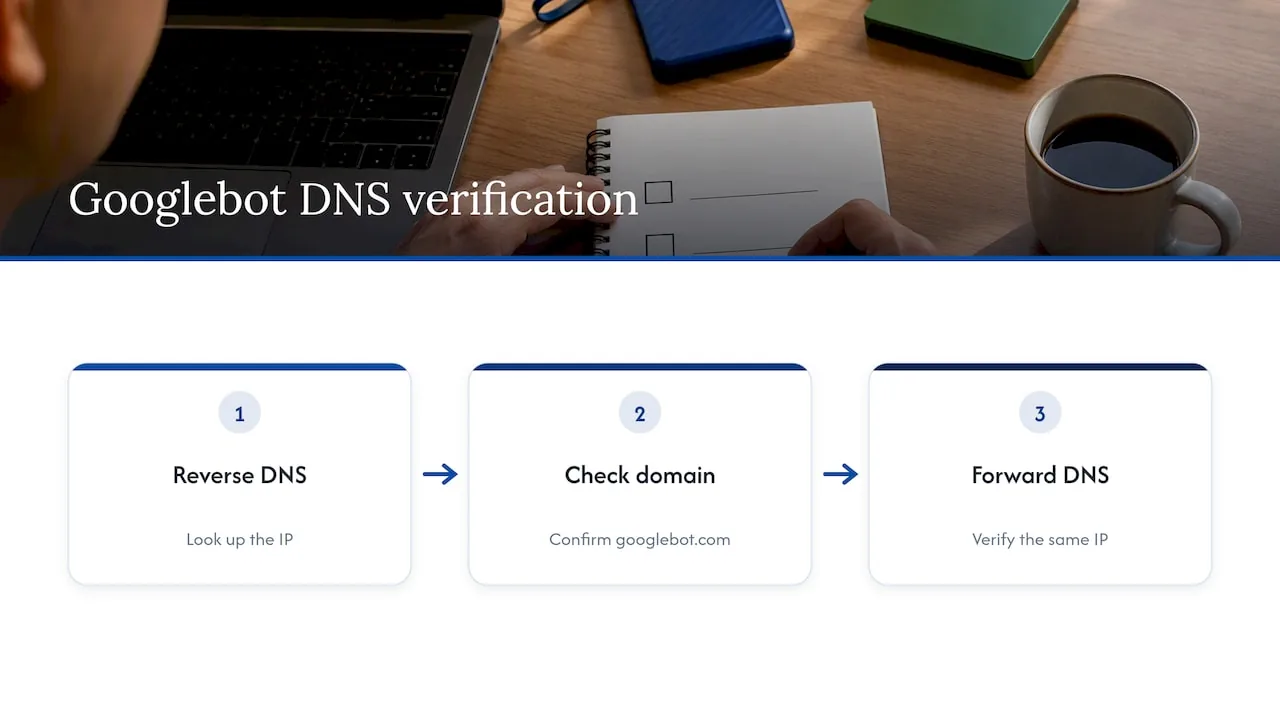
Google’s long-standing method is a two-step DNS check, described on Google’s Search Central blog: do a reverse DNS lookup on the IP, confirm the name is in the googlebot.com domain, then run a forward lookup on that name and confirm it returns the same IP. Google also publishes current IP ranges for its crawlers in its documentation, which is easier to automate across large files. Most dedicated log tools do this verification for you, but confirm the setting is switched on.
How to analyze log files, step by step
1. Choose your tool
For a small or medium site, a desktop tool such as the Screaming Frog SEO Log File Analyser handles the heavy lifting. It lets you upload logs, verify search engine bots, see which URLs were crawled and review bot behavior. Larger sites often use enterprise platforms or pipe logs into a data warehouse and query them with SQL. A spreadsheet works for a few thousand lines but not for a real site.
2. Import and filter
Load 30 to 90 days of logs. Filter to verified Googlebot first, then add Bingbot and, if you care about AI visibility, the AI crawlers that appear in your files. Split Googlebot Smartphone from Desktop, since mobile-first crawling means the smartphone bot usually dominates.
3. Match logs to a site crawl
This step is where logs become useful. Crawl your site with your preferred crawler, then import that URL list alongside the log data. Now you can answer two questions:
- Which URLs does the site contain that bots never request?
- Which URLs do bots request that your site structure does not contain?
The first list points to weak internal linking or pages blocked from discovery. The second points to old URLs, parameter variations and orphan pages.
4. Read the patterns, not single lines
Look at crawl volume by site section, by status code and by day. Spikes, sudden drops and uneven distribution tell the story. A section of your site that holds 30% of your revenue but gets 2% of bot requests is a finding. One odd request is not.
5. Prioritize and fix
Rank findings by how many requests they affect and how important the URLs are. Fix the pattern that wastes the most crawling on the least valuable pages first.
What log file analysis can uncover
Crawl waste
Search Engine Land’s guide lists low-value crawl targets such as faceted filters, archive pages and paginated feeds. If bots spend most of their visits on URLs with sort parameters, session IDs or calendar archives, the pages you want indexed get fewer visits. Google’s guide is clear on the remedy: use robots.txt for pages or resources you don’t want crawled at all, and note that noindex does not save crawl time because Google still requests the page before dropping it.
Errors bots keep hitting
Logs show every 404 a bot requests, along with redirect chains, 5xx server errors and slow responses. Frequent 5xx responses matter most: Google’s guide notes that server capacity limits can restrict how much it crawls. A 404 on a deleted page is normal. A 404 on a URL your own navigation or sitemap still links to is a bug.
Redirect problems
After a redesign or domain change, logs show whether bots actually follow your redirect map, how many hops they take and how long old URLs keep drawing requests. Our guide to redirect mapping for a website redesign covers building the map. The log is how you prove it worked.
Important pages bots overlook
Compare crawled URLs with your priority pages. Service pages, location pages and key articles that rarely appear in the logs usually sit too deep in the site, have few internal links or are missing from the sitemap. Orphan pages, which have no internal links, show up when bots request URLs your crawl never found.
Crawl frequency after changes
Publish or update a page, then watch how soon Googlebot requests it. If it takes weeks on a page you care about, the signal is that the page looks unimportant to the crawler, and internal links are the first thing to strengthen.
Turning findings into fixes
| Finding in the logs | Typical fix |
|---|---|
| Bots crawl thousands of filter or parameter URLs | Block with robots.txt, add canonical tags, remove internal links to those URLs |
| Priority pages rarely requested | Add internal links from high-traffic pages, add to XML sitemap, shorten click depth |
| Redirect chains | Point old URLs straight to the final destination |
| Old URLs still crawled heavily after a migration | Confirm 301s, update internal links and sitemap |
| Repeated 404s on linked URLs | Fix the link or restore or redirect the page |
| 5xx errors or slow responses | Work with your host or developer on server capacity and caching |
Change one thing at a time where you can, then check the next batch of logs to confirm bots changed behavior. Results show up in crawl data first and in rankings later, if at all.
What server logs cannot tell you
Logs record requests, not outcomes. They cannot tell you whether a page ranks, earns clicks, converts or satisfies the searcher’s intent. A page crawled daily can still rank nowhere because the content is thin. A page crawled monthly can rank first because nothing about it needs to change.
They also depend on the quality of your data. Missing CDN logs, truncated files or the wrong time zone lead to wrong conclusions. And for most local sites, crawl efficiency is not the bottleneck. Rankings in the map pack depend more on your Google Business Profile, reviews, citations and on-page relevance. Our piece on local SEO reporting shows which numbers actually tell you the work is paying off.
Our perspective: logs are evidence, not a strategy
We work with local service businesses, franchises, dental and healthcare practices, law firms and rental companies. Most of them do not have a crawl problem. They have an entity problem: search engines and AI answer tools are not sure who they are, where they operate or why they should be trusted.
So we treat log analysis as a diagnostic tool we reach for in specific cases: a multi-location site where location pages seem invisible, a redesign where we need proof that redirects are working, or a site with thousands of auto-generated URLs. In those cases it is the quickest way to stop guessing. In the rest, we would rather spend your budget on structure, content and profile work that moves rankings.
One more reason logs are getting more interesting: AI crawlers now show up in the same files. Seeing which of your pages those bots request is an early indicator of how your content may surface in AI-generated answers. Combine that with clean site architecture and clear entity signals, which is the approach behind how SEO, GEO and AEO work together, and logs become a feedback loop rather than a one-off audit.
, NSYGHT
Get a second pair of eyes on your crawl data
If you have pulled your logs and are not sure what the patterns mean, we can help. Our local and multi-location SEO services start with a technical review of how search engines reach and understand your site, and our services page lists consulting at $125 per hour for a focused one-off look at a specific problem.
If the issue turns out to be site structure rather than crawling, our SEO-native website design builds pages that are easy for bots to find from day one.
FAQ
What is a log file in SEO?
It is the server’s record of every request made to your website, whether from a person’s browser or a search engine bot. For SEO, you filter it to verified crawlers to see which URLs they fetch, how often and with what result.
Is it okay to delete .log files?
Usually yes, once you no longer need them, and servers rotate and delete old logs automatically to save disk space. If you plan to analyze crawl behavior, export 30 to 90 days first. Check with your host or developer before deleting anything on a production server, and keep logs longer if your business has retention requirements.
What program opens .log files?
A .log file is plain text, so any text editor opens it. Large files are slow or impossible to open that way, so SEOs use a dedicated log analyzer such as the Screaming Frog Log File Analyser, a command-line tool or a database query instead.
Is the Screaming Frog Log File Analyser enough?
For small and medium sites, yes. It imports logs, verifies bots and shows crawled URLs and response codes. For very large sites or continuous monitoring, teams often need a platform that processes logs automatically and keeps long histories.
How is log analysis different from Search Console’s crawl stats?
Search Console gives an aggregated, Google-only summary. Logs give every individual request from every bot, so you can see specific URLs, status codes and other crawlers, including those that never appear in Google’s reports.
Sources
- Server access logs and SEO: Everything you need to know (Search Engine Land)
- Log File Analysis for SEO: Find Crawl Issues & Fix Fast (Search Engine Land)
- What server logs reveal that SEO tools miss (Search Engine Land)
- What Can Log File Data Tell Me That Tools Can’t? (Search Engine Journal)
- Crawl Budget Management (Google Search Central)
- How to verify Googlebot (Google Search Central Blog)