

Run a full crawl and analytics export, then build a 1:1 redirect map before anyone touches a URL. That single step decides whether your redesign gains traffic or torches it. Protect your top-performing pages, block staging from indexing, and lock in a 48-hour, two-week, and four-week monitoring cadence before launch day arrives.
- Building a comprehensive redirect map with a dedicated owner and testing every URL redirect before launch is critical to preserving rankings and traffic.
- Maintaining metadata, schema markup, internal links, and content depth on high-value pages prevents ranking drops caused by thinning or structural changes.
- Conducting a full site crawl, exporting performance data, and creating a keyword-to-URL map before redesign guides prioritization and prevents regressions.
- Monitoring indexation, crawl budget, and redirect accuracy in the first 48 hours and through four weeks helps catch and fix issues early.
- Phased rollouts and involving SEO from the start reduce risks on large or complex sites, avoiding common pitfalls like broken backlinks and incorrect URL restructuring.
Why Does an SEO Website Redesign Put Rankings at Risk?
A website redesign changes the very signals search engines use to understand and trust your pages: URLs, internal links, page titles, content depth, and site structure. Google has to rediscover, recrawl, and revalidate nearly everything at once, and any gap between old and new signals shows up as a ranking or traffic drop. This is why a full pre-redesign audit that includes a site crawl, a Search Console export, and an analytics review is the standard first move in nearly every credible migration checklist.
The real danger isn't redesigning your site. It's redesigning it blind. Teams that skip benchmarking don't know what they had until it's gone, and by then the fix costs weeks instead of hours. A redesign done with full redirect mapping and metadata parity typically returns to pre-redesign ranking levels within 4 to 8 weeks; a rushed one can take 3 to 6 months to recover, if it recovers at all. That gap is the whole argument for doing the work up front.
Website SEO optimization during a redesign isn't a bolt-on task for after launch. It has to run parallel to design and development from day one, with SEO holding sign-off authority on URL changes, template structure, and content cuts. Skip that authority and you'll find out about problems from a traffic graph, not a checklist.
What Should You Audit Before Redesigning for SEO?
Before a single wireframe gets approved, you need a complete picture of what's currently working. This baseline is what you'll compare against after launch to catch regressions fast.
Start with a full site crawl using a tool like Screaming Frog, Sitebulb, or JetOctopus. Export every URL along with its response code, title tag, H1, canonical tag, meta robots directive, and any structured data markup. This becomes your reference document for every "does the new site match the old one" question that comes up later.
Then pull performance data straight from your own accounts:
- Google Search Console performance report, broken out by URL, covering clicks, impressions, and average position
- GA4 landing page report showing sessions, conversions, and engagement rate per URL
- Backlink profile by URL from Ahrefs, Semrush, or Moz, so you know which pages carry link equity
- Server log files, if you have access, showing which URLs Googlebot actually crawls and how often
Once the exports are in hand, build a keyword-to-URL map. For every URL, note its target keyword, current ranking position, organic sessions, conversions, and backlink count. Rank the list by value, not traffic alone. A page with modest traffic but a high conversion rate might matter more than a blog post with triple the visits.
This value ranking becomes the backbone of every decision that follows: which pages get frozen, which get merged, and which pages earn a redirect straight to the top of the priority list instead of getting lumped in with the rest.
How Do You Protect Your Highest-Value Pages During a Redesign?
Not every page deserves the same level of caution. The pages generating most of your organic sessions, conversions, and backlinks need to be treated like load-bearing walls, not drywall you can knock out and rebuild on a whim.
These are the pages that pay the bills. Assign each one a migration priority level, with the highest earners requiring manual review before any change goes live, not just an automated redirect rule.
For these pages, the default should be: keep the URL unless there's a clear structural reason to change it. A URL change is not a design decision. It's an SEO decision with design implications, and it should be treated that way. When a URL does need to move, plan the redirect and content merge before development starts, not after someone notices the page is gone.
On every high-value page, preserve these elements without exception:
- Existing schema markup (product, FAQ, review, or article schema)
- H1 placement and hierarchy relative to surrounding content
- FAQ blocks and their structured data markup
- Internal links pointing to and from the page
Stage your changes in layers. Update the visual layout first and watch performance for a week. Then touch the content. Only change the URL if there's truly no way around it. Each layer you add increases risk, so isolate them and you'll know exactly what caused a ranking shift if one happens.
Reducing content depth on a ranking page to fit a cleaner design is one of the most common and costly mistakes in a redesign. Guides consistently warn that thinning out detailed content in favor of vague marketing copy strips away the contextual signals and long-tail keyword coverage that earned the ranking in the first place.
How Do You Build a Redirect Map That Actually Works?
Redirects are the single biggest point of failure in any site migration SEO project, and they're also the most fixable one. Every URL that currently earns traffic, links, or conversions needs a 1:1 redirect to the most relevant page on the new site.
Your redirect spreadsheet needs these columns at minimum:
- Old URL
- New URL
- Status: keep, merge, or prune
- Backlink count
- Owner (the person accountable for verifying this row)
- Notes (why this mapping was chosen)
The mapping rules matter as much as the spreadsheet structure itself:
- Redirect every URL to the page that most closely matches its original topic, not the closest available page by convenience
- Never redirect a page with real traffic or backlinks to the homepage; that's a signal to Google that the specific content is gone, and it tanks the value of any links pointing there
- Map directly to the final destination URL, never through an intermediate page, since chained redirects slow crawling and dilute link equity with every hop
- Treat the redirect map as a living document with a named owner per row, not a one-time export nobody revisits
Test the map before launch using a crawler against the staging environment or a local proxy setup, checking that every old URL resolves in a single hop to the correct new destination. After launch, audit redirect coverage again within the first 48 hours and fix mismatches immediately rather than letting them sit in a backlog.
Assign redirect map ownership by section, not by person alone. If your blog has 400 URLs and your product pages have 60, split ownership so one person isn't drowning in a spreadsheet with no context for half the rows.
Should You Change Your URL Structure During a Redesign?
The safest answer is: only if you have a real reason to. Changing URL structure "for cleanliness" without a functional or strategic need is one of the more avoidable risks in an SEO friendly redesign, because every changed URL adds a redirect dependency and a chance for something to break.
Keep your existing URL structure when the current paths are already descriptive, logical, and reasonably short. Rework it when the current structure buries important pages five or six folders deep, uses non-descriptive parameters, or no longer matches how the business is organized (a site that's grown from one location to twelve, for example).
When you do redesign the information architecture, aim to keep every commercially important page within three clicks of the homepage. Use descriptive, keyword-relevant paths rather than internal codenames or numeric IDs. A URL like /services/seo/local-businesses tells both users and crawlers what the page is about; /svc/id4471 tells them nothing.
Paginated, filtered, and parameterized pages need a canonicalization plan before launch, not after Google starts indexing duplicate variations. Decide which version of a filtered category page is canonical, and apply that tag consistently across the template rather than page by page.
Every proposed IA change should get checked against the keyword-to-URL map you built during the audit. If a folder restructuring would orphan a page ranking for a valuable term, that's a red flag requiring SEO sign-off before development proceeds, not a note for the retrospective.
What On-Page Elements Need to Stay the Same?
Improving website SEO during a redesign means protecting the on-page signals that are already working while upgrading the ones that aren't. This is where a lot of teams lose ground quietly, because these changes look cosmetic but carry real ranking weight.
Run a metadata parity check across the board: title tags, meta descriptions, H1 headings, and canonical tags should carry over from the old site unless there's a specific optimization reason to change them. If a title tag is already ranking well, redesigning the template is not a license to rewrite it on a whim.
Content density deserves particular attention on your top-performing pages. Design teams often want to "simplify" copy for a cleaner look, but cutting product specs, explanatory detail, or long-tail keyword coverage removes exactly the substance that earns rankings for specific, lower-competition searches.
Images need care too:
- Add descriptive alt text to every image, not just a filename dump
- Serve compressed, modern formats like WebP where the platform supports it
- Set explicit width and height attributes so the browser reserves space and layout shift stays low
Internal linking is easy to overlook during a redesign but expensive to lose. Maintain the contextual anchor links running from high-traffic blog posts to product and category pages. These links pass authority and guide both users and crawlers toward your conversion pages, and a template overhaul that strips them out quietly cuts off a traffic source that took months to build.
Before development starts, export every internal link on your top 50 pages into a spreadsheet. After launch, run the same export and diff the two. Missing links are one of the easiest things to lose in a redesign and one of the hardest to notice without a direct comparison.
What Technical SEO Targets Matter Most in a Redesign?
A redesign is the best chance you'll get to fix long-standing performance problems, and Core Web Vitals should be part of the design brief from the start, not a post-launch patch job.
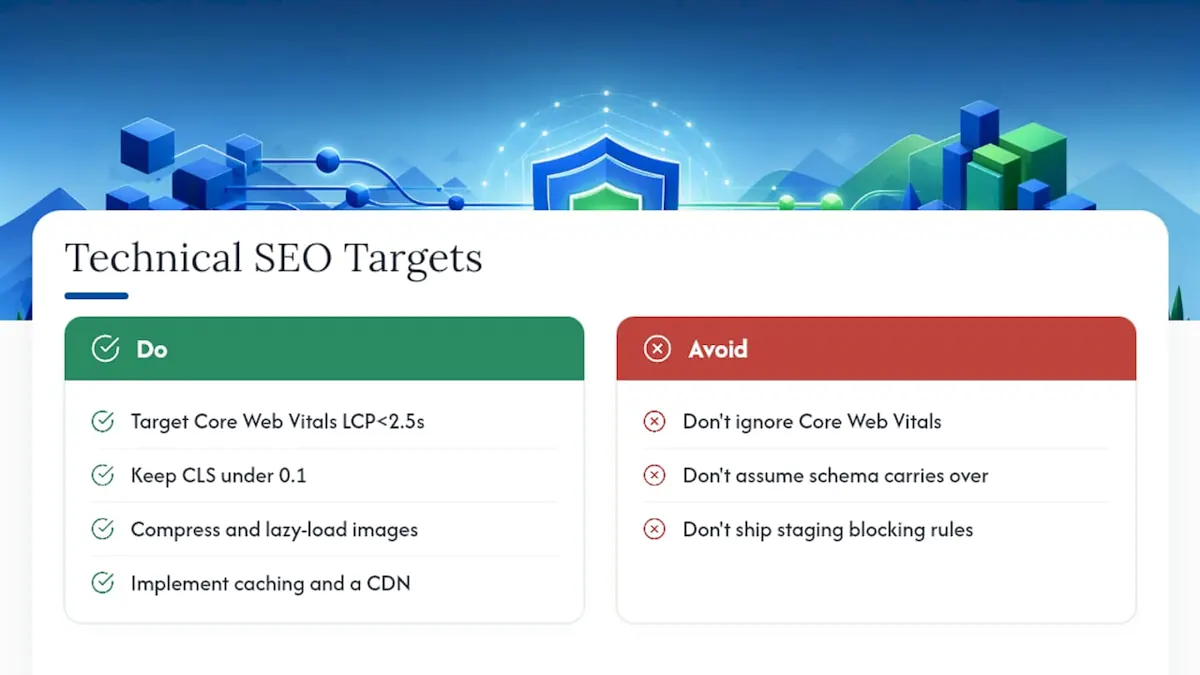
Google's Core Web Vitals measure loading speed, interactivity, and visual stability, and they factor into both rankings and user experience. Target a Largest Contentful Paint under 2.5 seconds, keep Cumulative Layout Shift under 0.1, and aim for fast interaction responsiveness. Achieving those numbers usually comes down to a handful of fixes: compressing and lazy-loading images, implementing browser caching, and serving assets through a CDN.
A redesign that ignores Core Web Vitals is rebuilding the house on the same cracked foundation. Performance problems that existed on the old site tend to carry straight through into the new one unless someone explicitly budgets time to fix them, and partner guidance on Core Web Vitals fixes for small business sites is a useful reference point if your team is tackling this for the first time.
Mobile-first checks matter just as much as desktop polish, since Google indexes the mobile version of your site by default. Test rendering across real device sizes, not just a resized browser window, and confirm tap targets, font sizes, and navigation menus all function properly on a phone screen.
Structured data has to be rebuilt and validated, not assumed to carry over automatically with the new templates. In 2026, schema markup increasingly affects whether AI-powered search tools cite your content in generated answers, on top of its long-standing role in earning rich results. Run every template through Google's Rich Results Test and a schema validator before launch.
Finally, lock down indexation controls. Check robots.txt, canonical tags, and hreflang tags if you operate in multiple languages or regions, and confirm none of the staging environment's blocking rules accidentally shipped to production.
What Should You Test on Staging Before Launch?
Staging QA is where most preventable disasters get caught, if someone actually runs the checks instead of assuming the build matches the plan.
- Crawl the staging environment with the same tool you used for the baseline audit, then compare the two crawls side by side, flagging missing title tags, dropped H1s, absent schema, or template regressions.
- Confirm staging itself is blocked from indexing through robots.txt or a meta robots noindex tag, since a staging leak into Google's index is one of the most damaging and entirely preventable mistakes in any migration.
- Verify that production robots.txt is correct and ready to go live before the flip, since it's easy to leave a blocking rule in place from testing.
- Sample-test a batch of redirects on staging or a local proxy to confirm they resolve correctly, and validate canonical tags and hreflang implementation if applicable.
- Run a performance smoke test to catch any glaring Core Web Vitals regressions, and do a basic accessibility pass against WCAG fundamentals like color contrast, alt text, and keyboard navigation.
Treat this as a hard gate, not a formality. If staging fails any of these checks, launch waits.
What Happens in the First 48 Hours After Launch?
Launch day itself follows a specific sequence, and skipping a step here is how small problems turn into two-week fire drills.
- Crawl the live site immediately after it goes live to confirm the production build matches what staging showed.
- Verify robots.txt on production allows crawling of the pages that should be indexed.
- Submit the updated XML sitemap to Google Search Console so Google discovers the new URL set as quickly as possible.
- Confirm analytics and Search Console tracking are firing correctly on the new site.
- Spot-check at least 50 of your highest-value redirects manually to confirm they resolve to the correct destination.
Over the following 48 hours, watch indexation progress in Search Console, review the Coverage report for new errors, and validate that GA4 events are recording accurately against the new templates.
At the two-week and four-week marks, run deeper audits: compare rankings for your priority keywords against pre-launch positions, check Core Web Vitals field data as it accumulates in the Chrome User Experience Report, review your backlink profile for any links that broke during the move, and pull a fresh redirect error report.
Set a clear escalation threshold before launch, not during a panic.
Compact SEO Redesign Checklist You Can Copy Into a Ticket
Hand this to development, design, and SEO as a shared reference during sprint planning.
Before launch:
- Baseline crawl and analytics export completed
- Full 1:1 redirect map built and reviewed
- Staging environment blocked from indexing
- Schema inventory documented for every template
Launch day:
- Live site crawled and compared to staging
- Robots.txt verified on production
- XML sitemap submitted to Search Console
- Analytics and conversion tracking verified
- Sample of redirects spot-checked manually
Post-launch:
- 48-hour, two-week, and four-week monitoring cadence in place
- Redirect errors fixed as soon as they're found
- Content sprints prioritized for any page that dropped in rankings
| Phase | Top priority | Owner |
|---|---|---|
| Prelaunch | Redirect map and staging block | SEO lead |
| Launch day | Robots.txt and sitemap submission | Dev lead |
| Post-launch | Monitoring cadence and redirect fixes | SEO + dev |
How Do You Protect Backlinks During a Site Redesign?
Every backlink pointing to your site is a vote of confidence you spent time earning, and a careless migration can quietly waste a good chunk of it. The fix isn't complicated, but it does require discipline.
Pull your full backlink profile by URL before the redesign starts, using Ahrefs, Semrush, or Moz. Every linked page needs a spot on the redirect map, with linked pages carrying extra weight in the "don't touch this URL without a plan" category. A page with 40 referring domains pointing at it deserves more caution than a page with none, even if its traffic numbers look similar.
For your most heavily linked pages, reach out to a handful of the sites linking to you after launch, letting them know the URL has changed if a redirect isn't already smoothing the transition. This matters most for high-authority links where you want the strongest possible signal passed through, not just a technically functioning redirect.
Watch your backlink report in the weeks after launch for any drop-off in referring domains. A sudden loss usually points to a broken redirect or a page that got merged into something less relevant than the original destination, and it's far easier to fix in week one than to notice six months later when the damage has compounded.
How Do You Avoid Thin Content When Migrating a Site?
Thin content is one of the sneakiest risks in a redesign because it usually happens by accident, not by decision. A designer wants a cleaner page. A stakeholder wants fewer words above the fold. Each small cut seems reasonable, and then the page that used to rank for fifteen long-tail terms only covers three of them.
Before any content gets trimmed, compare the word count and topic coverage of the old page against the proposed new version. If the new version covers meaningfully less ground, that's a flag for review, not a rubber stamp. This applies especially to product specification pages, service detail pages, and long-form guides, where depth is often the entire reason the page outranks thinner competitors.
Consolidating similar pages during a redesign is fine, and often smart, but only when the combined page actually retains the coverage of both originals. Merging three thin pages into one comprehensive page can be a genuine SEO win. Merging one detailed page into a shorter summary page is a loss dressed up as a simplification.
What Happens to Crawl Budget After a Redesign?
Crawl budget rarely gets attention until it becomes a problem, and a redesign is exactly the kind of event that can quietly strain it. When your URL structure changes, Google has to recrawl both the old paths (to discover the redirects) and the new ones (to index fresh content), which temporarily increases the crawl demand on your site.
Watch the Crawl Stats report in Search Console closely in the weeks after launch. A spike in crawl requests is normal and expected. What you're watching for is crawl requests concentrated on low-value or duplicate URLs, like faceted navigation or parameter variations, while your priority pages get crawled less often than they should.
If crawl budget is being wasted on low-value pages, tighten your canonicalization rules and confirm robots.txt or meta robots tags are blocking crawlers from pages that add no indexing value, such as internal search results or filtered list views. Every redirect chain you missed during mapping also burns crawl budget unnecessarily, since Googlebot has to follow each hop instead of landing directly on the final page.
For large sites, this monitoring should extend past the standard four-week window. Sites with tens of thousands of URLs can take longer for crawl patterns to stabilize, and checking in at the two-month and three-month marks catches drift that a shorter monitoring cycle would miss entirely.
Should You Roll Out a Redesign in Phases?
For small sites, a full launch on a single date is usually manageable. For large or complex sites, a phased rollout meaningfully reduces risk.
A staged rollout, whether by percentage of traffic or by launching one site section at a time, limits how many indexation changes happen simultaneously. Instead of monitoring thousands of URL changes at once, your team can watch a few hundred, catch problems early, and apply fixes before rolling out the next section.

This approach works especially well for multi-location businesses or large e-commerce catalogs, where a single template error can multiply across thousands of pages before anyone notices. Launching the blog section first, watching it for two weeks, then moving to product pages gives you a real feedback loop instead of one high-stakes launch day.
A/B testing specific template or content changes before a full redesign commitment is another way to de-risk the process. Testing a new page layout against a small percentage of traffic, or on a handful of representative pages, tells you whether Core Web Vitals or engagement metrics move in the right direction before you commit the whole site to that design.
Phased rollouts take longer to complete than a single flip, and that tradeoff is worth naming plainly: you're trading speed for a much smaller blast radius if something goes wrong.
How NSYGHT Bakes SEO Into Every Redesign
NSYGHT writes SEO requirements directly into the design brief, not into a follow-up audit after launch. Template-level items like H1 placement, FAQ schema, and internal linking modules get locked in before development starts, based on the same principle behind preserving template-level SEO elements across a rebuild. NSYGHT's own website relaunch followed this exact process. If you're planning a redesign, assign one owner for the redirect map and one for post-launch monitoring before the project kicks off.
When It Makes Sense to Bring in Help for a Redesign
A single-location site with a couple hundred pages is a manageable in-house redesign if someone on your team owns the audit and redirect map from start to finish. Multi-location businesses, large catalogs, and teams without dedicated SEO bandwidth are a different story. That's where a redesign started with the right foundation instead of a design-first, SEO-later approach.
NSYGHT builds redesigns around entity-driven SEO architecture, combining technical SEO with Generative Engine Optimization and Answer Engine Optimization so the finished site is built to be found by both traditional search engines and the AI tools now handling a growing share of search queries. That means the redirect map, the schema plan, and the content structure all get built with how modern discovery actually works, not just how a template looks in a mockup.

If you're staring down a redesign with a multi-location footprint, a large content library, or simply not enough internal hours to run a proper 48-hour and two-week monitoring cadence, an SEO-native website design built around your existing rankings is worth a conversation before development starts. Get in touch with NSYGHT to scope your redesign and find out what a protected migration plan looks like for your specific site.
Sources
Keep these references handy while executing the checklist:
- Search Essentials / SEO starter guide, Google Developers
- Website redesign SEO checklist: Retaining and improving SEO, Search Engine Land
- Website Redesign SEO Checklist: Relaunch Your Site Without Losing Rankings, HubSpot
- Website Redesign SEO: How To Preserve Organic Traffic, Shopify
- Website Redesign SEO Guide 2026: Protect Rankings, Shadow Digital
Frequently Asked Questions
Yes. Changing URLs, page templates, content, or site structure can affect how search engines crawl, index, and rank your pages, which is why a redirect map and pre-launch audit are standard practice before any redesign goes live.
Run a full crawl and analytics export first, build a 1:1 redirect map for every valuable URL, preserve metadata and schema on high-performing pages, and follow a structured 48-hour, two-week, and four-week monitoring cadence after launch.
Some ranking fluctuation during recrawling is normal, but sustained losses usually trace back to missing redirects, thinned content, or lost technical signals. A redesign with full redirect mapping and metadata parity typically returns to pre-redesign rankings within 4 to 8 weeks.
Costs vary widely based on site size, the number of templates, and whether SEO strategy is built in from the start rather than added after launch. Agencies like NSYGHT scope SEO-native web design projects individually based on the site's complexity and existing traffic to protect.
Missing or incorrect redirects are consistently cited as the single biggest risk in a site migration, since every unmapped URL either loses its ranking signals or leads to error pages that harm both users and search engines.