

A technical SEO audit is a systematic review of a site's crawlability, indexability, performance, and page-level technical signals that uncovers blockers and produces a prioritized remediation plan. Run correctly, it flags indexability problems, exposes performance issues that hurt rankings and user experience, and hands you a ranked list of fixes. The fastest next step is a quick crawl health scan paired with a look at your Search Console Coverage report.
- Indexability issues often stem from simple mistakes like incorrect noindex tags or disallowed robots.txt rules, which can silently hide large sections from search results.
- Prioritizing fixes for high-traffic pages with slow Core Web Vitals metrics yields more ranking and user experience improvements than micro-optimizations on low-impact pages.
- Google may index pages incompletely or late if client-side rendering relies heavily on JavaScript without server-side rendering or pre-rendering solutions.
- Hreflang tags that reference broken URLs or mismatch language and region codes can cause international pages to show incorrectly or not at all in search results.
- Log file analysis is crucial after site changes to verify Googlebot's crawling behavior, especially for large sites with complex URL structures or after migration efforts.
Quick technical SEO checklist to start with today
Before running a full technical site audit, triage the categories that cause the most damage: pages that cannot be crawled or indexed, pages that load too slowly, and pages that render differently for bots than for people.
- Crawl and index: check robots.txt, XML sitemaps, and canonical tags for accidental blocks.
- Performance: pull Core Web Vitals from Search Console and PageSpeed Insights.
- JavaScript and rendering: compare the rendered HTML to what a browser shows a visitor.
- On-page technical: confirm titles, meta descriptions, H1 tags, and structured data are present and unique.
- Redirects: look for chains, loops, and soft 404s.
- Structured data: validate JSON-LD against schema.org patterns.
For a first pass, sample a representative selection of URLs across your main templates rather than crawling everything. A full crawl comes later, once you know where the trouble spots are.
Crawlability and indexability: robots, sitemaps, and Search Console checks
Indexability problems hide in plain sight. A single misplaced noindex tag or a robots.txt disallow rule can quietly remove entire sections of a site from search results.
- Open URL Inspection in Search Console and confirm the page is indexed as expected, then check the Coverage report for excluded or error-flagged URLs.
- Review robots.txt for disallow rules that block important templates, and check each page's meta robots tag and X-Robots-Tag header for stray noindex directives.
- Confirm canonical tags point to the correct preferred URL, not to a parameter variant or an unrelated page.
- Compare your XML sitemap's URL count against the number of pages actually indexed, and remove any URLs from the sitemap that are noindexed, redirected, or blocked.
- Run a manual spot check: use curl to fetch a page's raw HTML, use the
site:operator to see what Google has indexed, and use Search Console's live test to see the rendered version.
Google Search Central's technical SEO guidance recommends sitemaps, canonical tags, and Search Console's coverage reports as the core diagnostic set for indexing issues.
When sitemap and index counts diverge by more than a small margin, check for recent redirects or bulk noindex changes before assuming a crawl budget problem.
Site performance and Core Web Vitals: measuring and triaging slow pages
Performance diagnostics need both field data (what real visitors experience) and lab data (what a controlled test measures). Field data comes from the Chrome User Experience Report inside Search Console; lab data comes from Lighthouse or PageSpeed Insights.
- Largest Contentful Paint (LCP): measures how fast the main content appears; large hero images and unoptimized fonts are common culprits.
- Cumulative Layout Shift (CLS): measures visual stability; missing image dimensions and late-loading ads are frequent causes.
- Interaction to Next Paint (INP): measures responsiveness to user input, often slowed by heavy JavaScript execution.
- Prioritize by business impact: fix your highest-traffic or highest-converting pages first.
- Write developer tickets with evidence: include the specific metric, the page URL, the lab score, and a screenshot of the waterfall.
Core Web Vitals give you a measurable baseline. Google Search Central notes that improving LCP on a high-traffic landing page typically delivers more value than micro-optimizing a low-traffic page, since Core Web Vitals should be gathered from both field and lab tools before prioritizing fixes.
JavaScript and rendering: how Google processes dynamic content
Google crawls a page, queues it for rendering, then executes the JavaScript to see the final content. That queue introduces delay, and pages that depend heavily on client-side rendering can be indexed later or incompletely if the rendering step fails.
- Inspect the rendered HTML using URL Inspection's rendered view to confirm your content actually appears after JavaScript executes.
- Test structured data with the Rich Results Test to confirm schema markup survives rendering.
- Watch for fragment-based routing (URLs using
#) instead of the History API, which can hide pages from crawlers entirely. - Check for injected tags: JavaScript that overwrites canonical or meta robots tags after page load can undo your on-page work.
- Flag lazy-loaded text that never becomes visible to a renderer that does not scroll or interact.
Google's JavaScript SEO documentation recommends server-side rendering or pre-rendering when client-side rendering creates indexing delays, along with meaningful HTTP status codes instead of soft 404s.
If a page's rendered HTML in URL Inspection looks thinner than what you see in a browser, that gap is usually your indexing problem.
On-page technical checks: metadata, structured data, and duplicate content
Page-level technical signals shape both how a page ranks and how it appears in results. Start with the basics and work toward the more fragile pieces like structured data and redirect chains.
- Titles and meta descriptions: confirm each page has a unique title and description, and that H1 tags match the page's actual topic.
- Per-page robots tags: audit for pages accidentally set to noindex or nofollow.
- Structured data: implement JSON-LD following Schema, then validate with the Rich Results Test before publishing.
- Redirect chains and soft 404s: map any URL that redirects more than once, and fix pages that return a 200 status but show "not found" content.
- Canonical strategy: make sure canonical tags are consistent across paginated series, parameter variants, and mobile versions.
- Image optimization: compress images, add descriptive alt text, and lazy-load below-the-fold images without hiding above-the-fold content from crawlers.
Tools and workflow: combining automated scans with manual checks
No single tool tells the whole story. Crawl tools find broken links and duplicate metadata; performance tools measure speed; Search Console shows what Google actually sees; render testers and structured-data validators catch the errors that only appear after JavaScript runs.
- Run a full-site crawl to catch broken links, redirect chains, and duplicate titles or meta descriptions.
- Pull Core Web Vitals from Search Console and PageSpeed Insights for both field and lab data.
- Check indexing status page by page using URL Inspection, focusing on pages that should rank but don't.
- Validate structured data with the Rich Results Test on every unique template.
- Consolidate everything into one remediation sheet with columns for issue, severity, affected URLs, and owner.
- Re-run the health scan after fixes ship to confirm the issue is resolved.
This sequence, health scan, deep dive on failing pages, prioritize, implement, monitor, keeps an audit from turning into an unstructured list of unrelated findings.
Turning audit findings into a prioritized roadmap
Not every issue deserves the same urgency. Ranking fixes by impact against effort keeps a team focused on the changes that move the needle instead of the ones that are simply easy to describe.
- High impact, low effort: fixing a noindex tag on a page that should rank, or removing a redirect chain on a high-traffic page.
- High impact, high effort: migrating a JavaScript-heavy section to server-side rendering.
- Low impact, low effort: cleaning up minor duplicate meta descriptions on low-traffic pages.
- Ticket fields that matter: issue description, affected URLs, before and after screenshots, expected impact, and an owner.
- Monitoring cadence: re-check Core Web Vitals and Coverage reports monthly, and re-run a full crawl after any major site change.
Attach a before-and-after screenshot to every ticket. It turns an abstract fix into evidence a stakeholder can approve without a follow-up meeting.
How NSYGHT approaches technical SEO audits for local brands
NSYGHT treats a technical audit as the foundation for entity-driven SEO architecture, not a standalone deliverable. Fixes get layered into the same framework that supports Generative Engine Optimization and Answer Engine Optimization, described in the NSYGHT Stack, so a site becomes easier for both search engines and AI answer tools to understand. For multi-location clients, audit findings often feed directly into ongoing local business public relations strategy work such as Google Business Profile and location pages rather than sitting in a one-time report.
Reading log files to see how crawlers actually behave
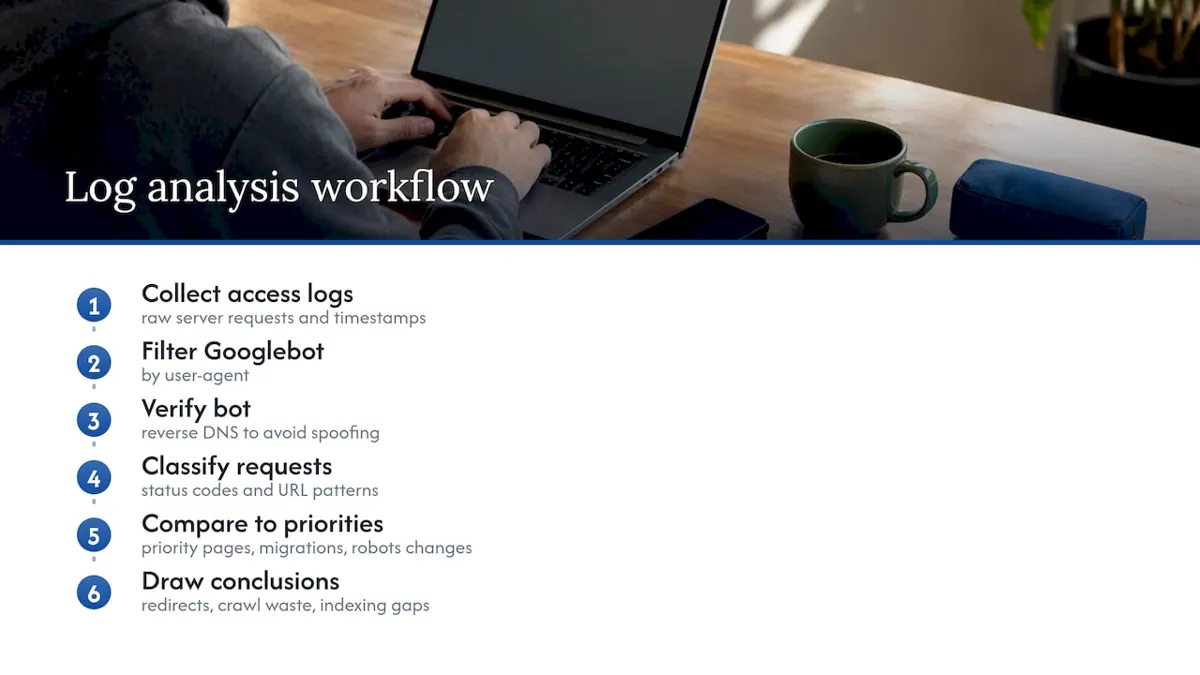
Crawl tools and Search Console show you what Google reports after the fact. Server log files show you what actually happened: every request a bot made, when it made it, and what status code the server returned.
Pulling raw access logs (or using a log analyzer) lets you answer questions a crawl tool cannot. Which pages does Googlebot visit most often, and does that match your priority pages? Are bots repeatedly hitting URLs that return 404s or redirects, wasting crawl activity that could go toward pages you actually want indexed? Is a large share of crawl activity going to parameter-heavy URLs or filtered category pages that add little value?
Log analysis is especially useful after a migration or a big structural change, since it shows whether Googlebot has picked up new URLs and dropped old ones, or whether it's still stuck crawling a legacy URL pattern. It also helps confirm whether a robots.txt change actually stopped bot traffic to the intended section, since Search Console reporting can lag behind real crawler behavior by days.
For larger sites, filtering logs by user agent to isolate Googlebot (and verifying it via reverse DNS lookup to rule out spoofed crawlers) is a standard first step before drawing conclusions about crawl patterns.
International SEO considerations for multi-region sites
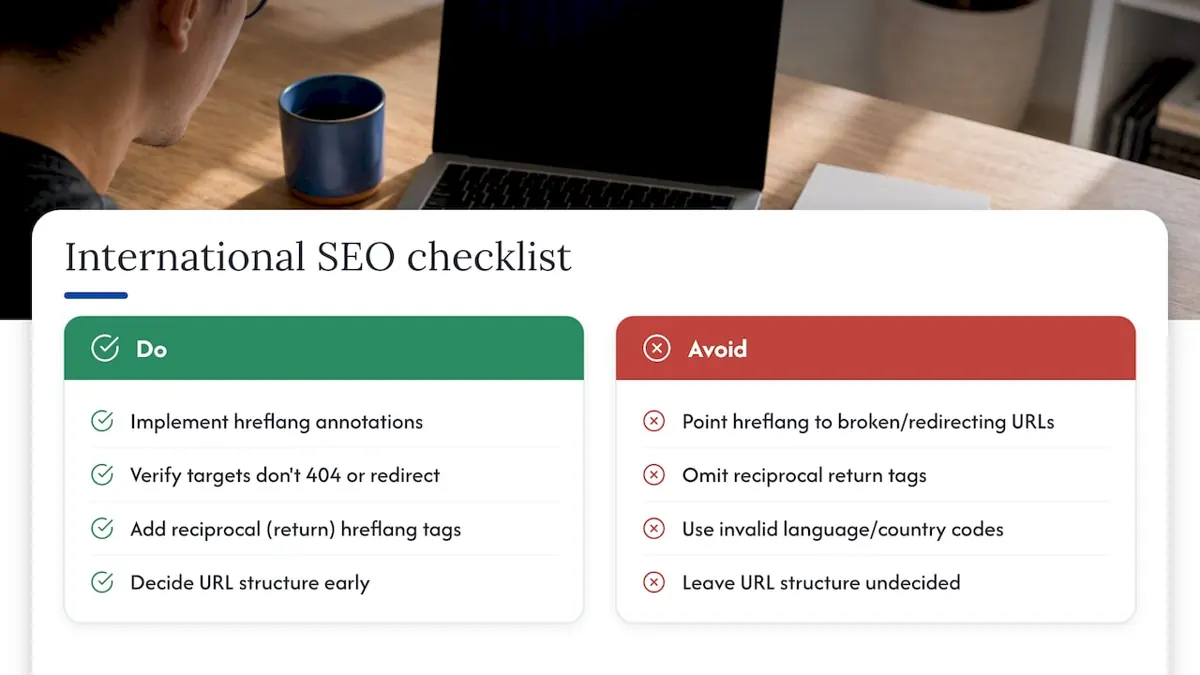
Sites serving more than one country or language add a layer of technical complexity on top of everything else in this checklist. The core mechanism is hreflang: annotations that tell search engines which page variant to show for a given language and region combination.
Common technical failures include hreflang tags that reference a URL returning a 404 or redirect, missing return tags (where page A points to page B but page B doesn't point back to page A), and hreflang values that don't match a supported language or country code format. Any of these can cause the wrong regional page to rank, or cause search engines to ignore the annotations entirely.
Beyond hreflang, decide on a URL structure early: country-code top-level domains, subdomains, or subdirectories each carry different implications for how authority consolidates across regions. Duplicate content across near-identical regional pages (for example, US and UK English versions of the same page) is common and usually fine when hreflang is implemented correctly, since it signals the duplication is intentional rather than accidental.
If your site doesn't currently serve multiple countries or languages, this section can be skipped entirely. It only applies once you have distinct regional or language variants competing for the same search intent.
When a DIY audit is enough and when to bring in help
A DIY audit usually works for small, mostly static sites. Complex JavaScript frameworks, large catalogs, or an upcoming migration are strong signals to bring in a team that audits sites for a living, since an agency engagement typically includes ongoing implementation, not just a one-time report.
Where NSYGHT fits after your audit is done
Finding the issues is half the job. NSYGHT's SEO services, including SEO Foundation, SEO Growth, and SEO Premium plans plus Google Business Profile management, turn an audit into an ongoing fix-and-monitor program rather than a report that sits unread.

If you'd rather hand off the technical work than manage it in-house, check current plan details on the SEO services page and see which level matches your site's size and complexity.
Sources
Frequently Asked Questions
Timing depends on site size and complexity: a small site can be reviewed in a few hours, while a large or JavaScript-heavy site can take several days to audit thoroughly. Agencies typically scope timing based on page count and the number of templates involved.
Cost varies widely by provider and site size, since pricing depends on scope and depth. NSYGHT offers audit work through its SEO services plans, and hourly consulting is available at $125 per hour.
A technical audit examines crawlability, indexability, site speed, and code-level signals, while a content audit reviews the quality, relevance, and performance of the actual written material on a page. Many full site reviews, like the audit framework described by Shopify, combine both alongside a UX review.
A full audit once or twice a year is common, with lighter health checks monthly or after any major site change. Re-running a scan after a migration, redesign, or CMS change catches issues before they affect rankings.
Use URL Inspection in Search Console to view the rendered HTML and compare it to what a browser shows. Google's JavaScript SEO documentation also recommends the Rich Results Test to confirm structured data survives rendering.