
Google removes reviews that break its Maps User Contributed Content Policy, but it will not delete a genuine negative opinion just because you dislike it. The fastest path forward is to flag the review through your Business Profile, screenshot everything before it can be edited or deleted, and set up review alerts. If that first report gets denied, you still have appeal, escalation, and legal routes left to try.
- Review accounts created the same week with no activity, generic profiles, and vague language are strong indicators of fake reviews worth reporting.
- Matching review claims to your records, such as receipts or timestamps, is crucial, and avoid making unprovable accusations in your report.
- Reporting reviews through both Business Profile and Google Maps increases your chances of removal, with clear evidence boosting approval chances during human review.
- If a review is denied, adding new precise evidence and using legal or support escalation channels are essential next steps.
- Responding publicly with short, factual replies while monitoring reviews helps manage ongoing reputation risks while gathering evidence.
How Do You Identify a Fake Google Review?
Not every one-star review is fake, and treating every critic like a liar will waste your appeal budget on cases you're going to lose. Google's Maps Content Policy defines removable content narrowly: spam, conflicts of interest, off-topic rants, harassment, impersonation, and posts exposing someone's personal information all qualify. A customer who says your technician showed up late and was rude does not qualify, even if it stings.
The reviews worth fighting share a pattern. Watch for these signals before you spend time reporting anything:
- A reviewer account created the same week the review posted, with no other activity.
- No photos, a generic profile picture, and a name that sounds automated or oddly formal.
- Language that's vague on specifics ("terrible service," "never again") but names no date, employee, or transaction.
- A location or service mentioned that doesn't match what you actually offer.
- A cluster of similar negative reviews landing within hours or days of each other, often from accounts with no history.
- A single review from an account that has posted nowhere else, ever.
Once you've flagged a suspect review, pull your own records before you report anything. Check your CRM or booking software for the date and name the reviewer cites. Look for matching receipts, invoice numbers, or order IDs. If you run a location with door access logs or security footage, timestamps from that day are gold. Appointment software timestamps work the same way: if a reviewer claims a visit on March 3 and your calendar shows no appointment under that name, you have a factual contradiction to hand to Google, not just an accusation.
Don't just tell Google "this is fake" in your report. Write one sentence that states a fact Google can verify: "We have no record of this customer in our booking system for the date claimed." Moderators respond to disprovable claims, not adjectives.
It helps to know what Google will not touch. A review that says the food was cold, the wait was long, or the price felt too high is a genuine, protected opinion, even if it's unfair or based on a bad day. What Google will act on is content that violates a specific policy clause, like a competitor posting under a fake name, a reviewer threatening you unless you pay them, or a post that includes someone's home address. Match the review to a clause before you report it. That match is the entire game.
How Do You Report a Fake Review on Google?
You have two official entry points, and using both increases your paper trail. Here's the sequence that works.
- Log into Business, open your profile, and click into "Reviews."
- Find the review, click the three-dot menu next to it, and select "Report review."
- Choose the policy category that matches your evidence, such as "Off topic," "Spam or fake content," or "Conflict of interest."
- Add a short, factual note. One or two sentences citing a specific record beats a paragraph of outrage.
- Repeat the process on the Google Maps app or maps.google.com by locating the same review under your listing and reporting it there. Reporting through Maps happens anonymously, so a review you flag there won't tip off the reviewer that it came from your business account.
- Track the report's status inside the Reviews Management Tool, which labels each report "Decision pending," "Report reviewed, no policy violation," or "Escalated."
Google's own product team has said that clear spam often gets caught and removed by automated detection within days, while anything requiring nuance, like a real-sounding review that's actually fabricated, tends to move to human review, which can stretch into multiple weeks. That gap is exactly why the evidence you gather upfront matters more than how fast you click "report."
Match your report language to the category you pick. For a suspected competitor attack, cite "Conflict of interest" and note that the reviewer has no verifiable transaction with your business. For a review that reads like a template dropped across five unrelated businesses, cite "Spam or fake content" and mention the duplicate phrasing if you can find it elsewhere online. For a post naming an employee's home address or phone number, cite "Personal information" directly, since Google's own reporting guidance treats that category as one of the more clear-cut removal paths.
What Happens If Your Report Gets Denied?
A denial isn't the end of the process. It just means your first attempt didn't give Google enough to act on, and you have specific next moves depending on what kind of fake review you're dealing with.
- File the one-time appeal. Inside the Reviews Management Tool, a denied report unlocks a single appeal. Use it to add evidence you didn't include the first time: a CRM screenshot, a booking log excerpt, or a timestamp that contradicts the reviewer's story. Google's appeal process rewards specificity; restating "this is fake" a second time changes nothing.
- Use the legal removal request for defamation or doxxing. If a review contains a provably false factual statement (not an opinion), exposes personal data, or reads as extortion or a coordinated attack, Google has a separate legal request process outside the standard report flow. Save any threatening messages tied to the review; extortion attempts (leave us five stars or we'll post a fake review) are exactly the kind of documentation that strengthens both a legal request and a later FTC complaint.
- Contact Google Business Profile support directly. Use the live chat or callback option inside your Business Profile dashboard and ask for a case escalation. Bring your report ID, a timeline of what happened, and the specific policy clause you believe applies.
- File a complaint with the FTC when it's a scheme, not a single bad actor. If a reviewer or a review-farming operation is running a pattern of fake reviews for pay or extortion, Ftc is the right channel. The FTC's rule banning fake reviews and testimonials gives the agency real enforcement teeth against organized schemes, though it's built for pattern-level fraud, not a single disgruntled ex-employee's post.
Human reviewers on Google's side are looking for a fact they can check, not an adjective they have to trust. A timestamp, an order ID, or a staff log entry that contradicts the reviewer's claimed interaction does more work than any amount of insisting the review is unfair.
Document everything as you escalate. A folder with screenshots, dates you reported each stage, and any correspondence turns a frustrating back and forth into a case file, which matters if you end up needing legal counsel later.
How Should You Respond While a Fake Review Stays Live?
A fake review sitting on your profile for two or three weeks while Google reviews it doesn't have to sit there unanswered. Reply publicly, but keep it short and boring on purpose:
- Thank the reviewer for the feedback, state plainly that you have no record of the transaction described, and invite them to contact you directly to resolve it.
- Never offer a refund, discount, or incentive in a public reply. That can look like you're admitting fault or, worse, buying a review's removal.
- Never accuse the reviewer of lying in the public reply, even if you're confident they are. Save that argument for your report, not your response.
- Keep a running log of every suspicious review, including reviewer names, dates, and any pattern you notice across multiple platforms, not just Google.
Set up review alerts through your Business Profile or a monitoring tool so new reviews reach you the moment they post, not a week later when the damage is already visible. Centralize your records now, before you need them: CRM exports, appointment logs, and receipts scattered across five systems are much harder to pull together in a panic than they are on a slow Tuesday.
Solicit reviews from real customers on a rolling basis, and keep a light record of consent when you ask, like a text or email confirming they're happy to leave one. A steady stream of legitimate five-star and four-star reviews doesn't stop a fake one from appearing, but it dilutes its visibility and gives Google's spam detection more real signal to compare against. If the attacks keep coming or start looking coordinated, that's the point to loop in a paid reputation management provider or an attorney rather than keep fighting it solo.
What Does an Evidence-First Removal Workflow Look Like?
Most business owners lose fake review disputes not because Google is unreasonable, but because their reports skip straight to outrage and skip the evidence. NSYGHT built a workflow around the opposite instinct: treat every report like a small case file, not a complaint.
- Detect. Set alerts on your Business Profile and check weekly for reviewer patterns that don't match your actual customer base.
- Document. Pull the CRM record, booking log, or order ID before you touch the report button, not after.
- Report. Match the review's language to one specific policy clause and file through both the Business Profile dashboard and Google Maps.
- Escalate. If denied, use the one-time appeal with new evidence, then move to GBP support or a legal request if the case involves defamation or extortion.
- Respond. Post a short, factual public reply while the report is pending.
- Restore. Once resolved, refresh your review pipeline so one bad actor doesn't define your rating for months.
Businesses juggling this alone often burn weeks chasing a single review while new ones pile up. That's usually the point where handing Google Business Profile management to a team that does this daily starts paying for itself, not because the process is complicated, but because it's tedious and easy to do wrong on the first try.
Fake Reviews Deserve a Process, Not a Reaction
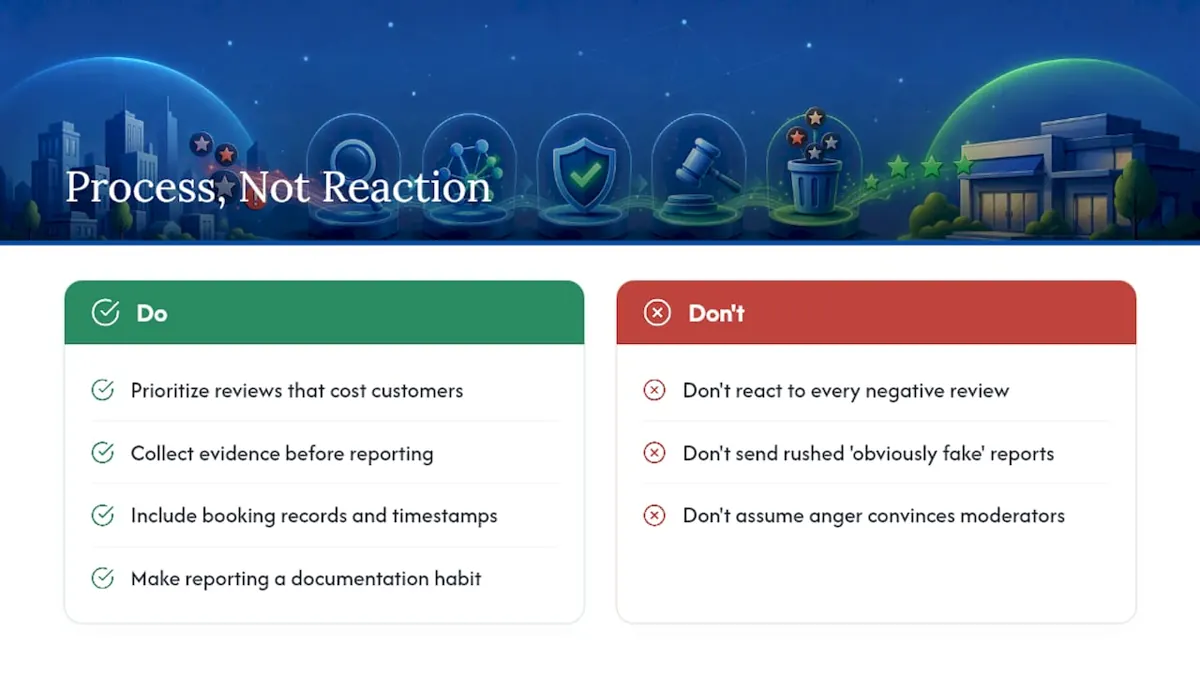
Most advice on this topic treats every negative review like a fire to put out immediately, and that instinct is exactly what gets business owners nowhere with Google. The moderators on the other end of your report don't care how angry you are. They care whether your report proves something they can verify in thirty seconds.
The overlooked piece here is patience paired with precision. A rushed report that says "obviously fake, please remove" gets denied fast, while a slower report built around a booking record or a timestamp mismatch has a real shot, especially on appeal. Prioritize the review that's actually costing you customers, not the one that just annoyed you most, and build your evidence file before you click anything. Businesses that treat this like a documentation habit, not a one-time scramble, end up with cleaner profiles and far less stress every time a new fake review shows up.
Get Help Cleaning Up and Protecting Your Google Reviews
Chasing down fake reviews while running a business is a part time job nobody signed up for, and most owners only learn the reporting categories and appeal language after losing their first dispute. A professional agency handles Google Business Profile management, evidence compilation, and escalation as part of ongoing local SEO work, so the reporting, documentation, and follow up happen without pulling you away from customers.

Before an intake call, gather what you already have: screenshots of the suspicious reviews, a rough timeline of when they posted, and any CRM or booking records tied to the dates in question. On that call, NSYGHT reviews your current Business Profile setup, flags which reviews have a real shot at removal based on Google's policy categories, and outlines what ongoing SEO and reputation management would look like for your account. If you're ready to stop handling this piecemeal, reach out and get your profile reviewed.