

LocalBusiness schema is structured data that tells search engines and AI systems who your business is, where it operates, and how customers can reach it, resolving ambiguity that plain text leaves open. Done well, it helps your business surface more accurately in local results and AI-generated answers. See the JSON-LD example below for a version you can adapt today.
- For each location page, include name and address as required fields; add a specific business subtype, canonical URL, phone, hours, and coordinates.
- Format addresses as PostalAddress fields, hours as hh:mm:ss, and coordinates to at least five decimal places; every marked up value must match visible page text.
- Give every physical location its own LocalBusiness block and canonical @id; service area businesses without storefronts should omit streetAddress and specify areaServed instead.
- For service queries, layer Service schema onto the relevant location and link its provider property to that location’s LocalBusiness entity.
- Test each URL with Google’s Rich Results Test after changes, review Search Console weekly, and audit every location monthly against page and profile details.
What LocalBusiness schema is and why it matters for local search
LocalBusiness schema is a Schema vocabulary that describes a physical or service-area business using structured properties like name, address, phone number, and hours. It sits inside the broader Organization type but adds location-specific fields that a generic Organization markup does not capture.
Search engines already pull plenty of signals from your Google Business Profile, your website copy, and citations across the web. Schema does not replace any of that. It corroborates it. When your JSON-LD says your dental practice is open until 6 PM and your Google Business Profile says the same thing, you have given Google two consistent signals instead of one, and consistency is what builds confidence in an entity.
That distinction matters more as AI-driven answer engines enter the picture. These systems parse structured data to categorize businesses and retrieve precise details, and a well-specified entity is easier for them to match to a user's query.
One choice has outsized impact: picking a subtype instead of the generic type. Schema.org defines dozens of subtypes, Restaurant, DaySpa, Dentist, Electrician, and more, each carrying the inherited LocalBusiness properties plus category-specific ones. Using the most specific subtype available helps AI-driven systems categorize your business for more precise answer retrieval, according to schema.org's own guidance.
A few fundamentals before you touch any code:
- LocalBusiness schema describes identity and location details, not promotional content or marketing claims.
- It complements, rather than substitutes for, an active and accurate Google Business Profile listing.
- The most specific subtype available should always replace the generic "LocalBusiness" type.
- JSON-LD is the preferred format because it is easier to maintain, test, and scale across templates than Microdata or RDFa.
Google supports three structured data formats, JSON-LD, Microdata, and RDFa, but Google's own documentation recommends JSON-LD for most implementations because it sits in a single script block separate from your HTML, which makes it far simpler to update, audit, and template across pages.
Required and recommended properties to map on your site
Google does not require every property schema.org defines. Its structured data guidelines for LocalBusiness draw a line between what is required for eligibility and what strengthens the listing.
For location pages, name and address are required. Everything else is recommended, but recommended does not mean optional in practice. The properties Google highlights as valuable include:
- telephone, formatted consistently with how it appears in visible page text.
- url, pointing to the canonical page for that specific location.
- geo, using latitude and longitude coordinates.
- openingHoursSpecification, structured as a defined object rather than a line of prose.
- priceRange, a general indicator like "$$" rather than exact pricing.
- aggregateRating or review, included only when genuine review data backs it.
Formatting matters as much as inclusion. Addresses should use the PostalAddress object with discrete fields for street address, locality, region, postal code, and country rather than one flattened string. Opening hours need hh:mm:ss time format within the openingHoursSpecification object, and any seasonal closures should use ISO 8601 date formatting. Geo coordinates should carry at least five decimal places of precision, per Google's documentation, since lower precision can fuzz your location enough to affect how accurately you show up in local results.
Every property you mark up should also appear in your page's visible text. This is not a stylistic preference, it is one of Google's general structured data policies: markup must accurately reflect what a visitor actually sees on the page. A phone number in your JSON-LD that does not match the one displayed in your footer is a mismatch that can cost you rich result eligibility. Placeholder values, a dummy phone number left over from a template, an address that was never updated after a move, cause the same problem and are worth auditing for specifically.
For businesses with multiple departments or nested locations (a hospital with several clinics, a franchise with regional offices), each distinct entity should carry its own @id, set to that location's canonical URL. This unifies the entity across pages and prevents search engines from treating duplicate or near-duplicate listings as separate, competing businesses, a problem that fragments your presence in the knowledge graph rather than strengthening it.
How to add LocalBusiness schema with a working JSON-LD example
Here is a working example for a single-location service business. Adjust the values to match your own site exactly, including the visible text they correspond to.
{
  "@context": "https://schema.org",
  "@type": "Dentist",
  "@id": "https://example.com/locations/downtown#business",
  "name": "Example Dental Downtown",
  "image": "https://example.com/images/office-exterior.jpg",
  "url": "https://example.com/locations/downtown",
  "telephone": "+1-555-010-1234",
  "address": {
    "@type": "PostalAddress",
    "streetAddress": "123 Main St",
    "addressLocality": "Springfield",
    "addressRegion": "IL",
    "postalCode": "62701",
    "addressCountry": "US"
  },
  "geo": {
    "@type": "GeoCoordinates",
    "latitude": 39.78172,
    "longitude": -89.65066
  },
  "openingHoursSpecification": [
    {
      "@type": "OpeningHoursSpecification",
      "dayOfWeek": ["Monday", "Tuesday", "Wednesday", "Thursday"],
      "opens": "08:00:00",
      "closes": "17:00:00"
    }
  ],
  "priceRange": "$$"
}
Note the generic "@type": "LocalBusiness" has been swapped for "Dentist", the specific subtype, and the @id points directly to the canonical page URL for that location.
You have three realistic ways to get this onto your pages. You can paste the script directly into the page's <head> if you manage templates directly. You can deploy it through a tag management system, which is useful when marketing and development teams work separately. Or, if you run WordPress, a structured data plugin can generate and inject the markup for you without endorsing any single tool, this is simply the common pattern most site owners follow.
Before you publish, run through this checklist:
- Every value in the schema matches the visible text on the page, word for word where it counts.
- Time formats follow
hh:mm:ss, not "9am to 5pm" or similar shorthand. - Any referenced image URL actually loads and returns a real image, not a broken link or placeholder graphic.
- The
urland@idvalues align with your canonical tag for that page. - You have run the page through Google's Rich Results Test and confirmed no errors.
Restaurants carry a couple of extra considerations worth flagging separately: a menu property should point to an actual menu page or structured menu data, and any linked menu images need to be genuinely accessible, not gated behind a login or a slow-loading PDF viewer. For a deeper, step-by-step JSON-LD workflow built specifically for small business sites, MonsterWP's guide to local business schema walks through a complementary deployment pattern worth comparing against your own setup.
Service schema and multi-location considerations
Service queries, "emergency plumber near me," "same-day teeth whitening", often match better against Service schema layered on top of LocalBusiness than against LocalBusiness alone. Service schema answers "what you do" with properties like serviceType, areaServed, provider (which links back to your LocalBusiness entity), and hasOfferCatalog for listing multiple services under one umbrella.
For businesses operating across several locations, the practice that scales best is one LocalBusiness item per physical location, each using the most specific subtype available and each carrying an @id set to that location's own canonical URL. Resist the temptation to describe an entire multi-location chain with a single schema block, that approach collapses distinct entities into one and makes it harder for search engines to match the right location to the right query.
Service-area businesses, think mobile locksmiths, home cleaning services, or traveling tutors, face a different problem. If you do not have a storefront customers visit, including a streetAddress creates a false signal that you do. Google's guidance is direct on this point: omit streetAddress and use areaServed instead, paired with clear descriptive text about the regions you cover.
A few structural rules keep multi-entity setups clean:
- Give every location its own LocalBusiness block with a unique, canonical
@id. - Layer Service schema on top of LocalBusiness for service-specific queries, linking
providerback to the right location entity. - For service-area businesses, drop
streetAddressand rely onareaServed. - For franchise or department structures, nest sub-entities clearly rather than merging them into one oversized block.
Validation, monitoring, and common errors to avoid
Shipping schema once is not the job. Templates change, CMS plugins update, and content teams edit page copy without touching the structured data underneath it, any of which can quietly break what used to validate cleanly.
Two tools cover most of what you need. Google's Rich Results Test checks a single URL on demand and flags errors immediately. Search Console's rich results reports track eligibility across your whole site over time and surface regressions after deploys.
When something breaks, work through it in order:
- Pull the exact error message from Search Console or the Rich Results Test rather than guessing at the cause.
- Check for missing required fields first, since Google will not grant eligibility without
nameandaddresson location pages. - Compare every schema value against the page's visible text to catch mismatches introduced by a content edit.
- Verify time strings follow
hh:mm:ssand geo coordinates still carry five decimal places. - Confirm duplicate or near-duplicate pages either carry the same schema or share a consistent
@id, since Google's structured data policies call for markup on duplicates, not just the canonical page. - Re-test after each fix rather than batching changes, so you know exactly which change resolved the error.
Placeholder values deserve a special mention because they are the most avoidable error on this list: a sample phone number or lorem-ipsum address left in a template reads as either a validation failure or, worse, as content that does not match the real page.
Best practices, maintenance, and measuring impact
Treat schema as a living asset, not a one-time deployment. Google's structured data guidance is explicit that quality beats quantity: a handful of accurate, well-formatted properties outperform an exhaustive list where half the fields are stale or malformed.
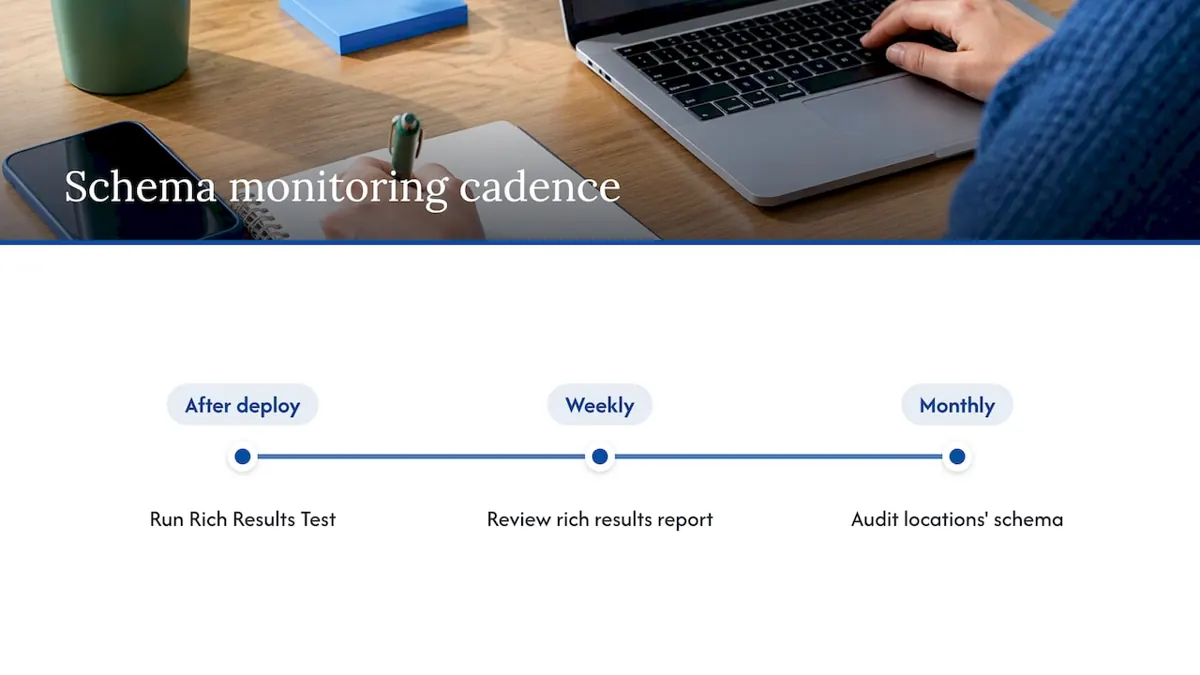
A simple monitoring cadence covers most businesses well. Run a quick Rich Results Test check immediately after any template or CMS deploy. Review Search Console's rich results report weekly for new errors. Do a fuller audit of every location's schema monthly, comparing values against your current Google Business Profile and website copy.
Watch four indicators to judge whether the work is paying off: visibility in the local pack, accuracy of any knowledge panel that appears for your business, referral traffic from search and AI-generated answers, and the error trend line inside Search Console's structured data reports.
Use the most specific LocalBusiness subtype your business qualifies for and keep a consistent @id across every page that references the same location, it is the single habit that does the most to protect your entity's integrity over time.
Why schema is one piece of a larger local SEO picture
Schema markup earns its keep as a corroborating signal, not a silver bullet. A technically perfect LocalBusiness block cannot compensate for an abandoned Google Business Profile, thin site authority, or a weak backlink profile, and treating schema as the whole strategy is the most common mistake we see. The businesses that actually move in local search treat schema as one disciplined layer among several, reviewed on a regular cycle rather than configured once and forgotten. A quarterly schema audit, folded into broader local SEO maintenance, catches the drift that template changes and content edits introduce long before it costs you rich result eligibility.
Get expert help with schema and local SEO
If auditing templates, mapping properties, and monitoring Search Console reports sounds like more ongoing attention than your team has time for, that is exactly the kind of work we handle for local and multi-location businesses.
Our technical SEO and schema audits start by checking what is already live against what Google and schema.org actually require, then prioritize fixes by impact rather than handing back a generic report. For businesses that want their schema work coordinated with an active listing strategy, we also offer Google Business Profile management so your structured data and your live profile stay consistent instead of drifting apart.
A short engagement typically includes:
- An audit of current schema against Google's required and recommended properties.
- A prioritized fix list ordered by what actually affects rich result eligibility.
- An ongoing monitoring plan so regressions get caught after your next site update, not months later.
If you want a clear picture of where your schema and local technical SEO stand, explore our SEO services and see what a focused engagement would look like for your business.
Frequently Asked Questions
LocalBusiness schema is a structured data vocabulary, built on schema.org's LocalBusiness type, that describes a business's name, address, hours, and other identifying details in a format search engines can read directly. It helps search engines and AI systems resolve exactly who your business is and where it operates.
A basic example includes @type set to a specific subtype like "Dentist" or "Restaurant," plus name, address (as a PostalAddress object), telephone, url, and openingHoursSpecification. The full JSON-LD snippet earlier in this guide shows a complete working version you can adapt.
You add a JSON-LD script block to your page's <head>, through a tag management system, or via a CMS plugin if you run a platform like WordPress. After adding it, Google's Rich Results Test confirms it validates correctly before you consider the job done.
"Business schema" generally refers to the Organization or LocalBusiness types defined at schema.org, used to describe a company's identity, location, and contact details in structured data. LocalBusiness is the more specific choice for any business with a physical location or a defined service area.
Sources
Authoritative docs and developer resources to consult
For implementation details straight from the source, Google's LocalBusiness structured data documentation and its general structured data policies are the definitive references, alongside schema.org's LocalBusiness and Service type pages. For broader context on how entity signals feed AI-driven search, our guide to AI search for local business owners and our local SEO checklist round out the next steps.