
Google retired the Business Profile Q&A feature and shut down its Q&A API on November 3, 2025, so the old system of merchants and customers posting public questions is done for good. Ask Maps, a Gemini-powered conversational feature, now generates answers about your business by pulling from your Google Business Profile, your reviews, and your website. Three things matter right now: fill out your GBP completely, publish a canonical FAQ page with structured data, and get serious about generating and responding to reviews.
- The Google Business Profile Q&A feature and its API were fully discontinued on November 3, 2025, eliminating manual question postings and automated management tools.
- Ask Maps now generates business answers by sourcing data first from your GBP, then reviews, and finally your website’s structured content, emphasizing the importance of complete profiles.
- To improve Ask Maps responses, businesses must optimize GBP details, publish a dedicated FAQ page with schema markup, and actively manage customer reviews with specific mentions.
- Website content changes and review activity influence Ask Maps answers more rapidly than schema updates or other technical adjustments.
- Regular monitoring of Ask Maps outputs can identify inaccuracies, guide updates, and ensure your business information appears correct in AI-generated replies.
What Changed: Timeline and API Deprecation
Google didn't pull the plug overnight. The retirement of Google Q&A followed a staged rollout that started well before the final shutdown, and if you manage a listing through a third-party dashboard, you likely saw the warning signs months in advance.
The formal groundwork began with ID format changes that Google flagged on February 12, 2024, and again on September 16, 2024, transition points meant to give developers time to update their integrations before the feature disappeared entirely. Then came the final cutoff.
Here's the sequence that mattered most:
- February and September 2024: Legacy question and answer ID formats were deprecated, an early signal that the underlying system was being rebuilt.
- Throughout 2025: Merchants using third-party tools that displayed or managed Q&A began noticing stale data, missing update notifications, or broken sync features.
- November 3, 2025: The My Business Q&A API was fully discontinued, cutting off the ability to read or post questions and answers through any automated tool.
For businesses that never touched the API directly, the practical effect was simpler: the Q&A tab on your listing either vanished or stopped functioning the way it used to. For agencies and software vendors that built reporting or auto-response tools on top of that API, the endpoints for creating, deleting, listing, and updating Q&A entries simply stopped responding. Any workflow that leaned on those calls needs a replacement plan now, not later.
What Ask Maps Is and How It Answers Questions About Your Business
Ask Maps is Google's Gemini-powered layer inside Google Maps that lets people ask conversational questions about a place and get a synthesized answer instead of a list of links. Instead of a customer posting "Do you have parking?" and waiting days for a business owner to reply, Ask Maps generates a response on the spot by reading everything Google already knows about that location.
That "everything" has a rough pecking order. Based on how Google's AI answers behave in practice, the sourcing priority looks something like this:
- Google Business Profile data first: your business description, services, attributes, hours, photos, and posts.
- Customer reviews second: specific mentions of amenities, wait times, staff, and service details.
- Your website third: FAQ pages, service pages, and any structured data that spells out facts plainly.
- Third-party sources last: directories, news mentions, and other public data when the first three don't have an answer.
The order matters more than most owners realize. If your GBP is thin, Google has to lean harder on reviews and your website, and if those are thin too, you get a generic non-answer or Ask Maps simply declines to respond, sometimes surfacing a message that there isn't enough information to answer confidently.
Answer variability is real. Ask two slightly different phrasings of the same question and you can get two different answers, sometimes with a cited source shown, sometimes with none. Google doesn't cite every source it draws from, and there's no dashboard yet that tells you exactly which line of text triggered a given answer. That opacity is exactly why controlling the inputs, not the output, is the only lever you actually have.

Action Checklist: What to Update So Ask Maps Gets It Right
Because Ask Maps reads your GBP first, an incomplete profile is the single biggest reason it gives a wrong or vague answer. Start there before touching anything else.
GBP fields to audit immediately:
- Business description, using specific language customers might ask about ("wheelchair accessible entrance," "same-day appointments available").
- Every relevant attribute checkbox, not just the obvious ones.
- Complete, accurate hours, including holiday hours and temporary closures.
- Services or products listed individually rather than lumped into one vague category.
- Recent photos that show what a visitor will actually encounter.
Once your GBP is solid, move to your website. Publish one canonical FAQ page rather than scattering questions across multiple pages. Write short, direct answers, one or two sentences each, formatted with FAQ schema markup so search engines and AI systems can parse them cleanly. Add matching structured data to service or product pages too; a page that says "we offer emergency plumbing" in plain prose is far less useful to a model than one marked up with clear, machine-readable service schema. Our local SEO checklist walks through the technical side of this if you want a full audit framework.
Reviews deserve their own line of attention. Since Ask Maps pulls language directly from what customers write, a review that says "fast response, arrived within 30 minutes" gives the model something concrete to echo back. Ask satisfied customers to mention specific services or details rather than leaving a generic five-star rating with no text, and respond to every review, positive or negative, because your responses become part of the same data pool. Encouraging several customers to mention specific details in their reviews helps the AI produce more accurate answers than relying solely on website content.
Finally, handle the operational cleanup. Audit every integration, plugin, or dashboard that used to touch the Q&A API and retire or replace it, since those endpoints no longer function. Confirm your team's manager access and permissions on the GBP dashboard are current, especially if an old agency or employee still has edit rights you forgot about.
How to Test and Correct What Ask Maps Says About You
Testing Ask Maps is closer to auditing a search engine than managing a customer service inbox. You're checking outputs, not fielding tickets.
Start by asking the same question multiple ways: "Do you take walk-ins?" versus "Can I come in without an appointment?" Run the same query from a different device or a different Google account, since availability and behavior can vary by platform. Log what you find.
A basic monitoring routine should track:
- The exact answer text, screenshotted or copied with a timestamp.
- Whether a source was cited and which one.
- Any change after you update a GBP field or publish a new FAQ answer.
GBP edits tend to propagate into Ask Maps responses faster than website changes, sometimes within days, while new website content and schema markup can take weeks to get crawled, indexed, and folded into an answer. Don't panic if a website fix doesn't show up in Ask Maps by the following morning. Watch your GBP performance insights and review alerts weekly for the first month after making changes, and consider more advanced measurement approaches like the ones outlined in Cairrot's AEO strategy research if you want to track citation frequency at scale.
The Entity-Driven Way to Feed Ask Maps Correctly
Ask Maps doesn't invent facts about your business. It assembles them from whatever entity data already exists, which is why treating your Google Business Profile as the primary source of truth matters more now than it did when Q&A was a manual back-and-forth.
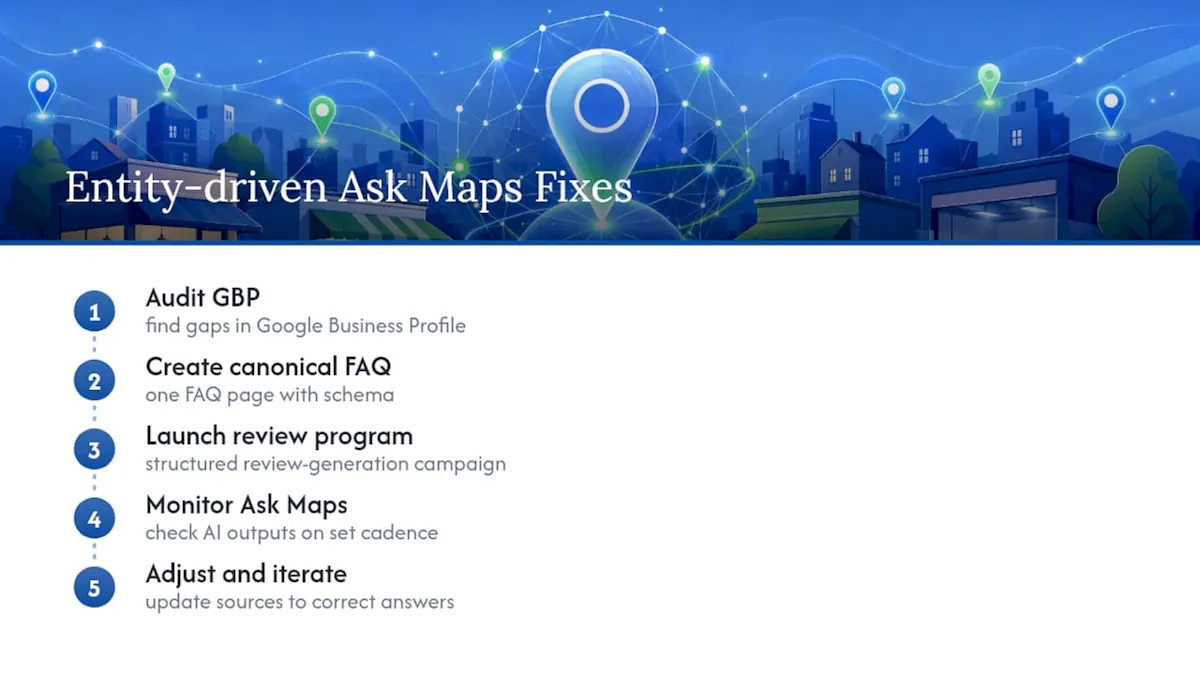
The framework we use with clients is straightforward: audit the GBP for gaps, build one canonical FAQ page with schema, launch a structured review-generation program, then monitor Ask Maps outputs on a set cadence and adjust. Skipping any one step weakens the rest, because the model draws from all of them at once.
The businesses that show up correctly in AI-generated answers aren't the ones with the flashiest website. They're the ones whose entity data agrees with itself everywhere Google looks: the GBP, the reviews, and the site.
Retainer-based work in this space succeeds when it produces measurable movement: cleaner Ask Maps answers, more citations pointing back to owned content, and steadier review velocity, not just a completed checklist sitting in a folder.
What We've Seen Work (and Fail) With Clients
Clients who complete the checklist tend to see cleaner, more accurate Ask Maps answers within a month. The most common mistakes: skipping FAQ schema, ignoring review responses, and assuming a manually edited Q&A answer still matters. We recommend weekly monitoring for the first month, then monthly after that, tracking citation frequency, review volume, and GBP completeness as core KPIs.
Get Your Google Business Profile Ready for Ask Maps
Our team provides expert guidance through this transition. Rather than manually testing prompts and hoping a GBP edit sticks, our team runs a structured audit of your profile, reviews, and site content, then prioritizes fixes based on what Ask Maps actually reads first.
Our approach pairs Google Business Profile management with Answer Engine Optimization and a review-generation program built specifically to feed AI-driven answers with accurate, citable facts, all under the integrated stack we use for local and multi-location clients. A typical engagement starts with a full audit, moves into prioritized fixes across your GBP and site, and settles into a monitoring cadence that catches drift before it costs you visibility. If you manage a listing that's still leaning on outdated Q&A workflows, request an audit through our local SEO services page and get a prioritized fix list within days.
Sources
Frequently Asked Questions
You can't. The public Q&A feature and its API were retired, with the API officially discontinued on November 3, 2025. Instead, focus on completing your GBP fields, reviews, and website FAQ content, since those now feed Ask Maps directly.
The most common questions across local searches ask about hours, location, parking, appointment availability, pricing, and whether a business accepts walk-ins. That's exactly the information Ask Maps looks for first in your GBP attributes and posts.
Complete every relevant field in your Google Business Profile, publish a canonical FAQ page with schema markup on your website, and build a steady flow of detailed customer reviews. Ask Maps pulls from all three, in roughly that order.
Google discontinued the public Q&A feature and its supporting API, replacing manual question and answer threads with Ask Maps, an AI system that generates answers automatically from existing business data.