

Duplicate content is the same or nearly identical text living at more than one URL, and Google does not slap a blanket penalty on it. What it does is filter out the copies, split your link signals, and sometimes let the wrong page win the search result. There's no fine to pay, but there is a real cost in rankings and crawl efficiency. Start by checking your rel=canonical tags and the Pages report in Search Console before you touch anything else.
- Duplicate internal URLs caused by parameters, filters, and pagination can often be fixed with canonical tags or redirects, but require careful implementation.
- External duplicates from syndication or scraping only harm rankings if Google considers them malicious or manipulative, not by default.
- Prioritizing fixing contradictory signals, canonical issues, and parameter handling yields the most benefit before addressing thin or duplicate content.
- Properly configured canonical tags are hints, not commands, so they must align with internal links, sitemaps, and redirects to be effective.
- Preventing duplicate content issues starts during site development by embedding canonical logic into CMS templates and avoiding external duplication from staging sites.
Duplicate Content SEO: Types and Real Examples
Not all duplication looks the same, and the fix depends entirely on which kind you're dealing with. Exact duplicates are byte-for-byte identical pages, usually created by accident through technical misconfiguration. Appreciably similar content is trickier: two product pages with 80% overlapping text, or city landing pages that swap out a name and zip code but keep everything else. Thin or boilerplate repetition happens when templated sections (shipping policies, disclaimers, author bios) make up most of a page's word count.
You'll typically run into duplicate content SEO problems in two buckets:
- Internal duplication: URL parameters (
?sort=price,?sessionid=123), tag and category archives that pull the same posts into multiple URLs, and paginated series that generate near-identical listing pages. - External duplication: content syndication to partner sites, RSS scraping, or straight-up content theft that republishes your articles without permission.
Most internal duplication is a housekeeping problem, not a penalty risk. External duplication only becomes a spam issue when Google decides the scraping is malicious or manipulative, which is a narrow and specific case rather than the default outcome for syndicated content.
Why Duplicate Content SEO Issues Actually Hurt Rankings
Google has said plainly there is no general duplicate content penalty, and that guidance has held up for years. What happens instead is filtering: Google picks one version to show and quietly drops the rest from the index. That sounds harmless until you realize which version it picks isn't always the one you wanted.
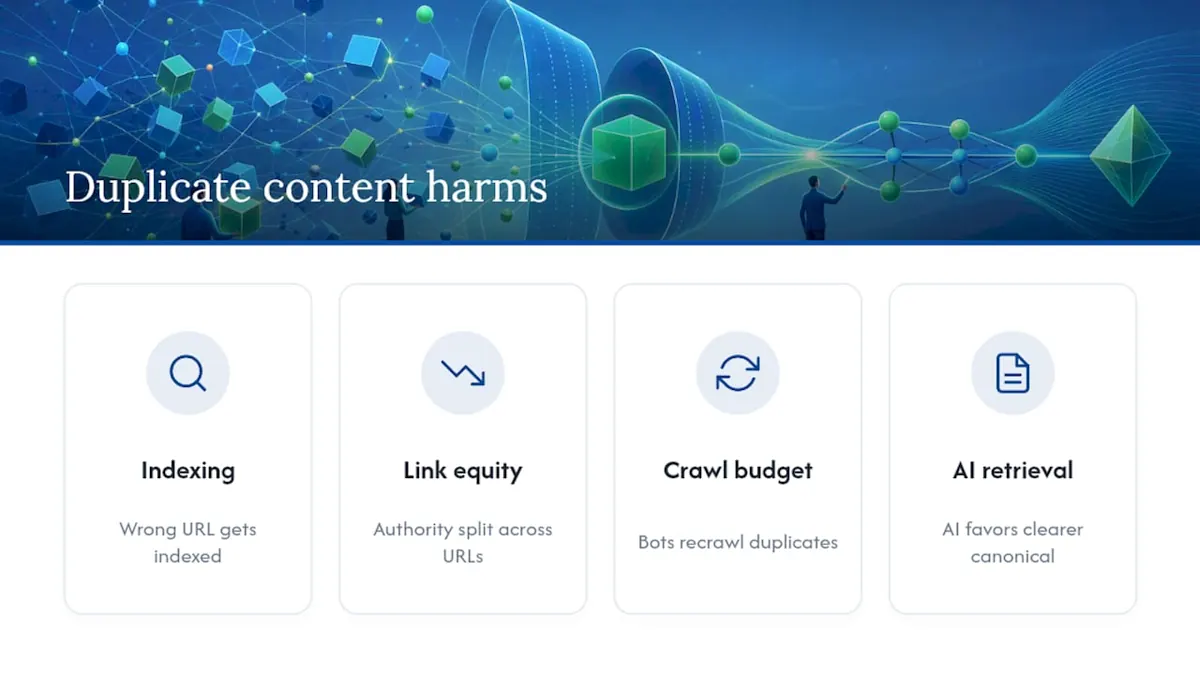
The real damage shows up in four places. First, indexing gets muddled. If your canonical signals are weak, Google may index the parameter-heavy URL instead of your clean one, and your tracking tools will show traffic landing on the wrong page. Second, link equity splits. Five external sites might link to five different URL variants of the same page instead of consolidating authority on one. Third, crawl budget gets wasted. Bots spend time recrawling duplicate parameter combinations instead of discovering your new content. Fourth, and increasingly relevant, generative AI systems pulling answers into overviews tend to favor the URL with the clearest canonical and entity signals, so messy duplication can knock you out of the answer entirely even when your content is good.
Common Causes Behind Duplicate Pages SEO Problems
Almost every duplicate content SEO issue traces back to one of five structural causes. Knowing which one you have determines whether you need a redirect, a canonical tag, or a robots directive.
- URL parameter permutations. Filters, sort orders, and tracking parameters (
?utm_source=,?color=blue) can generate thousands of URL variants for a single page of content. - Faceted navigation. Ecommerce category pages that let shoppers combine size, color, price, and brand filters create a combinatorial explosion of near-duplicate URLs, sometimes numbering in the tens of thousands for a mid-size catalog.
- Pagination mistakes. Canonicalizing every page 2, 3, and 4 of a series back to page 1 tells search engines to ignore unique products or articles that only exist on those later pages.
- Protocol and subdomain mismatches. Running
http://,https://,www, and non-wwwversions of the same site simultaneously, without redirects, produces four indexable copies of every page. - CMS-generated thin pages. Tag archives, author pages, and auto-generated category pages often carry almost no unique text of their own, just excerpts of posts that live elsewhere.
Faceted navigation deserves special attention because it scales badly. A furniture retailer with multiple categories, colors, and price bands can generate a very large number of filter combinations from a single template, and most of them have zero search demand. Treating high-demand facets differently from long-tail ones is the only workable approach at scale.
How to Find Duplicate Content: An Audit Workflow
Detection is mostly a matter of reading the right report correctly, not running exotic tools. Start inside Google Search Console.
- Open the Pages report under Indexing and look for the status "Duplicate without user-selected canonical." That label means Google found copies and picked one for you, which is rarely what you want.
- Check "Duplicate, Google chose different canonical than user" separately. This is worse: you specified a canonical and Google overrode it, which usually points to a conflicting signal elsewhere on the site.
- Crawl the site with Screaming Frog or Sitebulb and export the canonical tag column alongside a content hash or similarity score to catch exact-duplicate pages your CMS spits out.
- Search a unique sentence from your homepage or top article in Google with quotation marks to surface scraped or syndicated copies you don't control.
- Review your XML sitemap for parameter URLs or non-canonical pages that shouldn't be there.
Sort your Screaming Frog crawl by word count and canonical URL together. Pages under 100 words that all share the same canonical target are almost always the thin, auto-generated duplicates worth cleaning up first.
Cross-reference backlink data too. If Ahrefs or Search Console shows external links pointing to three different URL variants of the same page, you've found link equity that redirects could consolidate immediately.
How to Fix Duplicate Content: A Prioritized Playbook
Not every duplicate needs the same treatment, and picking the wrong fix can make things worse. Here's the decision order that actually works.
Use this triage logic first:
- If the duplicate URL has no reason to exist anymore (old CMS structure, deprecated campaign page), use a 301 redirect. This is the strongest consolidation signal you can send, because it merges link equity permanently.
- If both URLs need to stay live for users but only one should rank, use a self-referencing rel=canonical on the preferred version and a canonical pointing to it from every duplicate.
- If a page must exist for functional reasons but has no business being in search results at all (staging environments, printable versions, internal search results pages), use noindex or an
X-Robots-TagHTTP header.
A word of caution on that third option: robots.txt only blocks crawling, not indexing. A page disallowed in robots.txt can still show up in search results if something external links to it. If you actually want a page out of the index, noindex is the tool, not a robots.txt disallow rule.
For the structural causes covered earlier, here's what to implement:
- Parameters: canonicalize tracking and session parameters back to the clean URL, and enforce a consistent parameter order in your CMS so
?color=red&size=mand?size=m&color=reddon't generate two separate crawlable paths. - Pagination: self-canonicalize each paginated page rather than pointing every page back to page 1, unless you publish a genuine, fast-loading "view all" page that can absorb the canonical instead.
- Faceted navigation: index only the facet combinations with real search demand and unique copy; noindex or canonicalize the rest back to the parent category.
- Protocol/subdomain issues: pick one canonical version (https, with or without www) and 301 redirect every other variant permanently.
When in doubt between canonical and redirect, ask whether a human ever needs to visit the duplicate URL directly. If the answer is no, redirect it. If yes, canonicalize it.
Combining redirects, canonical tags, and clean sitemap entries gives Google multiple reinforcing signals rather than one that can be second-guessed by conflicting internal links.
Canonical Tags for SEO: Why Google Sometimes Ignores Them
Rel=canonical is a hint, not a directive. Google weighs it against redirects, internal linking patterns, and sitemap entries, and if those signals disagree with your tag, Google can and will pick a different URL to index.
The most common self-inflicted wound is pointing a canonical tag at a page that's itself noindexed or blocked in robots.txt. That creates a dead end. Google can't consolidate signals toward a URL it's been told not to index in the first place. Multiple canonical tags on one page, often introduced by a plugin conflict, are another silent killer, because Google will typically ignore all of them when it detects more than one.
When you see "Duplicate, Google chose different canonical than user" in Search Console, that's Google telling you your own signals contradict each other. Fix it by auditing internal links first: if 40 links point to the parameter URL and only 2 point to your intended canonical, Google will trust the 40.
Pagination has its own trap. Self-referencing canonicals on each page in a series are correct in almost every case. Canonicalizing page 2 back to page 1 tells Google to ignore any product or article that only appears on page 2, which quietly removes it from the index.
Duplicate Content Checker Checklist and KPIs to Track
Run this checklist quarterly, or immediately after any migration, replatform, or major content push.
| Checklist item | What to verify | KPI to track |
|---|---|---|
| Preferred domain | 301 redirects enforce one https/www version | Redirect chain length (aim for zero chains) |
| Self-canonicals | Every indexable page has a canonical pointing to itself | Canonical match rate in GSC |
| Parameter handling | Tracking/session params canonicalize to clean URLs | Indexed page count vs. total URL count |
| Low-value pages | Thin tag/category pages are noindexed | Crawl budget trend in GSC crawl stats |
| Sitemap hygiene | Only canonical URLs appear in the XML sitemap | Organic traffic landing on canonical URLs |
| Internal linking | Links point to canonical URLs, not variants | Number of "duplicate without canonical" flags |
Schedule a recheck 30 days after any fix goes live. Canonical match rate and indexed page count are the two fastest-moving indicators, and NSYGHT's own local SEO checklist walks through the same audit categories in more granular detail if you want a companion reference.
NSYGHT's Take on Entity-Driven Canonical Strategy
Duplicate content SEO problems compound when a site has no clear entity structure behind it. NSYGHT builds canonical strategy around a defined entity architecture from the start, so every URL maps to one clear topic and one clear intent, which naturally suppresses the parameter and facet sprawl that causes most duplication. On client sites, this kind of cleanup typically improves index hygiene and often supports better local-pack visibility once crawl budget stops being wasted on redundant URLs. Sites with fewer than a few hundred pages can often self-audit using Search Console alone; sites with faceted catalogs or multi-location templates usually benefit from a professional technical audit before problems compound.
Impact of Duplicate Content on User Experience and Engagement
Duplicate pages create a confusing experience even when search engines aren't the immediate concern. A visitor who lands on an outdated parameter URL might see stale pricing, a broken filter state, or a page that never gets updated when the canonical version does. That mismatch erodes trust fast, especially on ecommerce sites where price or stock data drifts out of sync between duplicate templates.
Engagement metrics tend to fragment across duplicate URLs in ways that distort your own reporting. If five URL variants of the same article each get partial traffic, none of them individually accumulates enough time-on-page or scroll depth data to look like a strong-performing piece, even if the underlying content is genuinely good. That fragmentation can mislead editorial decisions: a piece that actually resonates with readers might get deprioritized because its analytics look mediocre when split five ways.
Search intent mismatch is the other cost. A searcher who clicks a duplicate URL from an old bookmark or an outdated backlink may land on a version missing recent updates, comments, or corrected information, then bounce because the page feels neglected. Consolidating to one canonical URL means every visitor, regardless of entry point, lands on the version you're actually maintaining. It also means your engagement data reflects reality instead of being scattered across phantom copies that nobody is optimizing.
How Duplicate Content Affects Social Sharing and Backlinks
When multiple URLs serve the same content, sharing behavior splits in ways that quietly weaken your off-page signals. A reader who bookmarks a parameter URL, then shares it on social media or links to it from their own blog, sends that link equity to a version of the page that isn't your canonical target. Multiply that across dozens of sharers and you end up with backlink authority scattered across three or four URL variants instead of concentrated on one.
Open Graph and Twitter Card metadata compound the problem. If duplicate URLs each carry slightly different metadata (an older title tag, a stale preview image), the same article can look inconsistent depending on which version gets shared, which undermines brand consistency at the exact moment someone is deciding whether to click.
Backlink audits routinely surface this issue on sites that never bothered to canonicalize. Pulling a domain's backlink profile in a tool like Ahrefs or Majestic often reveals three or four different URLs for what is functionally one page, each carrying a fraction of the total referring domains that page should have. Redirecting old variants to the canonical URL consolidates that scattered authority into a single ranking signal instead of leaving it fragmented across copies nobody actively promotes anymore.
Preventing Duplicate Content During Development and Content Management
The cheapest time to fix duplicate content is before it exists. Most of the causes covered earlier (parameter sprawl, faceted navigation, pagination) are architectural decisions made during development, and retrofitting a fix after launch always costs more than building it correctly the first time.
Bake canonical logic into your CMS templates rather than adding it page by page. If your platform generates category, tag, and filter URLs automatically, configure the template layer to output self-referencing canonicals by default and force manual override only where genuinely needed. This single decision prevents the vast majority of accidental internal duplication.
Staging and development environments are a frequent, avoidable source of external duplication. A staging subdomain that isn't password-protected or noindexed can get crawled and indexed alongside the production site, creating a full duplicate copy of your entire catalog. Lock staging environments behind authentication or a sitewide noindex header before they ever go live.
Content workflows matter just as much as technical setup. Editorial teams publishing to multiple regional sites, franchise locations, or syndication partners need a documented rule for who canonicalizes to whom, decided before content goes live, not negotiated after Google starts indexing three versions of the same press release. If your team plans a redesign, NSYGHT's SEO-native web design service folds canonical planning into the information architecture from the first wireframe, rather than patching it in after launch.
The Role of Content Uniqueness in Reducing Duplicate Content Risk
Genuinely original content is the most durable defense against duplicate content SEO issues, because it sidesteps the appreciably-similar category entirely. Two location pages that share a template but each contain distinct testimonials, local landmarks, staff names, and service details read as unique to Google, even though they share a layout. Two location pages that only swap a city name and zip code read as near-duplicates, template included.
This matters most for multi-location businesses and franchises, where the temptation to copy-paste a single page across dozens of city URLs is strongest and the SEO damage is most common. A dental practice with dental practice locations in three cities gains far more from three pages with distinct patient reviews, local insurance information, and neighborhood-specific details than from one template stamped with three different addresses.

Quality also acts as a tiebreaker when Google is deciding which of several similar URLs to surface. Between two pages with comparable technical signals, the one with deeper, more specific content and stronger engagement tends to win the canonical selection. Investing in uniqueness doesn't just avoid duplication penalties that don't formally exist. It actively improves your odds of being the version that gets indexed, ranked, and pulled into AI-generated answers when a searcher's query maps to more than one page on your own site.
What the Data Actually Tells You to Prioritize
Most duplicate content advice treats every duplicate as equally urgent, and that's the wrong lens. The data points toward triage, not panic. Google's own guidance has said for years that there's no blanket penalty, yet plenty of SEO content still frames duplication like an infraction waiting to be caught. The real cost is quieter: diluted link signals, wasted crawl budget, and the wrong URL winning the click. None of that requires alarm, but all of it requires attention.
The conventional advice to "just add canonical tags everywhere" falls short because a canonical tag is a hint, not a command. If your redirects, sitemaps, and internal links contradict the tag, Google will trust the stronger pattern of signals, not the tag alone. That's the piece most checklists skip, and it's the reason so many sites see "Google chose different canonical than user" messages in Search Console despite having canonical tags in place.
Prioritize in this order: fix contradictory signals first, consolidate parameter and faceted URLs second, and only then worry about thin content or syndication. Chasing scraped copies before your own house is in order is effort spent on the smallest part of the problem.
How NSYGHT Fixes Duplicate Content Issues for Local Businesses
Diagnosing canonical conflicts across a multi-location site or a faceted ecommerce catalog takes more than a one-time crawl, as explained in this marketing and consulting blog that offers practical business-growth insights. NSYGHT's SEO services start with a technical audit that maps every duplicate signal (redirects, canonical tags, sitemap entries, internal links) against each other, then builds an entity-first architecture so future pages don't recreate the same problem.

Engagements typically begin with an audit deliverable that flags contradictory canonical signals, parameter sprawl, and faceted navigation risks, followed by a prioritized fix list your team or a technical team can implement. From there, ongoing SEO plans keep monitoring canonical match rates and index coverage so regressions get caught before they cost rankings. If Google Business Profile visibility is also part of the problem, NSYGHT's Google Business Profile management service runs alongside the technical fix to make sure local pack placements improve at the same time. Reach out through NSYGHT to scope an audit for your site.
Sources
For hands-on implementation details, Google's canonicalization documentation and robots.txt guidance are the primary references. Search Engine Land's canonicalization guide and Backlinko's duplicate content hub offer practitioner-level walkthroughs worth bookmarking.
- Canonicalization | Google Search Central
Frequently Asked Questions
Duplicate content means the same or appreciably similar text appears at more than one URL, whether that's within your own site (parameter variants, tag pages) or across different domains (scraping, syndication). It's a URL-level issue, not a writing-quality issue. A page can be well-written and still count as duplicate if a near-identical copy exists elsewhere.
No. Google has stated there's no general duplicate content penalty; instead, it filters duplicates and picks one version to index. The exception is malicious scraping or deliberately manipulative replication, which can trigger a spam action separate from ordinary duplication filtering.
Start with the Pages report in Google Search Console and look for "Duplicate without user-selected canonical" or "Duplicate, Google chose different canonical than user" statuses. Follow that with a full crawl using Screaming Frog or Sitebulb to compare canonical tags against actual content similarity across your URL set.
A 301 redirect permanently sends users and search engines to a new URL and merges link equity completely, making it the right choice for deprecated pages. A rel=canonical tag lets both URLs stay live for users while signaling which one should rank, which fits parameter variants or filtered views that still serve a functional purpose.
Yes. NSYGHT's SEO services include technical audits that identify canonical conflicts, parameter sprawl, and faceted navigation risks, then implement entity-driven fixes across the site. Current pricing and plan details are available directly on the services page.